HDDS-4082. Create ZH translation of HA.md in doc. #1591
There are no files selected for viewing
This file contains hidden or bidirectional Unicode text that may be interpreted or compiled differently than what appears below. To review, open the file in an editor that reveals hidden Unicode characters.
Learn more about bidirectional Unicode characters
This file contains hidden or bidirectional Unicode text that may be interpreted or compiled differently than what appears below. To review, open the file in an editor that reveals hidden Unicode characters.
Learn more about bidirectional Unicode characters
| Original file line number | Diff line number | Diff line change |
|---|---|---|
| @@ -0,0 +1,117 @@ | ||
| --- | ||
| title: "高可用" | ||
| weight: 1 | ||
| menu: | ||
| main: | ||
| parent: 特性 | ||
|
Contributor
There was a problem hiding this comment. In the previous comment, I marked the wrong code block, it should be here. |
||
| summary: Ozone 用于避免单点故障的高可用设置 | ||
| --- | ||
|
|
||
| <!--- | ||
| Licensed to the Apache Software Foundation (ASF) under one or more | ||
| contributor license agreements. See the NOTICE file distributed with | ||
| this work for additional information regarding copyright ownership. | ||
| The ASF licenses this file to You under the Apache License, Version 2.0 | ||
| (the "License"); you may not use this file except in compliance with | ||
| the License. You may obtain a copy of the License at | ||
|
|
||
| http://www.apache.org/licenses/LICENSE-2.0 | ||
|
|
||
| Unless required by applicable law or agreed to in writing, software | ||
| distributed under the License is distributed on an "AS IS" BASIS, | ||
| WITHOUT WARRANTIES OR CONDITIONS OF ANY KIND, either express or implied. | ||
| See the License for the specific language governing permissions and | ||
| limitations under the License. | ||
| --> | ||
|
|
||
| Ozone 有两个leader节点(用于键管理的 *Ozone Manager* 和用于块空间管理的 *Storage Container Management* )以及存储节点(数据节点)。数据是借助 RAFT 共识算法在数据节点之间复制。 | ||
|
|
||
| 为了避免任何单点故障,leader 节点也应该具备高可用的设置。 | ||
|
|
||
| 1. Ozone Manager 的高可用是借助 RAFT 协议实现的; | ||
| 2. Storage Container Manager 的高可用则 [还在实现中]({{< ref path="scmha.md" lang="en">}}) 。 | ||
|
|
||
| ## Ozone Manager 的高可用 | ||
|
|
||
| 一个 Ozone Manager 使用 [RocksDB](https://github.com/facebook/rocksdb/) 在本地持久化元数据(卷、桶和键)。 Ozone Manager 的高可用版本在功能上完全一致,只是所有的数据都借助 RAFT 共识算法复制到 Ozone Manager 的 follower 实例上。 | ||
|
|
||
|  | ||
|
|
||
| 客户端连接到 Ozone Manager 上,而 Ozone Manager 负责处理请求并且安排复制。当请求复制到所有的 follower 上后,leader 就可以给客户端回包了。 | ||
|
|
||
| ## 配置 | ||
|
|
||
| 可以在 `ozone-site.xml` 中配置以下设置来启用 Ozone Manager 的高可用模式: | ||
|
|
||
| ```XML | ||
| <property> | ||
| <name>ozone.om.ratis.enable</name> | ||
| <value>true</value> | ||
| </property> | ||
| ``` | ||
|
|
||
| 一个 Ozone 的配置(`ozone-site.xml`)支持多个 Ozone 高可用集群。为了支持在多个高可用集群之间进行选择,每个集群都需要一个逻辑名称,该逻辑名称可以解析为 Ozone Manager 的 IP 地址(和域名)。 | ||
|
|
||
| 该逻辑名称叫做 `serviceId`,可以在 `ozone-site.xml` 中进行配置: | ||
|
|
||
| ``` | ||
| <property> | ||
| <name>ozone.om.service.ids</name> | ||
| <value>cluster1,cluster2</value> | ||
| </property> | ||
| ``` | ||
|
|
||
| 对于每个已定义的 `serviceId` ,还应为每个服务器定义一个逻辑配置名: | ||
|
|
||
| ```XML | ||
| <property> | ||
| <name>ozone.om.nodes.cluster1</name> | ||
| <value>om1,om2,om3</value> | ||
| </property> | ||
| ``` | ||
|
|
||
| 已定义的前缀可用于定义每个 OM 服务的地址: | ||
|
|
||
| ```XML | ||
| <property> | ||
| <name>ozone.om.address.cluster1.om1</name> | ||
| <value>host1</value> | ||
| </property> | ||
| <property> | ||
| <name>ozone.om.address.cluster1.om2</name> | ||
| <value>host2</value> | ||
| </property> | ||
| <property> | ||
| <name>ozone.om.address.cluster1.om3</name> | ||
| <value>host3</value> | ||
| </property> | ||
| ``` | ||
|
|
||
| 基于 [客户端接口]({{< ref path="interface/_index.md" lang="en">}}) ,定义好的 `serviceId` 就可用于替代单个 OM 主机。 | ||
|
Contributor
There was a problem hiding this comment. The Chinese version of the |
||
|
|
||
| 例如,使用 `o3fs://` | ||
|
|
||
| ```shell | ||
| hdfs dfs -ls o3fs://bucket.volume.cluster1/prefix/ | ||
| ``` | ||
|
|
||
| 或 `ofs://`: | ||
|
|
||
| ```shell | ||
| hdfs dfs -ls ofs://cluster1/volume/bucket/prefix/ | ||
| ``` | ||
|
|
||
| ## 实现细节 | ||
|
|
||
| 只要请求成功持久化到了大多数节点的 RAFT 日志中,Raft 就可以保证请求的复制。 其中,为了基于 Ozone Manager 实现高吞吐量,即使请求仅持久化到了 RAFT 日志中,它也会立即返回响应。 | ||
|
|
||
| RocksDB 由后台的批处理事务线程负责更新(这也就是所谓的"双缓冲区",因为当一个缓冲区用于提交数据时,另一个缓冲区用于收集用于下一次提交的新请求)。这里为了使得当前所有数据对于后续请求都可见,即使后台线程还未完全将其写入,这些键数据也会被缓存在内存中。 | ||
|
|
||
|  | ||
|
|
||
| 尽管在单独的[设计文档]({{< ref path="design/omha.md" lang="en">}})中介绍了这种方法的细节,但它仍算作是 OM 高可用的组成部分。 | ||
|
|
||
| ## 参考文档 | ||
|
|
||
| * 查看 [该页面]({{< ref path="design/omha.md" lang="en">}}) 以获取详细设计文档; | ||
| * Ozone 的分发包中的 compose/ozone-om-ha 目录下提供了一个配置 OM 高可用的示例,可以借助 [docker-compose]({{< ref path="start/RunningViaDocker.md" lang="en">}}) 进行测试。 | ||

Add this suggestion to a batch that can be applied as a single commit.
This suggestion is invalid because no changes were made to the code.
Suggestions cannot be applied while the pull request is closed.
Suggestions cannot be applied while viewing a subset of changes.
Only one suggestion per line can be applied in a batch.
Add this suggestion to a batch that can be applied as a single commit.
Applying suggestions on deleted lines is not supported.
You must change the existing code in this line in order to create a valid suggestion.
Outdated suggestions cannot be applied.
This suggestion has been applied or marked resolved.
Suggestions cannot be applied from pending reviews.
Suggestions cannot be applied on multi-line comments.
Suggestions cannot be applied while the pull request is queued to merge.
Suggestion cannot be applied right now. Please check back later.
There was a problem hiding this comment.
Choose a reason for hiding this comment
The reason will be displayed to describe this comment to others. Learn more.
This should be set to
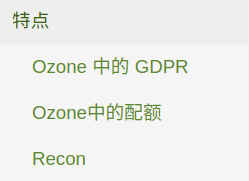
特点, otherwise this page will not be displayed on the left menu.There was a problem hiding this comment.
Choose a reason for hiding this comment
The reason will be displayed to describe this comment to others. Learn more.
This is the title of the chapter. I think the translation is correct.
Do you want to point the translation of 'parent'?
特性 --> 特点 ?
There was a problem hiding this comment.
Choose a reason for hiding this comment
The reason will be displayed to describe this comment to others. Learn more.
Thanks @yuyang733 for the reply.
特性-->特点-> Yes, I marked the wrong code block, it should be here.