[Layout foundations] Stack component prototype #7036
Merged
Conversation
This file contains hidden or bidirectional Unicode text that may be interpreted or compiled differently than what appears below. To review, open the file in an editor that reveals hidden Unicode characters.
Learn more about bidirectional Unicode characters


Contributor
size-limit report 📦
|

aveline
approved these changes
Aug 26, 2022
Contributor
 aveline
left a comment
aveline
left a comment
aveline
left a comment
There was a problem hiding this comment.
Overall looks good! What do you think about setting align="start" as default?
We should also look at making those spacing classes into some kind of shared utility that can be reused across components.
polaris-react/src/components/AlphaStack/components/Item/Item.tsx
Outdated
Show resolved
Hide resolved
polaris-react/src/components/AlphaStack/components/Item/Item.tsx
Outdated
Show resolved
Hide resolved
 chazdean
changed the title
chazdean
changed the title
chazdean
changed the title
chazdean
changed the title

alex-page
reviewed
Aug 30, 2022
polaris-react/src/components/AlphaStack/components/Item/Item.tsx
Outdated
Show resolved
Hide resolved
alex-page
reviewed
Aug 30, 2022

kyledurand
reviewed
Aug 30, 2022
kyledurand
reviewed
Aug 30, 2022
alex-page
reviewed
Aug 30, 2022

laurkim
reviewed
Aug 31, 2022

Co-authored-by: Lo Kim <[email protected]>
kyledurand
approved these changes
Sep 2, 2022
Member
 kyledurand
left a comment
kyledurand
left a comment
kyledurand
left a comment
There was a problem hiding this comment.
👏 This looks fantastic. Nice work @chazdean 👏
laurkim
approved these changes
Sep 2, 2022
Contributor
 laurkim
left a comment
laurkim
left a comment
laurkim
left a comment
There was a problem hiding this comment.
Nice this is looking great! 🚀

Contributor
Author
|
Creating a separate issue to complete testing here: |
laurkim
added a commit
that referenced
this pull request
Sep 6, 2022

<!--
  ☝️How to write a good PR title:
  - Prefix it with [ComponentName] (if applicable), for example: [Button]
  - Start with a verb, for example: Add, Delete, Improve, Fix…
  - Give as much context as necessary and as little as possible
  - Prefix it with [WIP] while it’s a work in progress
-->

### WHY are these changes introduced?

Fixes #6894  <!-- link to issue if one exists -->

<!--
  Context about the problem that’s being addressed.
-->

### WHAT is this pull request doing?

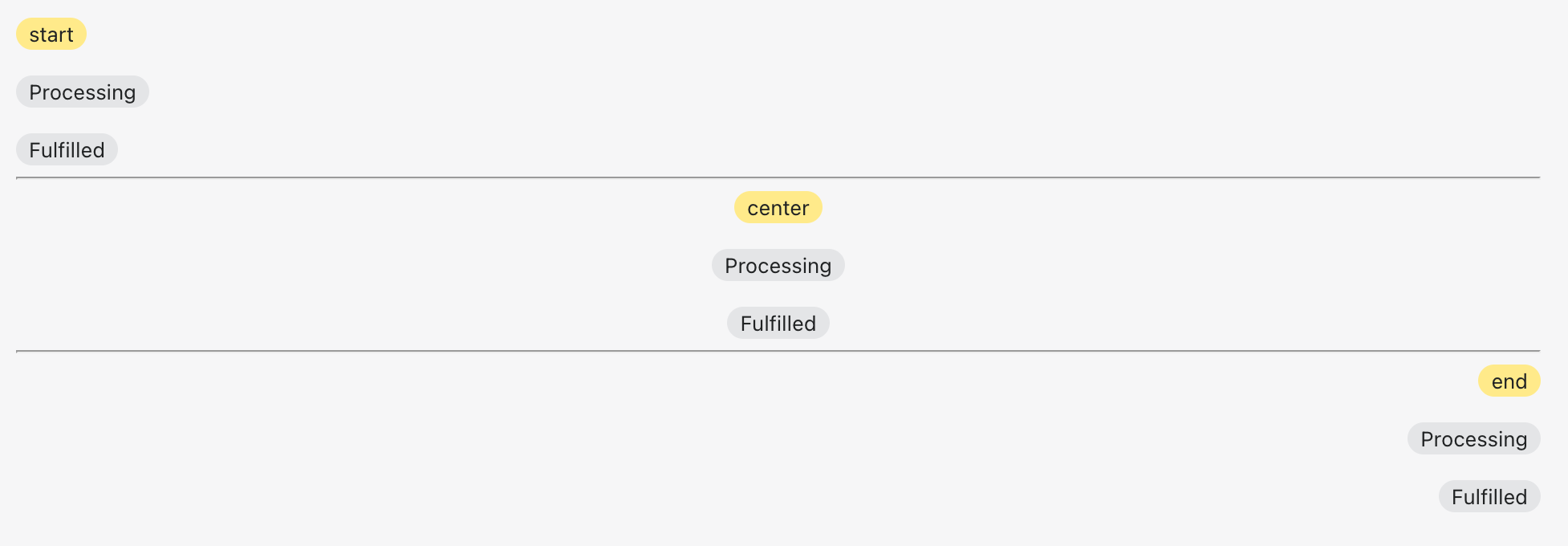
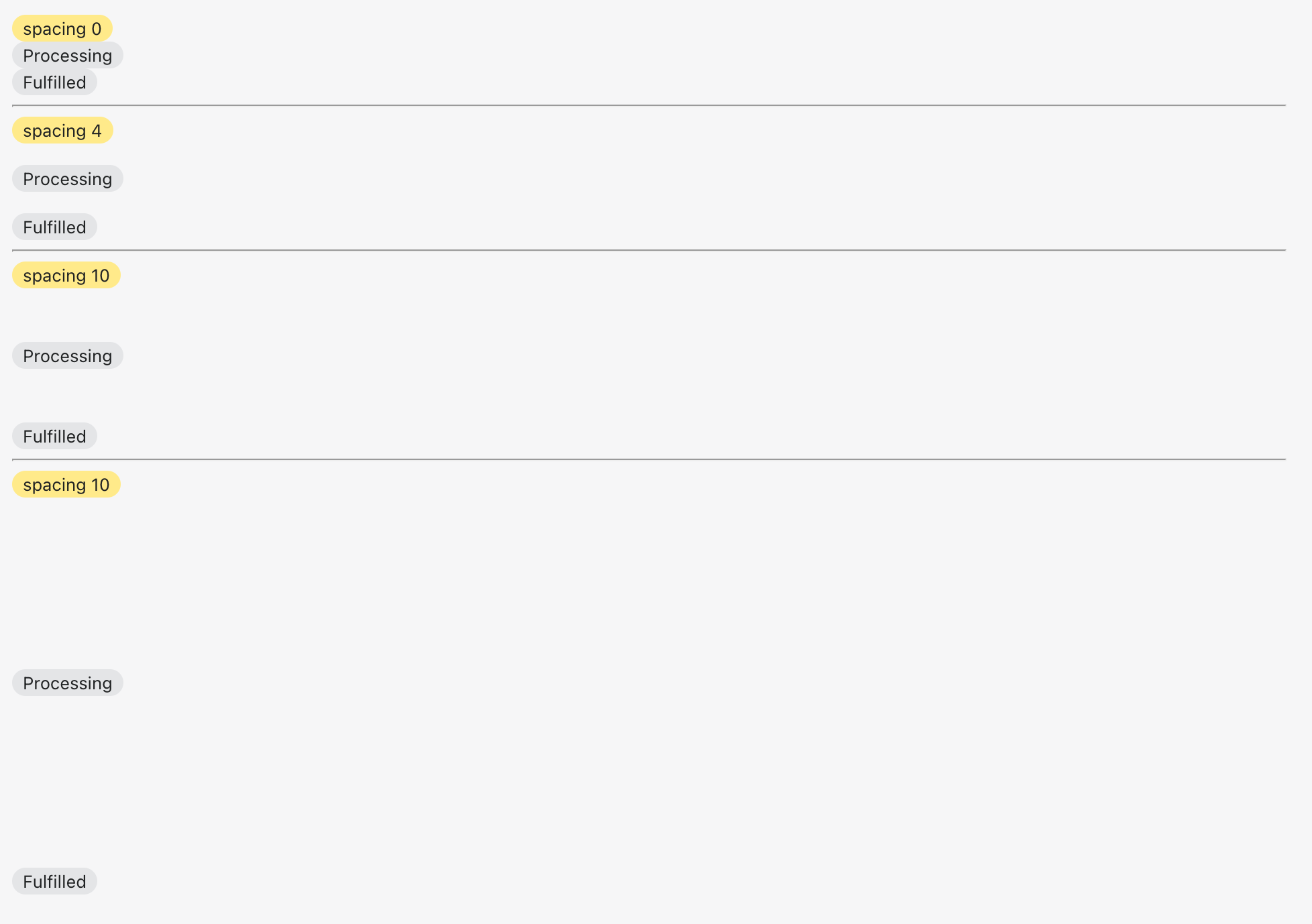
Adds a new alpha `Stack` component

 <details>
      <summary>Alignment</summary>
     <img width="977" alt="Screen Shot 2022-08-30 at 11 00 25 AM" src="https://user-images.githubusercontent.com/59836805/187471756-15963459-54fd-403d-93e2-9e7f0932865c.png">
    </details>

<details>
      <summary>Spacing</summary>
     <img width="978" alt="Screen Shot 2022-08-30 at 11 01 34 AM" src="https://user-images.githubusercontent.com/59836805/187471804-29d50f45-f00b-4007-abc9-575555fe37c5.png">
</details>

<!--
  Summary of the changes committed.

  Before / after screenshots are appreciated for UI changes. Make sure to include alt text that describes the screenshot.

  If you include an animated gif showing your change, wrapping it in a details tag is recommended. Gifs usually autoplay, which can cause accessibility issues for people reviewing your PR:

    <details>
      <summary>Summary of your gif(s)</summary>
      <img src="..." alt="Description of what the gif shows">
    </details>
-->

<!-- ℹ️ Delete the following for small / trivial changes -->

### How to 🎩

🖥 [Local development instructions](https://github.com/Shopify/polaris/blob/main/README.md#local-development)
🗒 [General tophatting guidelines](https://github.com/Shopify/polaris/blob/main/documentation/Tophatting.md)
📄 [Changelog guidelines](https://github.com/Shopify/polaris/blob/main/.github/CONTRIBUTING.md#changelog)

<!--
  Give as much information as needed to experiment with the component
  in the playground.
-->

<details>
<summary>Copy-paste this code in <code>playground/Playground.tsx</code>:</summary>

```jsx
import React from 'react';

import {Page, AlphaStack, Badge, Text} from '../src';

export function Playground() {
  return (
    <Page title="Playground">
      <AlphaStack>
        <Badge status="attention">start</Badge>
        <Badge>Processing</Badge>
        <Badge>Fulfilled</Badge>
      </AlphaStack>
      <hr />
      <AlphaStack align="center">
        <Badge status="attention">center</Badge>
        <Badge>Processing</Badge>
        <Badge>Fulfilled</Badge>
      </AlphaStack>
      <hr />
      <AlphaStack align="end">
        <Badge status="attention">end</Badge>
        <Badge>Processing</Badge>
        <Badge>Fulfilled</Badge>
      </AlphaStack>
      <hr />
      <AlphaStack spacing="0">
        <Badge status="attention">spacing 0</Badge>
        <Badge>Processing</Badge>
        <Badge>Fulfilled</Badge>
      </AlphaStack>
      <hr />
      <AlphaStack spacing="4">
        <Badge status="attention">spacing 4</Badge>
        <Badge>Processing</Badge>
        <Badge>Fulfilled</Badge>
      </AlphaStack>
      <hr />
      <AlphaStack spacing="10">
        <Badge status="attention">spacing 10</Badge>
        <Badge>Processing</Badge>
        <Badge>Fulfilled</Badge>
      </AlphaStack>
    </Page>
  );
}
```

</details>

### 🎩 checklist

- [ ] Tested on [mobile](https://github.com/Shopify/polaris/blob/main/documentation/Tophatting.md#cross-browser-testing)
- [ ] Tested on [multiple browsers](https://help.shopify.com/en/manual/shopify-admin/supported-browsers)
- [ ] Tested for [accessibility](https://github.com/Shopify/polaris/blob/main/documentation/Accessibility%20testing.md)
- [ ] Updated the component's `README.md` with documentation changes
- [ ] [Tophatted documentation](https://github.com/Shopify/polaris/blob/main/documentation/Tophatting%20documentation.md) changes in the style guide

Co-authored-by: Lo Kim <[email protected]>
laurkim
added a commit
that referenced
this pull request
Sep 9, 2022
<!--
  ☝️How to write a good PR title:
  - Prefix it with [ComponentName] (if applicable), for example: [Button]
  - Start with a verb, for example: Add, Delete, Improve, Fix…
  - Give as much context as necessary and as little as possible
  - Prefix it with [WIP] while it’s a work in progress
-->

### WHY are these changes introduced?

Fixes #6894  <!-- link to issue if one exists -->

<!--
  Context about the problem that’s being addressed.
-->

### WHAT is this pull request doing?

Adds a new alpha `Stack` component

 <details>
      <summary>Alignment</summary>
     <img width="977" alt="Screen Shot 2022-08-30 at 11 00 25 AM" src="https://user-images.githubusercontent.com/59836805/187471756-15963459-54fd-403d-93e2-9e7f0932865c.png">
    </details>

<details>
      <summary>Spacing</summary>
     <img width="978" alt="Screen Shot 2022-08-30 at 11 01 34 AM" src="https://user-images.githubusercontent.com/59836805/187471804-29d50f45-f00b-4007-abc9-575555fe37c5.png">
</details>

<!--
  Summary of the changes committed.

  Before / after screenshots are appreciated for UI changes. Make sure to include alt text that describes the screenshot.

  If you include an animated gif showing your change, wrapping it in a details tag is recommended. Gifs usually autoplay, which can cause accessibility issues for people reviewing your PR:

    <details>
      <summary>Summary of your gif(s)</summary>
      <img src="..." alt="Description of what the gif shows">
    </details>
-->

<!-- ℹ️ Delete the following for small / trivial changes -->

### How to 🎩

🖥 [Local development instructions](https://github.com/Shopify/polaris/blob/main/README.md#local-development)
🗒 [General tophatting guidelines](https://github.com/Shopify/polaris/blob/main/documentation/Tophatting.md)
📄 [Changelog guidelines](https://github.com/Shopify/polaris/blob/main/.github/CONTRIBUTING.md#changelog)

<!--
  Give as much information as needed to experiment with the component
  in the playground.
-->

<details>
<summary>Copy-paste this code in <code>playground/Playground.tsx</code>:</summary>

```jsx
import React from 'react';

import {Page, AlphaStack, Badge, Text} from '../src';

export function Playground() {
  return (
    <Page title="Playground">
      <AlphaStack>
        <Badge status="attention">start</Badge>
        <Badge>Processing</Badge>
        <Badge>Fulfilled</Badge>
      </AlphaStack>
      <hr />
      <AlphaStack align="center">
        <Badge status="attention">center</Badge>
        <Badge>Processing</Badge>
        <Badge>Fulfilled</Badge>
      </AlphaStack>
      <hr />
      <AlphaStack align="end">
        <Badge status="attention">end</Badge>
        <Badge>Processing</Badge>
        <Badge>Fulfilled</Badge>
      </AlphaStack>
      <hr />
      <AlphaStack spacing="0">
        <Badge status="attention">spacing 0</Badge>
        <Badge>Processing</Badge>
        <Badge>Fulfilled</Badge>
      </AlphaStack>
      <hr />
      <AlphaStack spacing="4">
        <Badge status="attention">spacing 4</Badge>
        <Badge>Processing</Badge>
        <Badge>Fulfilled</Badge>
      </AlphaStack>
      <hr />
      <AlphaStack spacing="10">
        <Badge status="attention">spacing 10</Badge>
        <Badge>Processing</Badge>
        <Badge>Fulfilled</Badge>
      </AlphaStack>
    </Page>
  );
}
```

</details>

### 🎩 checklist

- [ ] Tested on [mobile](https://github.com/Shopify/polaris/blob/main/documentation/Tophatting.md#cross-browser-testing)
- [ ] Tested on [multiple browsers](https://help.shopify.com/en/manual/shopify-admin/supported-browsers)
- [ ] Tested for [accessibility](https://github.com/Shopify/polaris/blob/main/documentation/Accessibility%20testing.md)
- [ ] Updated the component's `README.md` with documentation changes
- [ ] [Tophatted documentation](https://github.com/Shopify/polaris/blob/main/documentation/Tophatting%20documentation.md) changes in the style guide

Co-authored-by: Lo Kim <[email protected]>
laurkim
added a commit
that referenced
this pull request
Sep 9, 2022
<!--
  ☝️How to write a good PR title:
  - Prefix it with [ComponentName] (if applicable), for example: [Button]
  - Start with a verb, for example: Add, Delete, Improve, Fix…
  - Give as much context as necessary and as little as possible
  - Prefix it with [WIP] while it’s a work in progress
-->

### WHY are these changes introduced?

Fixes #6894  <!-- link to issue if one exists -->

<!--
  Context about the problem that’s being addressed.
-->

### WHAT is this pull request doing?

Adds a new alpha `Stack` component

 <details>
      <summary>Alignment</summary>
     <img width="977" alt="Screen Shot 2022-08-30 at 11 00 25 AM" src="https://user-images.githubusercontent.com/59836805/187471756-15963459-54fd-403d-93e2-9e7f0932865c.png">
    </details>

<details>
      <summary>Spacing</summary>
     <img width="978" alt="Screen Shot 2022-08-30 at 11 01 34 AM" src="https://user-images.githubusercontent.com/59836805/187471804-29d50f45-f00b-4007-abc9-575555fe37c5.png">
</details>

<!--
  Summary of the changes committed.

  Before / after screenshots are appreciated for UI changes. Make sure to include alt text that describes the screenshot.

  If you include an animated gif showing your change, wrapping it in a details tag is recommended. Gifs usually autoplay, which can cause accessibility issues for people reviewing your PR:

    <details>
      <summary>Summary of your gif(s)</summary>
      <img src="..." alt="Description of what the gif shows">
    </details>
-->

<!-- ℹ️ Delete the following for small / trivial changes -->

### How to 🎩

🖥 [Local development instructions](https://github.com/Shopify/polaris/blob/main/README.md#local-development)
🗒 [General tophatting guidelines](https://github.com/Shopify/polaris/blob/main/documentation/Tophatting.md)
📄 [Changelog guidelines](https://github.com/Shopify/polaris/blob/main/.github/CONTRIBUTING.md#changelog)

<!--
  Give as much information as needed to experiment with the component
  in the playground.
-->

<details>
<summary>Copy-paste this code in <code>playground/Playground.tsx</code>:</summary>

```jsx
import React from 'react';

import {Page, AlphaStack, Badge, Text} from '../src';

export function Playground() {
  return (
    <Page title="Playground">
      <AlphaStack>
        <Badge status="attention">start</Badge>
        <Badge>Processing</Badge>
        <Badge>Fulfilled</Badge>
      </AlphaStack>
      <hr />
      <AlphaStack align="center">
        <Badge status="attention">center</Badge>
        <Badge>Processing</Badge>
        <Badge>Fulfilled</Badge>
      </AlphaStack>
      <hr />
      <AlphaStack align="end">
        <Badge status="attention">end</Badge>
        <Badge>Processing</Badge>
        <Badge>Fulfilled</Badge>
      </AlphaStack>
      <hr />
      <AlphaStack spacing="0">
        <Badge status="attention">spacing 0</Badge>
        <Badge>Processing</Badge>
        <Badge>Fulfilled</Badge>
      </AlphaStack>
      <hr />
      <AlphaStack spacing="4">
        <Badge status="attention">spacing 4</Badge>
        <Badge>Processing</Badge>
        <Badge>Fulfilled</Badge>
      </AlphaStack>
      <hr />
      <AlphaStack spacing="10">
        <Badge status="attention">spacing 10</Badge>
        <Badge>Processing</Badge>
        <Badge>Fulfilled</Badge>
      </AlphaStack>
    </Page>
  );
}
```

</details>

### 🎩 checklist

- [ ] Tested on [mobile](https://github.com/Shopify/polaris/blob/main/documentation/Tophatting.md#cross-browser-testing)
- [ ] Tested on [multiple browsers](https://help.shopify.com/en/manual/shopify-admin/supported-browsers)
- [ ] Tested for [accessibility](https://github.com/Shopify/polaris/blob/main/documentation/Accessibility%20testing.md)
- [ ] Updated the component's `README.md` with documentation changes
- [ ] [Tophatted documentation](https://github.com/Shopify/polaris/blob/main/documentation/Tophatting%20documentation.md) changes in the style guide

Co-authored-by: Lo Kim <[email protected]>
laurkim
added a commit
that referenced
this pull request
Sep 13, 2022
<!--
  ☝️How to write a good PR title:
  - Prefix it with [ComponentName] (if applicable), for example: [Button]
  - Start with a verb, for example: Add, Delete, Improve, Fix…
  - Give as much context as necessary and as little as possible
  - Prefix it with [WIP] while it’s a work in progress
-->

### WHY are these changes introduced?

Fixes #6894  <!-- link to issue if one exists -->

<!--
  Context about the problem that’s being addressed.
-->

### WHAT is this pull request doing?

Adds a new alpha `Stack` component

 <details>
      <summary>Alignment</summary>
     <img width="977" alt="Screen Shot 2022-08-30 at 11 00 25 AM" src="https://user-images.githubusercontent.com/59836805/187471756-15963459-54fd-403d-93e2-9e7f0932865c.png">
    </details>

<details>
      <summary>Spacing</summary>
     <img width="978" alt="Screen Shot 2022-08-30 at 11 01 34 AM" src="https://user-images.githubusercontent.com/59836805/187471804-29d50f45-f00b-4007-abc9-575555fe37c5.png">
</details>

<!--
  Summary of the changes committed.

  Before / after screenshots are appreciated for UI changes. Make sure to include alt text that describes the screenshot.

  If you include an animated gif showing your change, wrapping it in a details tag is recommended. Gifs usually autoplay, which can cause accessibility issues for people reviewing your PR:

    <details>
      <summary>Summary of your gif(s)</summary>
      <img src="..." alt="Description of what the gif shows">
    </details>
-->

<!-- ℹ️ Delete the following for small / trivial changes -->

### How to 🎩

🖥 [Local development instructions](https://github.com/Shopify/polaris/blob/main/README.md#local-development)
🗒 [General tophatting guidelines](https://github.com/Shopify/polaris/blob/main/documentation/Tophatting.md)
📄 [Changelog guidelines](https://github.com/Shopify/polaris/blob/main/.github/CONTRIBUTING.md#changelog)

<!--
  Give as much information as needed to experiment with the component
  in the playground.
-->

<details>
<summary>Copy-paste this code in <code>playground/Playground.tsx</code>:</summary>

```jsx
import React from 'react';

import {Page, AlphaStack, Badge, Text} from '../src';

export function Playground() {
  return (
    <Page title="Playground">
      <AlphaStack>
        <Badge status="attention">start</Badge>
        <Badge>Processing</Badge>
        <Badge>Fulfilled</Badge>
      </AlphaStack>
      <hr />
      <AlphaStack align="center">
        <Badge status="attention">center</Badge>
        <Badge>Processing</Badge>
        <Badge>Fulfilled</Badge>
      </AlphaStack>
      <hr />
      <AlphaStack align="end">
        <Badge status="attention">end</Badge>
        <Badge>Processing</Badge>
        <Badge>Fulfilled</Badge>
      </AlphaStack>
      <hr />
      <AlphaStack spacing="0">
        <Badge status="attention">spacing 0</Badge>
        <Badge>Processing</Badge>
        <Badge>Fulfilled</Badge>
      </AlphaStack>
      <hr />
      <AlphaStack spacing="4">
        <Badge status="attention">spacing 4</Badge>
        <Badge>Processing</Badge>
        <Badge>Fulfilled</Badge>
      </AlphaStack>
      <hr />
      <AlphaStack spacing="10">
        <Badge status="attention">spacing 10</Badge>
        <Badge>Processing</Badge>
        <Badge>Fulfilled</Badge>
      </AlphaStack>
    </Page>
  );
}
```

</details>

### 🎩 checklist

- [ ] Tested on [mobile](https://github.com/Shopify/polaris/blob/main/documentation/Tophatting.md#cross-browser-testing)
- [ ] Tested on [multiple browsers](https://help.shopify.com/en/manual/shopify-admin/supported-browsers)
- [ ] Tested for [accessibility](https://github.com/Shopify/polaris/blob/main/documentation/Accessibility%20testing.md)
- [ ] Updated the component's `README.md` with documentation changes
- [ ] [Tophatted documentation](https://github.com/Shopify/polaris/blob/main/documentation/Tophatting%20documentation.md) changes in the style guide

Co-authored-by: Lo Kim <[email protected]>
laurkim
added a commit
that referenced
this pull request
Sep 15, 2022
<!--
  ☝️How to write a good PR title:
  - Prefix it with [ComponentName] (if applicable), for example: [Button]
  - Start with a verb, for example: Add, Delete, Improve, Fix…
  - Give as much context as necessary and as little as possible
  - Prefix it with [WIP] while it’s a work in progress
-->

### WHY are these changes introduced?

Fixes #6894  <!-- link to issue if one exists -->

<!--
  Context about the problem that’s being addressed.
-->

### WHAT is this pull request doing?

Adds a new alpha `Stack` component

 <details>
      <summary>Alignment</summary>
     <img width="977" alt="Screen Shot 2022-08-30 at 11 00 25 AM" src="https://user-images.githubusercontent.com/59836805/187471756-15963459-54fd-403d-93e2-9e7f0932865c.png">
    </details>

<details>
      <summary>Spacing</summary>
     <img width="978" alt="Screen Shot 2022-08-30 at 11 01 34 AM" src="https://user-images.githubusercontent.com/59836805/187471804-29d50f45-f00b-4007-abc9-575555fe37c5.png">
</details>

<!--
  Summary of the changes committed.

  Before / after screenshots are appreciated for UI changes. Make sure to include alt text that describes the screenshot.

  If you include an animated gif showing your change, wrapping it in a details tag is recommended. Gifs usually autoplay, which can cause accessibility issues for people reviewing your PR:

    <details>
      <summary>Summary of your gif(s)</summary>
      <img src="..." alt="Description of what the gif shows">
    </details>
-->

<!-- ℹ️ Delete the following for small / trivial changes -->

### How to 🎩

🖥 [Local development instructions](https://github.com/Shopify/polaris/blob/main/README.md#local-development)
🗒 [General tophatting guidelines](https://github.com/Shopify/polaris/blob/main/documentation/Tophatting.md)
📄 [Changelog guidelines](https://github.com/Shopify/polaris/blob/main/.github/CONTRIBUTING.md#changelog)

<!--
  Give as much information as needed to experiment with the component
  in the playground.
-->

<details>
<summary>Copy-paste this code in <code>playground/Playground.tsx</code>:</summary>

```jsx
import React from 'react';

import {Page, AlphaStack, Badge, Text} from '../src';

export function Playground() {
  return (
    <Page title="Playground">
      <AlphaStack>
        <Badge status="attention">start</Badge>
        <Badge>Processing</Badge>
        <Badge>Fulfilled</Badge>
      </AlphaStack>
      <hr />
      <AlphaStack align="center">
        <Badge status="attention">center</Badge>
        <Badge>Processing</Badge>
        <Badge>Fulfilled</Badge>
      </AlphaStack>
      <hr />
      <AlphaStack align="end">
        <Badge status="attention">end</Badge>
        <Badge>Processing</Badge>
        <Badge>Fulfilled</Badge>
      </AlphaStack>
      <hr />
      <AlphaStack spacing="0">
        <Badge status="attention">spacing 0</Badge>
        <Badge>Processing</Badge>
        <Badge>Fulfilled</Badge>
      </AlphaStack>
      <hr />
      <AlphaStack spacing="4">
        <Badge status="attention">spacing 4</Badge>
        <Badge>Processing</Badge>
        <Badge>Fulfilled</Badge>
      </AlphaStack>
      <hr />
      <AlphaStack spacing="10">
        <Badge status="attention">spacing 10</Badge>
        <Badge>Processing</Badge>
        <Badge>Fulfilled</Badge>
      </AlphaStack>
    </Page>
  );
}
```

</details>

### 🎩 checklist

- [ ] Tested on [mobile](https://github.com/Shopify/polaris/blob/main/documentation/Tophatting.md#cross-browser-testing)
- [ ] Tested on [multiple browsers](https://help.shopify.com/en/manual/shopify-admin/supported-browsers)
- [ ] Tested for [accessibility](https://github.com/Shopify/polaris/blob/main/documentation/Accessibility%20testing.md)
- [ ] Updated the component's `README.md` with documentation changes
- [ ] [Tophatted documentation](https://github.com/Shopify/polaris/blob/main/documentation/Tophatting%20documentation.md) changes in the style guide

Co-authored-by: Lo Kim <[email protected]>
laurkim
added a commit
that referenced
this pull request
Sep 30, 2022
<!--
  ☝️How to write a good PR title:
  - Prefix it with [ComponentName] (if applicable), for example: [Button]
  - Start with a verb, for example: Add, Delete, Improve, Fix…
  - Give as much context as necessary and as little as possible
  - Prefix it with [WIP] while it’s a work in progress
-->

### WHY are these changes introduced?

Fixes #6894  <!-- link to issue if one exists -->

<!--
  Context about the problem that’s being addressed.
-->

### WHAT is this pull request doing?

Adds a new alpha `Stack` component

 <details>
      <summary>Alignment</summary>
     <img width="977" alt="Screen Shot 2022-08-30 at 11 00 25 AM" src="https://user-images.githubusercontent.com/59836805/187471756-15963459-54fd-403d-93e2-9e7f0932865c.png">
    </details>

<details>
      <summary>Spacing</summary>
     <img width="978" alt="Screen Shot 2022-08-30 at 11 01 34 AM" src="https://user-images.githubusercontent.com/59836805/187471804-29d50f45-f00b-4007-abc9-575555fe37c5.png">
</details>

<!--
  Summary of the changes committed.

  Before / after screenshots are appreciated for UI changes. Make sure to include alt text that describes the screenshot.

  If you include an animated gif showing your change, wrapping it in a details tag is recommended. Gifs usually autoplay, which can cause accessibility issues for people reviewing your PR:

    <details>
      <summary>Summary of your gif(s)</summary>
      <img src="..." alt="Description of what the gif shows">
    </details>
-->

<!-- ℹ️ Delete the following for small / trivial changes -->

### How to 🎩

🖥 [Local development instructions](https://github.com/Shopify/polaris/blob/main/README.md#local-development)
🗒 [General tophatting guidelines](https://github.com/Shopify/polaris/blob/main/documentation/Tophatting.md)
📄 [Changelog guidelines](https://github.com/Shopify/polaris/blob/main/.github/CONTRIBUTING.md#changelog)

<!--
  Give as much information as needed to experiment with the component
  in the playground.
-->

<details>
<summary>Copy-paste this code in <code>playground/Playground.tsx</code>:</summary>

```jsx
import React from 'react';

import {Page, AlphaStack, Badge, Text} from '../src';

export function Playground() {
  return (
    <Page title="Playground">
      <AlphaStack>
        <Badge status="attention">start</Badge>
        <Badge>Processing</Badge>
        <Badge>Fulfilled</Badge>
      </AlphaStack>
      <hr />
      <AlphaStack align="center">
        <Badge status="attention">center</Badge>
        <Badge>Processing</Badge>
        <Badge>Fulfilled</Badge>
      </AlphaStack>
      <hr />
      <AlphaStack align="end">
        <Badge status="attention">end</Badge>
        <Badge>Processing</Badge>
        <Badge>Fulfilled</Badge>
      </AlphaStack>
      <hr />
      <AlphaStack spacing="0">
        <Badge status="attention">spacing 0</Badge>
        <Badge>Processing</Badge>
        <Badge>Fulfilled</Badge>
      </AlphaStack>
      <hr />
      <AlphaStack spacing="4">
        <Badge status="attention">spacing 4</Badge>
        <Badge>Processing</Badge>
        <Badge>Fulfilled</Badge>
      </AlphaStack>
      <hr />
      <AlphaStack spacing="10">
        <Badge status="attention">spacing 10</Badge>
        <Badge>Processing</Badge>
        <Badge>Fulfilled</Badge>
      </AlphaStack>
    </Page>
  );
}
```

</details>

### 🎩 checklist

- [ ] Tested on [mobile](https://github.com/Shopify/polaris/blob/main/documentation/Tophatting.md#cross-browser-testing)
- [ ] Tested on [multiple browsers](https://help.shopify.com/en/manual/shopify-admin/supported-browsers)
- [ ] Tested for [accessibility](https://github.com/Shopify/polaris/blob/main/documentation/Accessibility%20testing.md)
- [ ] Updated the component's `README.md` with documentation changes
- [ ] [Tophatted documentation](https://github.com/Shopify/polaris/blob/main/documentation/Tophatting%20documentation.md) changes in the style guide

Co-authored-by: Lo Kim <[email protected]>
Sign up for free
to join this conversation on GitHub.
Already have an account?
Sign in to comment
5 participants


Add this suggestion to a batch that can be applied as a single commit.
This suggestion is invalid because no changes were made to the code.
Suggestions cannot be applied while the pull request is closed.
Suggestions cannot be applied while viewing a subset of changes.
Only one suggestion per line can be applied in a batch.
Add this suggestion to a batch that can be applied as a single commit.
Applying suggestions on deleted lines is not supported.
You must change the existing code in this line in order to create a valid suggestion.
Outdated suggestions cannot be applied.
This suggestion has been applied or marked resolved.
Suggestions cannot be applied from pending reviews.
Suggestions cannot be applied on multi-line comments.
Suggestions cannot be applied while the pull request is queued to merge.
Suggestion cannot be applied right now. Please check back later.
WHY are these changes introduced?
Fixes #6894
WHAT is this pull request doing?
Adds a new alpha
StackcomponentAlignment
Spacing
How to 🎩
🖥 Local development instructions
🗒 General tophatting guidelines
📄 Changelog guidelines
Copy-paste this code in
playground/Playground.tsx:🎩 checklist
README.mdwith documentation changes