feat(web-shell): make session sidebar configurable - #6750
Conversation


|
Thanks for the PR! (Re-run with fresh verification on latest commits including accessibility and focus fixes.) Template looks good ✓ Problem: Feature addition — making the web-shell sidebar configurable for embedders. Linked to #5074 (open P2 feature request). Real problem: embedding hosts need control over sidebar chrome (branding, footer actions, compact toggle, drawer API) without forking the component. No before/after reproduction needed for a new capability. Direction: Aligned with #5074's configurable session sidebar direction. Entirely in the web-shell UI layer — no core infrastructure touched. This is embedder-facing API surface, not internal restructuring. Size: Not applicable — all 8 files are in Approach: Four concerns bundled (host config props, imperative Moving on to code review. 🔍 中文说明感谢贡献!(重新验证,包含最新的无障碍和焦点修复提交。) 模板完整 ✓ 问题: 功能新增——让嵌入方可以配置 web-shell 侧边栏。关联 #5074(开放中的 P2 功能请求)。真实问题:嵌入方需要在不分叉组件的前提下控制侧边栏外观(品牌、底部操作、窄屏开关、抽屉 API)。新功能无需 before/after 复现。 方向: 与 #5074 的可配置会话侧边栏方向一致。完全在 web-shell UI 层——不涉及核心基础设施。这是面向嵌入方的 API 表面,而非内部重构。 规模: 不适用——8 个文件均在 方案: 四个关注点打包(宿主配置 props、命令式 进入代码审查 🔍 — Qwen Code · qwen3.7-max |
Code Review (re-run with fresh verification)Independent proposal (before reading the diff): I'd add optional The PR matches this approach closely:
No critical issues found. Code is well-structured, backward-compatible, and follows the codebase's conventions. One pragmatic tradeoff: Test Results (fresh run on PR branch)
tmux Real-Scenario TestingNot applicable for this PR. The changes are web-shell React components (sidebar configuration, responsive footer layout, tooltip viewport constraint, imperative drawer API). These require a browser environment to exercise visually — tmux testing of the CLI binary would not reach any of the changed code paths. The 145 unit tests provide comprehensive behavioral coverage including overflow priority ordering, tooltip placement at viewport edges, compact toggle hiding, branding customization, forced drawer open/close via the shell API, and full keyboard accessibility of the footer menu. — Qwen Code · qwen3.7-max |
|
Stepping back on this re-run: the latest commits added proper accessibility and focus management to the footer menu, which was the one area that felt incomplete on the first pass. That gap is now closed — The implementation reads like someone who knows this sidebar intimately. 145 tests pass (72 app + 73 sidebar), lint and typecheck clean, build succeeds. The test coverage is thorough — overflow priority ordering, tooltip placement at viewport edges, branding show/hide/custom, compact toggle hiding, forced drawer open/close, viewport-width transition clearing, and full keyboard accessibility of the overflow menu. Guard check: Ships clean. ✅ 中文说明重新审视:最新提交为底部菜单增加了恰当的无障碍和焦点管理支持——这是第一次审查中唯一感觉不完整的地方。现在已补齐—— 实现读起来像是熟悉这个侧边栏的人写的。 145 个测试全部通过(72 个应用 + 73 个侧边栏),lint 和 typecheck 均无问题,构建成功。测试覆盖全面——溢出优先级排序、视口边缘的提示放置、品牌显示/隐藏/自定义、窄屏开关隐藏、强制抽屉打开/关闭、视口宽度转换清除以及溢出菜单的完整键盘无障碍支持。 守卫检查:来自 fork 的 可以合并 ✅ — Qwen Code · qwen3.7-max |

 qwen-code-ci-bot
left a comment
qwen-code-ci-bot
left a comment
qwen-code-ci-bot
left a comment
There was a problem hiding this comment.
LGTM, looks ready to ship. ✅

qwen-code-ci-bot
left a comment
qwen-code-ci-bot
left a comment
There was a problem hiding this comment.
Reviewed — no blockers. Suggestions are inline.


✅ Local verification report — PR #6750
|
| Check | Command | Result |
|---|---|---|
| Reviewer's targeted tests | npm run test --workspace=packages/web-shell -- App.test.tsx components/sidebar/WebShellSidebar.test.tsx |
✅ 2 files, 134 passed (matches the PR's claim) |
| Full web-shell suite (regression) | npm run test --workspace=packages/web-shell |
✅ 89 files, 1477 passed |
| Lint | npm run lint --workspace=packages/web-shell |
✅ clean |
| Typecheck | npm run typecheck --workspace=packages/web-shell |
✅ clean |
Environment: macOS, Node v22.23.1, fresh npm ci in the worktree.
2. Independent before/after — the new tests are real gates
To confirm the added tests aren't vacuous, I restored the pre-PR source under the PR's test files and re-ran them:
| Overlaid pre-PR file | Kept PR test file | Outcome |
|---|---|---|
main:App.tsx |
App.test.tsx |
❌ exactly the 3 new tests fail (openSessionDrawer forces the drawer · forced drawer clears on wide viewport · showCompactToggle:false hides the toggle); 67 others still pass |
main:WebShellSidebar.tsx |
WebShellSidebar.test.tsx |
❌ 9 tests fail (footer overflow → More, version-in-More, footer:false, collapsed rail keeps actions direct, getSidebarTooltipPosition left-placement, brand hiding); 55 others pass |
Restoring the PR source turns every one of them green again — so the suite genuinely exercises the new behavior, not just its presence.
3. Visual evidence (real browser, mock daemon)
Rendered through the public API the PR adds — the sidebar={…} prop and shellRef.openSessionDrawer() — against a mock daemon, so these are the actual WebShellSidebar/App components, not mockups. (The inline version reads v0.0.0-e2e because that is the mock daemon's reported qwenCodeVersion.)
3a. Responsive footer — the headline change
| Wide sidebar (420 px) | Narrow sidebar (240 px) → More opened |
|---|---|
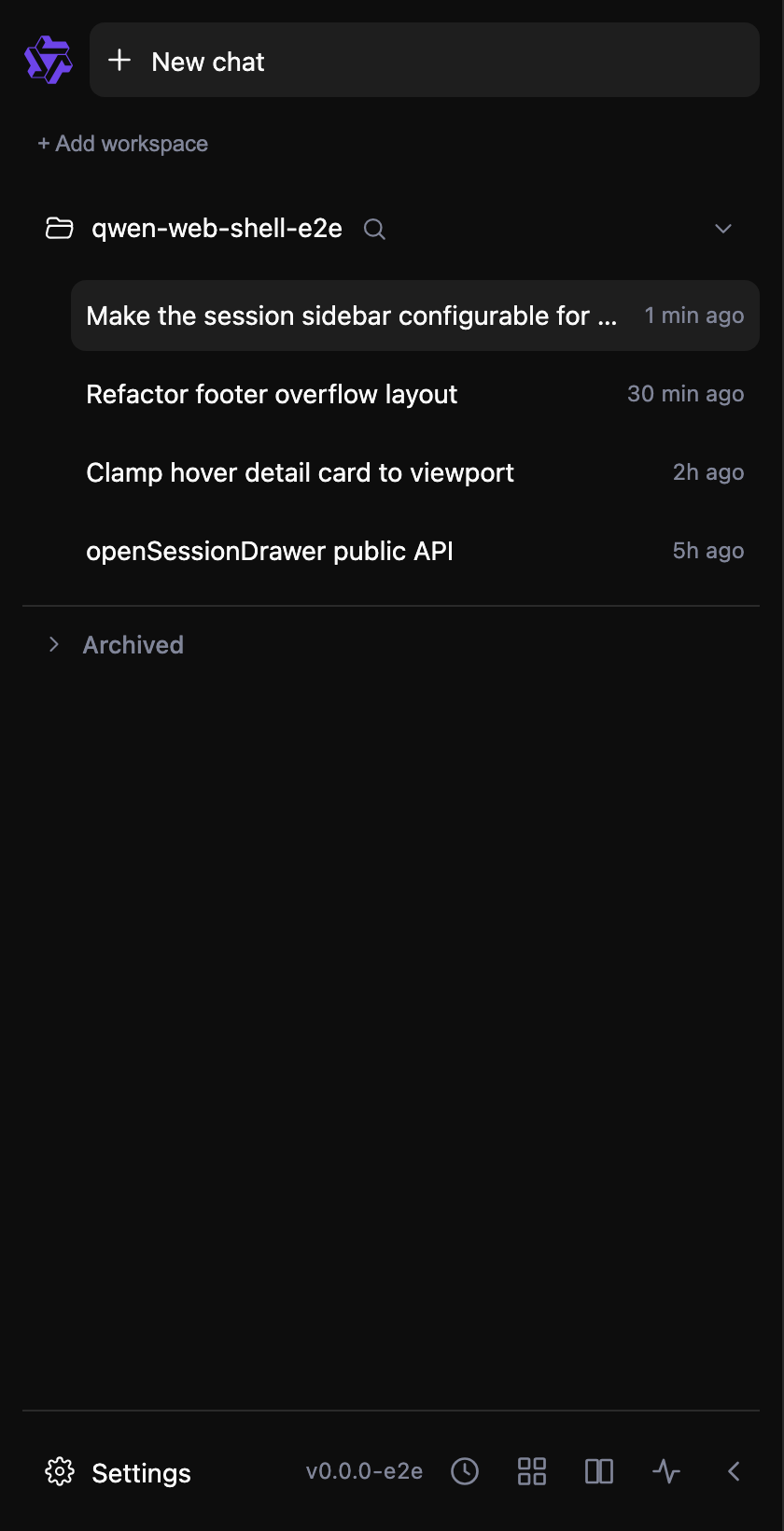 |
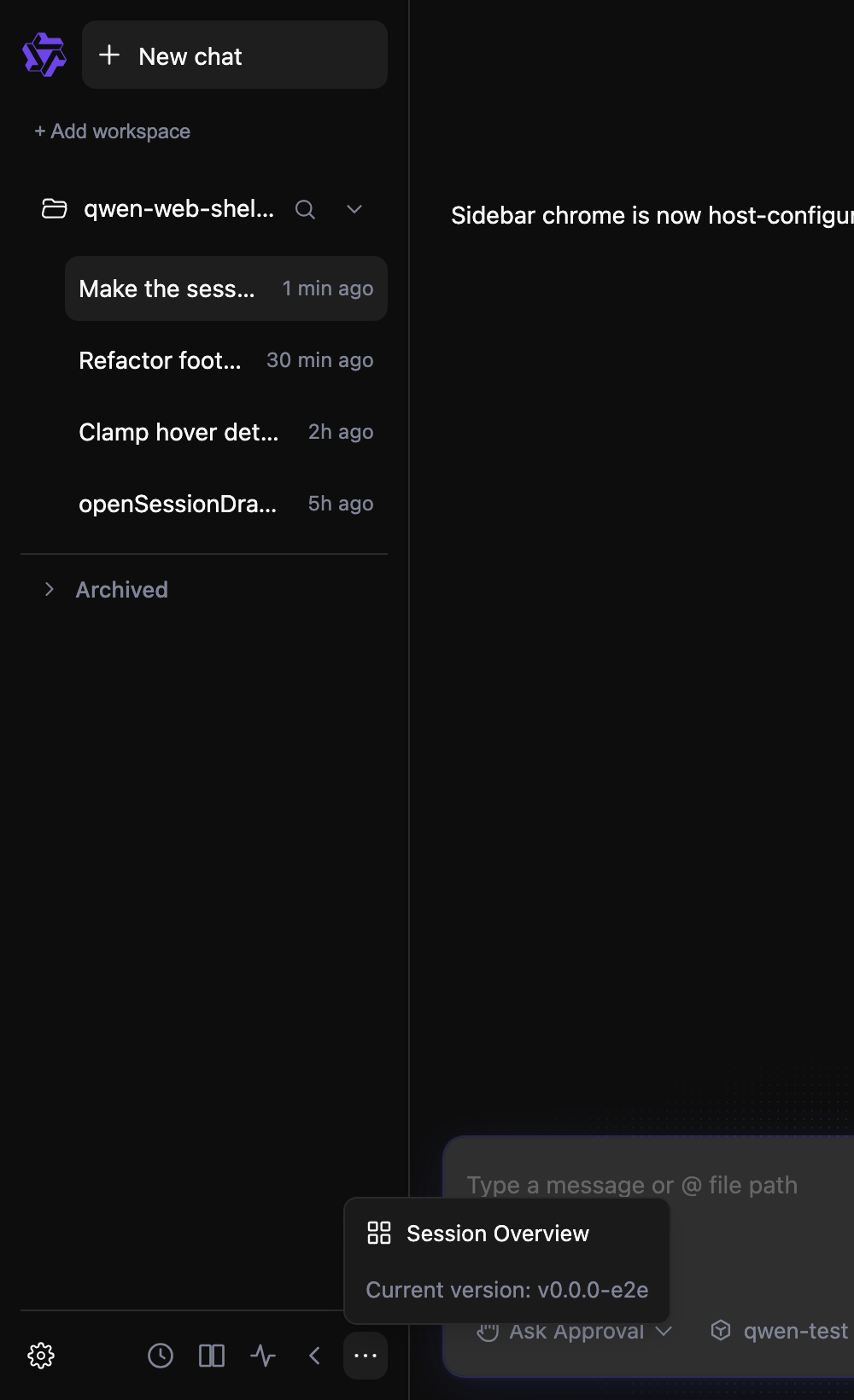 |
At full width the footer shows the Settings label, the version inline, and every action. As the sidebar narrows, lower-priority actions and the display-only version collapse into More — with Current version: placed last and non-interactive (aria-disabled). Settings stays on the leading side; the long session title uses the full available row width.
Same two states in light theme (theme-aware)
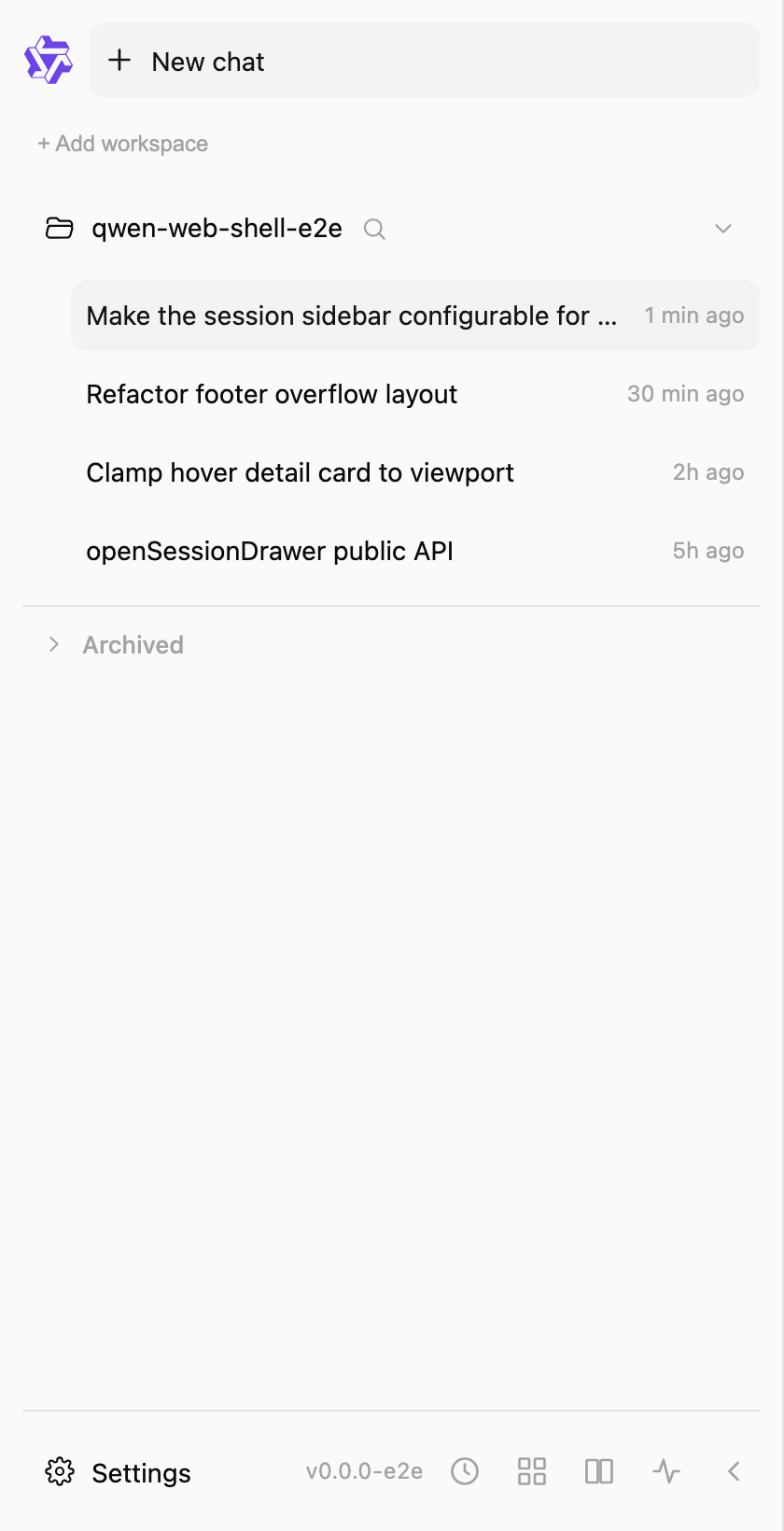 |
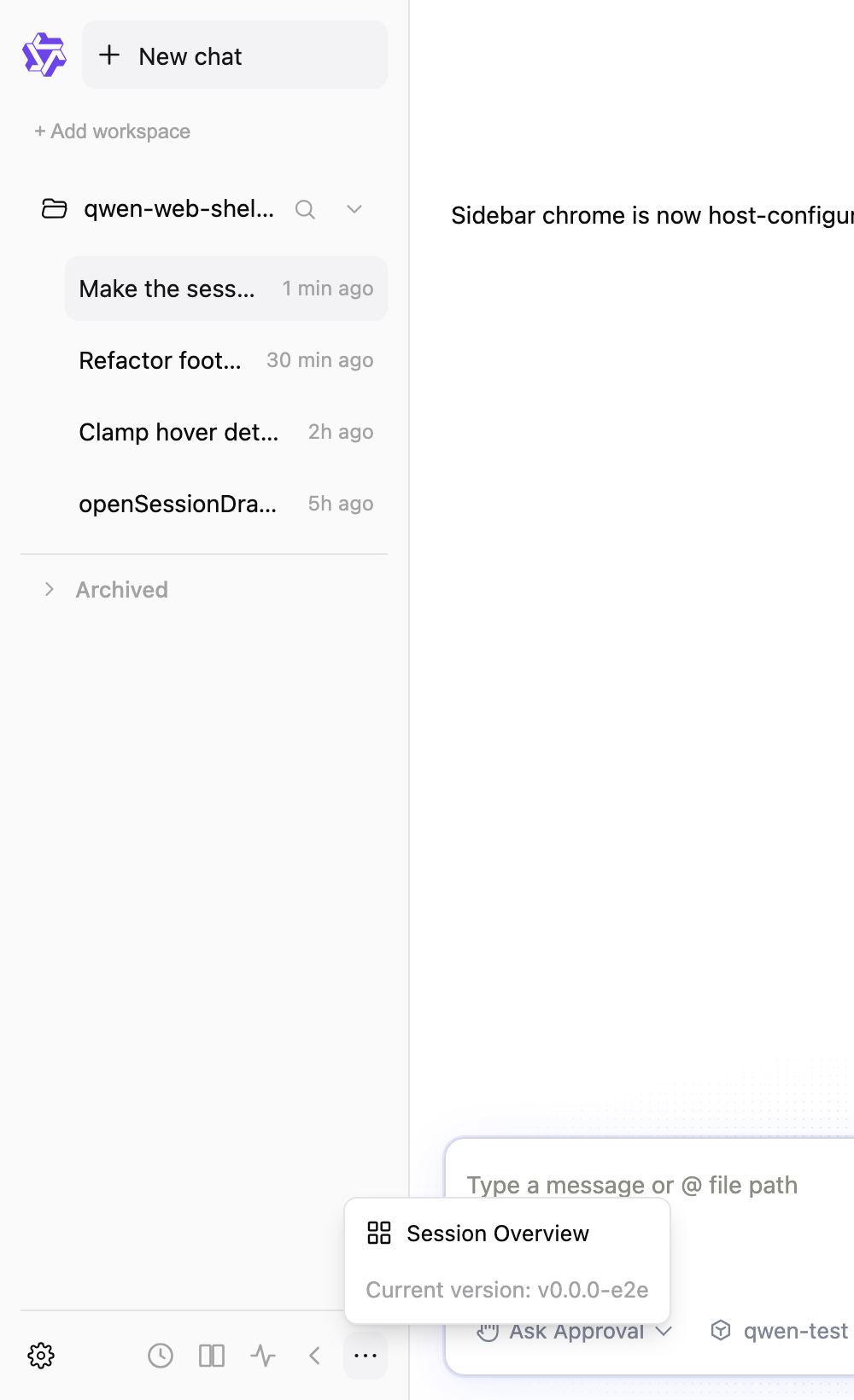 |
3b. Host configuration
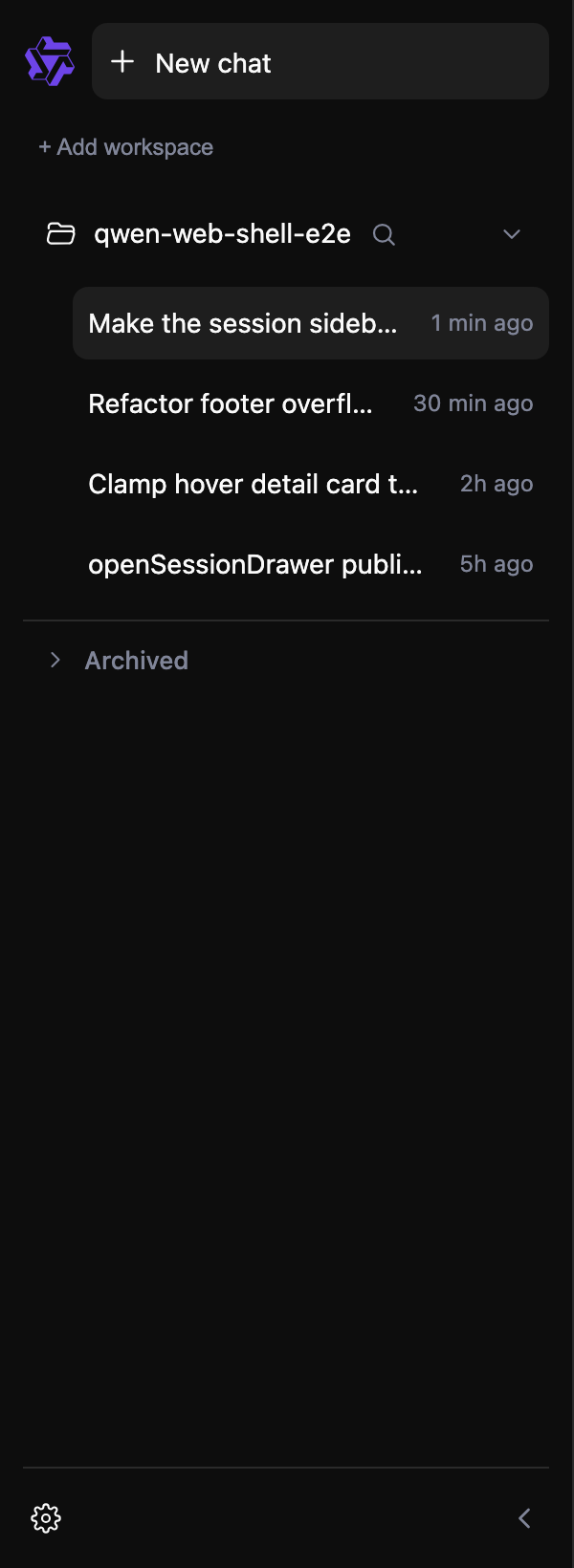
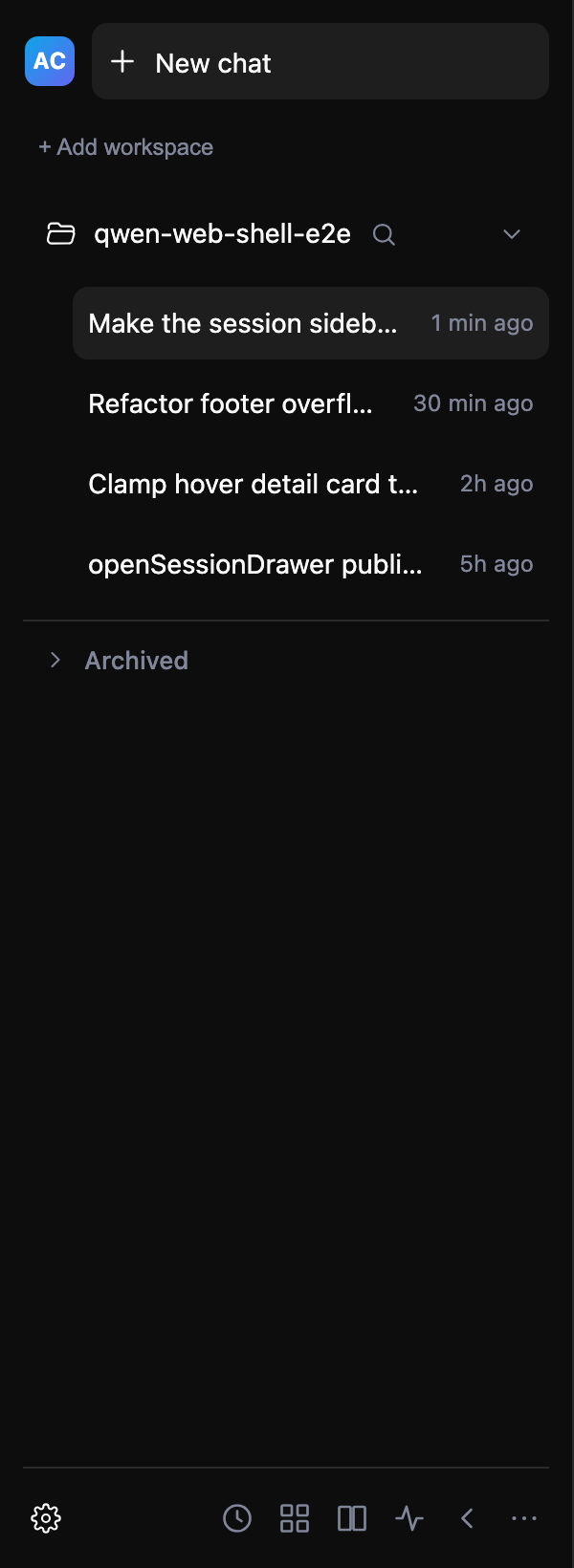
Footer items: ['settings','collapse'] |
Custom brand (branding.render) |
Branding hidden (branding:false) |
|---|---|---|
 |
 |
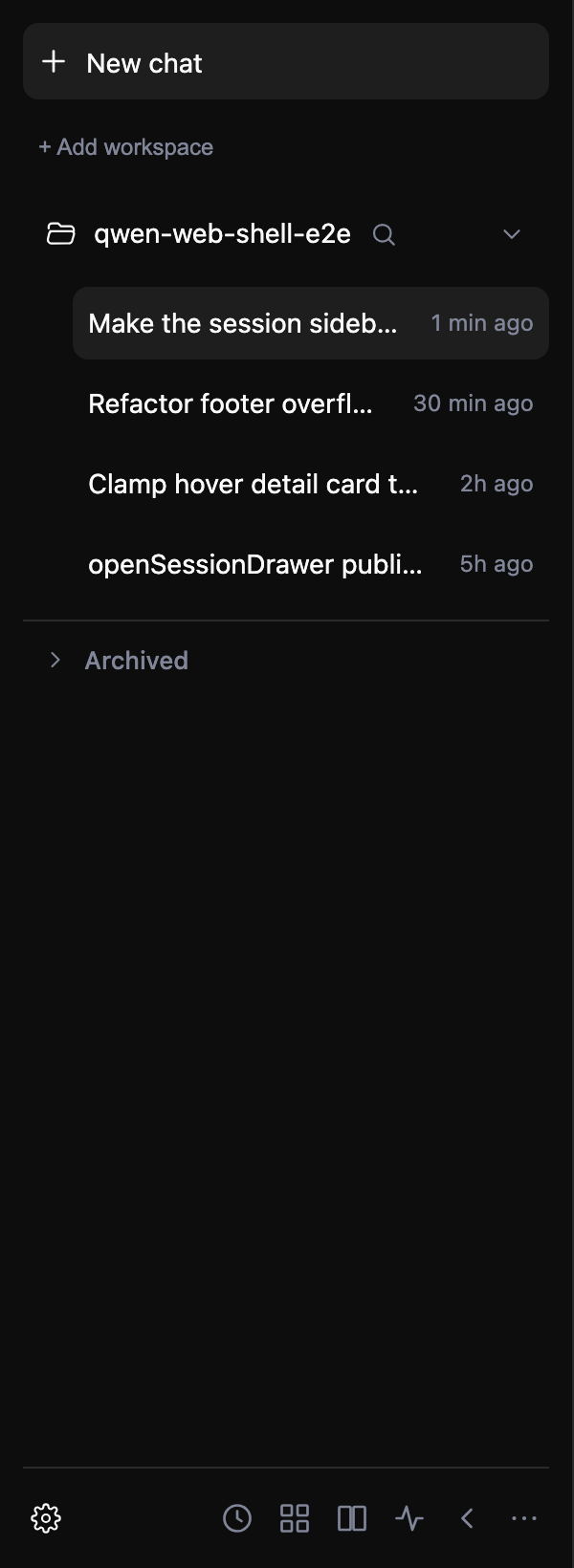 |
A host can trim the footer to just the entries it wants, swap the leading brand mark for its own (the AC chip above), or hide it entirely — all without forking the sidebar.
3c. openSessionDrawer() public API
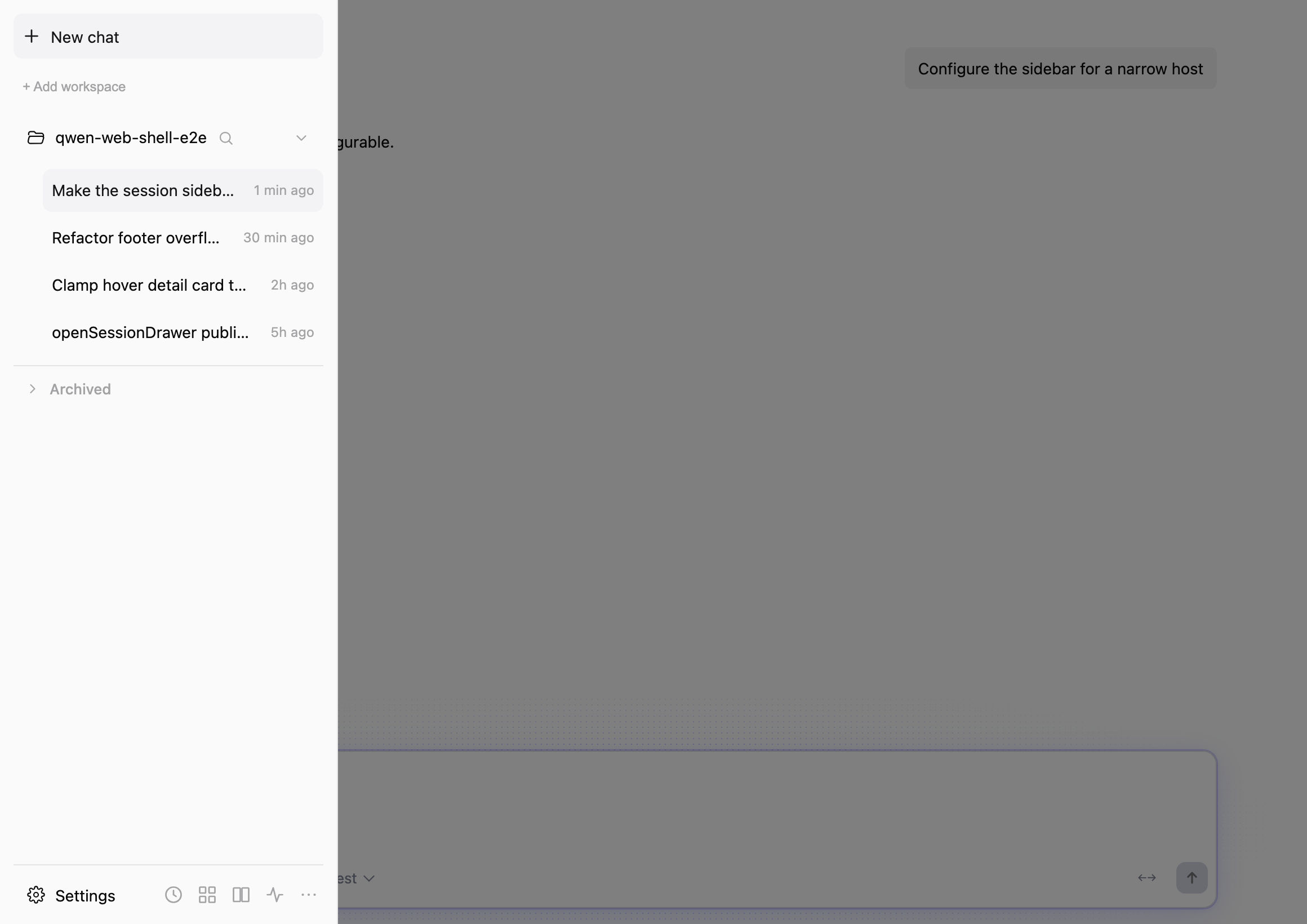
Calling shellRef.current.openSessionDrawer() on a wide viewport forces the compact drawer overlay open (dimmed backdrop), matching the hamburger control — the case the media query alone would not cover for a narrow embedded host. Note the brand mark is correctly hidden in the compact drawer.
Verdict
Behavior matches the PR description on every point I checked; defaults for standalone WebShell are preserved (the wide-footer shot is the unchanged default), the change is additive and type-safe, and the full suite shows no regressions. LGTM as a merge reference. 👍
Screenshots produced with a temporary local harness (mock daemon + a ?demo= preset switch in main.tsx + Playwright); the harness is throwaway and is not part of this PR.
🇨🇳 中文版本(点击展开)
✅ 本地验证报告 — PR #6750 feat(web-shell): make session sidebar configurable
由维护者在独立 worktree 中本地构建并测试,检出 PR 头 9b3e9d664,基于当前 main(7697c788d,即该 PR 与 main 保持同步)。全部通过;一次独立的“改动前/后”对比证明新增测试确实约束了新行为;并且——鉴于 PR 说明中提到无法提供外部截图——我在真实浏览器中渲染了用户可见的各个状态,为合并决策提供可视化证据。
1. 自动化检查 —— 全部通过
| 检查 | 命令 | 结果 |
|---|---|---|
| 评审者指定的定向测试 | npm run test --workspace=packages/web-shell -- App.test.tsx components/sidebar/WebShellSidebar.test.tsx |
✅ 2 个文件,134 通过(与 PR 声明一致) |
| web-shell 完整测试套件(回归) | npm run test --workspace=packages/web-shell |
✅ 89 个文件,1477 通过 |
| Lint | npm run lint --workspace=packages/web-shell |
✅ 无问题 |
| 类型检查 | npm run typecheck --workspace=packages/web-shell |
✅ 无问题 |
环境:macOS,Node v22.23.1,在 worktree 中全新 npm ci。
2. 独立的改动前/后对比 —— 新测试是真正的“行为闸门”
为确认新增测试并非空测试,我把 PR 之前的源码 覆盖回去、保留 PR 的测试文件后重新运行:
| 覆盖的 PR 前文件 | 保留的 PR 测试文件 | 结果 |
|---|---|---|
main:App.tsx |
App.test.tsx |
❌ 恰好 3 个新测试失败(openSessionDrawer 强制打开抽屉 · 宽视口下清除强制抽屉 · showCompactToggle:false 隐藏开关);其余 67 个仍通过 |
main:WebShellSidebar.tsx |
WebShellSidebar.test.tsx |
❌ 9 个测试失败(底部溢出进入 More、版本进入 More、footer:false、折叠轨道保持操作直达、getSidebarTooltipPosition 左侧放置、品牌隐藏);其余 55 个通过 |
恢复 PR 源码后它们又全部变绿——因此该套件确实覆盖了新行为,而不仅仅是其存在性。
3. 可视化证据(真实浏览器 + mock daemon)
通过 PR 新增的公共 API(sidebar={…} 属性与 shellRef.openSessionDrawer())在 mock daemon 下渲染,因此这些是真实的 WebShellSidebar/App 组件,而非示意图。(内联版本显示 v0.0.0-e2e,因为这是 mock daemon 上报的 qwenCodeVersion。)
3a. 响应式底部操作 —— 核心改动
见上方英文表格:左为宽侧边栏(420 px),右为窄侧边栏(240 px)并展开 More。宽度充足时,底部显示 Settings 文本标签、内联版本以及全部操作;侧边栏变窄时,低优先级操作与仅展示的版本收入 More,其中 Current version: 置于最后且不可交互(aria-disabled)。设置保持在左侧;长会话标题占用整行可用宽度。折叠展开的浅色主题对照见上方可折叠区块。
3b. 宿主配置
见上方英文三列表格:宿主可将底部裁剪为所需条目(items: ['settings','collapse'])、把前导品牌标识替换为自有标识(图中的 AC 徽标)或完全隐藏——全部无需分叉侧边栏。
3c. openSessionDrawer() 公共 API
见上方英文截图。在宽视口下调用 shellRef.current.openSessionDrawer() 会强制打开窄屏抽屉浮层(带变暗背景遮罩),与汉堡按钮一致——这是仅靠媒体查询无法覆盖的窄屏嵌入宿主场景。注意品牌标识在窄屏抽屉中被正确隐藏。
结论
我核对的每一点行为都与 PR 描述一致;独立 WebShell 的默认行为得以保留(宽底部截图即未改动的默认),改动为纯增量且类型安全,完整套件无回归。作为合并参考,LGTM。 👍
截图由临时本地脚手架生成(mock daemon + 在 main.tsx 中加入 ?demo= 预设开关 + Playwright);该脚手架为一次性用途,不属于本 PR。

qwen-code-ci-bot
left a comment
qwen-code-ci-bot
left a comment
There was a problem hiding this comment.
Reviewed — no blockers. Suggestions are inline.
|
@qwen-code /triage |
qwen-code-ci-bot
left a comment
qwen-code-ci-bot
left a comment
There was a problem hiding this comment.
LGTM, looks ready to ship. ✅

|
@qwen-code /triage |
qwen-code-ci-bot
left a comment
qwen-code-ci-bot
left a comment
There was a problem hiding this comment.
LGTM, looks ready to ship. ✅


main rewrote the sidebar footer (QwenLM#6750) from hardcoded buttons into a
data-driven `footerActions` list with leading/trailing groups, a width budget
and an overflow ("More") menu. This branch had added a Goals button to the old
hardcoded footer, which is the one conflict.

Took main's structure and registered Goals as a first-class footer item rather
than reinstating a hardcoded button: added `'goals'` to
`WebShellSidebarFooterItem`, `DEFAULT_FOOTER_ITEMS` (beside its peer, Scheduled
Tasks) and `footerActionById`.

In `FOOTER_OVERFLOW_PRIORITY` it sits just ahead of Scheduled Tasks: an eighth
button makes the footer wider, so something has to yield sooner than it used to,
and the new item should absorb that pressure rather than push an existing button
into the overflow menu at a width where it used to stay inline.

Two of main's footer tests encoded the seven-item budget and had to move:

- "shows the settings label and current version at full footer width" assumed
  all items fit inline at 420px. They fit with 4px to spare; eight items need
  452, and 420 is `SIDEBAR_MAX_WIDTH`. So the version badge — display-only
  metadata, and by main's own priority list the first thing to yield — now lives
  in the More menu at every width. The test asserts that, and that it is still
  reachable there.
- "focuses and navigates the actionable items in More" asserted ArrowDown kept
  focus on the first item, which only held while exactly one actionable item
  overflowed. ArrowDown is `(i + 1) % len`; the assertion is now written that
  way so it does not depend on the overflow set's size.

3 participants


What this PR does
Adds an optional, generic session-sidebar configuration surface for embedders: hide the built-in compact toggle, hide or replace branding, select footer actions, and open the compact session drawer through the public shell API. It also makes the footer respond to the sidebar width by moving lower-priority actions and the display-only version into More, keeps settings on the leading side, gives long session titles the usable row width, and constrains hover details to the viewport.
Why it's needed
Hosts embed WebShell in layouts that range from a narrow drawer to a full-height rail. They need to adapt sidebar chrome and available actions without forking the sidebar, while preserving the existing default behavior for standalone WebShell users. This advances the persistent, configurable session-sidebar direction in #5074.
Reviewer Test Plan
How to verify
Run
npm run test --workspace=packages/web-shell -- App.test.tsx components/sidebar/WebShellSidebar.test.tsx,npm run lint --workspace=packages/web-shell, andnpm run typecheck --workspace=packages/web-shell; all pass locally. In a host, passsidebar={{ showCompactToggle: false, branding: false, footer: false }}to hide host-unwanted chrome, or choose footer items such as['collapse']; callshellRef.current.openSessionDrawer()in a compact host and verify that the drawer opens. At a narrow expanded sidebar width, verify that lower-priority actions and the mutedCurrent version: …row move into More, the version is last, and More closes when the sidebar collapses. At a wide width, verify the visible Settings label and direct actions. Hover a long session near the viewport edge and verify that its detail card remains onscreen.Evidence (Before & After)
Before: hosts could not control sidebar branding, the built-in compact toggle, or footer entries, and had no public compact-drawer open API; narrow footer/title/tooltip behavior was fixed. After: optional host configuration and an imperative drawer API cover those cases, with focused component and App coverage (134 passing tests). External screenshots are unavailable because the user-visible integration was validated in an internal embedded host; no internal artifacts are attached to this public PR.
Tested on
Environment (optional)
macOS local workspace using
npm ci, Vitest, ESLint, TypeScript, and the repository preflight. The exactnpm run preflightcompleted formatting, lint, build, and typecheck but exited on two unrelated existing CLI tests: a full-parallel artifact-route ordering assertion and a locale-sensitive English-string assertion. The route test passed in isolation; dedicated WebShell validation is green.Risk & Scope
Linked Issues
Related to #5074
中文说明
此 PR 的内容
为嵌入方增加可选且通用的会话侧边栏配置能力:可隐藏内置窄屏开关、隐藏或替换品牌标识、选择底部操作,并通过公开 Shell API 打开窄屏会话抽屉。同时,底部操作会随侧边栏宽度自适应,把低优先级操作和仅展示的版本信息收进“更多”;设置按钮保持在左侧;长会话标题会使用行内可用宽度;悬停详情卡片会被限制在视口内。
为什么需要
宿主会在从窄抽屉到全高轨道的不同布局中嵌入 WebShell。它们需要在不分叉侧边栏的前提下调整侧边栏外观和可用操作,同时保持独立 WebShell 用户原有的默认行为。本改动推进了 #5074 中持续存在且可配置的会话侧边栏方向。
评审测试计划
验证方法
运行
npm run test --workspace=packages/web-shell -- App.test.tsx components/sidebar/WebShellSidebar.test.tsx、npm run lint --workspace=packages/web-shell和npm run typecheck --workspace=packages/web-shell;本地均通过。在宿主中传入sidebar={{ showCompactToggle: false, branding: false, footer: false }}可隐藏宿主不需要的外观,也可选择['collapse']等底部操作;在窄宿主中调用shellRef.current.openSessionDrawer()并确认抽屉打开。在展开侧边栏的窄宽度下,确认低优先级操作和灰色的Current version: …行进入“更多”,版本信息位于最后,并且侧边栏收起时“更多”会关闭。在较宽宽度下,确认“设置”标题和直接操作显示。将鼠标悬停在靠近视口边缘的长会话上,确认详情卡片仍留在屏幕内。证据(改动前后)
改动前:宿主无法控制侧边栏品牌标识、内置窄屏开关或底部操作,也没有公开的窄屏抽屉打开 API;窄宽度下的底部、标题和提示卡片行为固定。改动后:可选的宿主配置和命令式抽屉 API 覆盖这些场景,并新增了聚焦组件和 App 覆盖(134 个测试通过)。由于用户可见的集成在内部嵌入式宿主中验证,无法提供外部截图;本公开 PR 不附带任何内部产物。
已测试平台
环境(可选)
macOS 本地工作区,使用
npm ci、Vitest、ESLint、TypeScript 和仓库预检。完整执行了npm run preflight,format、lint、build 和 typecheck 均完成,但两条无关的既有 CLI 测试导致退出:一条全并行运行下的 artifact 路由顺序断言,以及一条受语言环境影响的英文文案断言。路由测试单独运行已通过;专属 WebShell 验证均为绿色。风险与范围
关联 Issue
Related to #5074