Skip to content

fix(packaging): restore clipboard image paste in standalone builds - #6708

Merged
wenshao merged 1 commit into
QwenLM:mainfrom
zjunothing:fix/6590-standalone-clipboard
Jul 11, 2026
Merged

fix(packaging): restore clipboard image paste in standalone builds#6708
wenshao merged 1 commit into
QwenLM:mainfrom
zjunothing:fix/6590-standalone-clipboard

Conversation

@zjunothing

Copy link
Copy Markdown
Collaborator

What this PR does

Standalone release builds now stage the lockfile-pinned clipboard meta package and all supported native variants once, then include only the variant matching each archive target. Explicit release staging fails closed when a required artifact is missing, while local packaging keeps its existing best-effort behavior.

If the native clipboard module still cannot load on macOS or Windows, the TUI now shows one actionable error per session instead of failing silently. The same behavior covers direct clipboard shortcuts and empty bracketed-paste events, and concurrent load attempts share one result.

Why it's needed

Standalone archives externalize clipboard support but previously shipped without its runtime package, so pasting a clipboard image did nothing even though npm installations worked. Users also received no visible explanation because the load failure was only written to the debug log.

Reviewer Test Plan

How to verify

  1. Build a macOS arm64 standalone archive and extract it outside the repository so parent dependencies cannot satisfy the runtime import.
  2. Confirm the archive contains the clipboard meta package and the macOS arm64 native package, with no native packages for other targets.
  3. Put a PNG in the macOS system clipboard, start the extracted standalone CLI, and press Ctrl+V. A PNG attachment should appear and a valid clipboard PNG should be written to the runtime temp directory.
  4. Remove the two bundled clipboard packages from an extracted copy and press Ctrl+V twice. One visible reinstall/npm-installation error should appear, with no attachment created.

Evidence (Before & After)

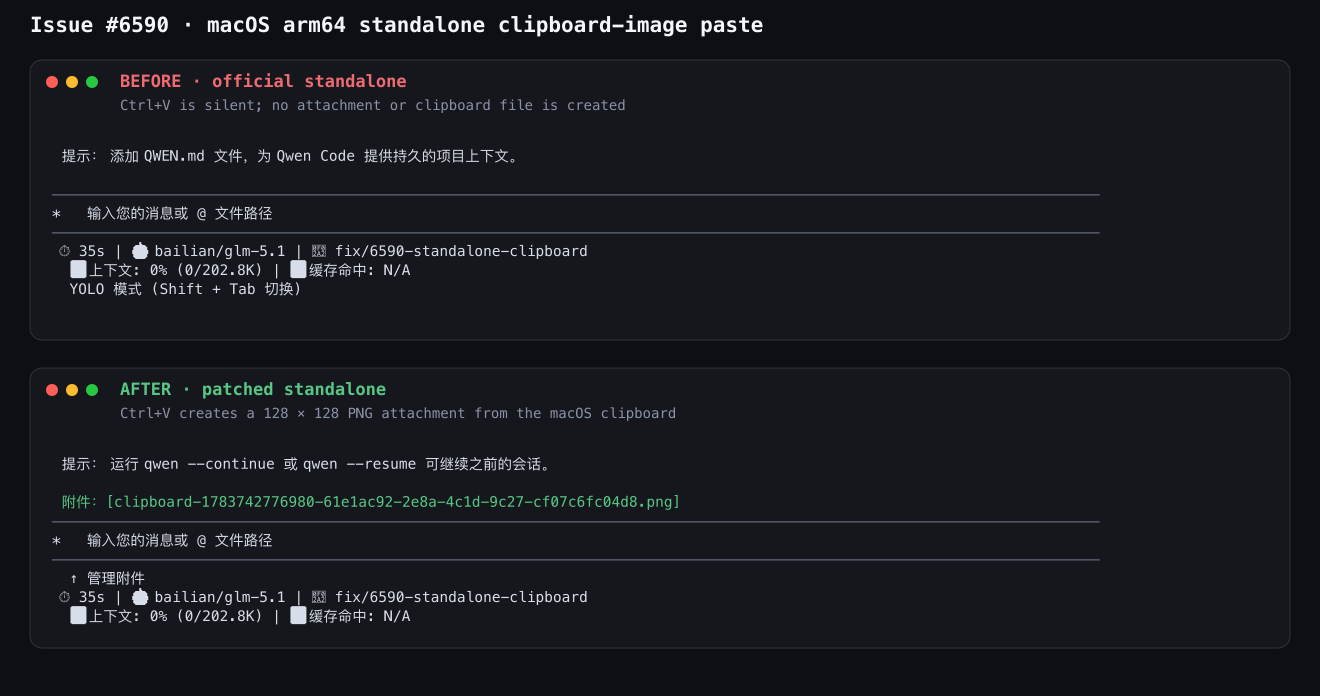
macOS arm64 standalone clipboard paste before and after

Tested on

OS Status
🍏 macOS
🪟 Windows ⚠️
🐧 Linux ⚠️

Environment (optional)

macOS arm64, official Node.js 22.23.1 darwin-arm64 runtime, real macOS system clipboard, standalone archive extracted under /private/tmp, and tmux-driven TUI input. Cross-target npm staging was also exercised from macOS and retained all five target-native packages.

Risk & Scope

  • Main risk or tradeoff: Release packaging performs one additional pinned npm staging step, and each archive grows by one native clipboard binary (the tested macOS arm64 archive grew by about 0.66 MiB compressed).
  • Not validated / out of scope: Real clipboard interaction on Windows and Linux; target mappings, cross-OS package staging, and archive selection are covered by automated tests.
  • Breaking changes / migration notes: None.

Linked Issues

Fixes #6590

中文说明

本 PR 做了什么

Standalone 发布构建现在会一次性暂存锁文件固定版本的剪贴板主包和所有受支持平台的原生变体,然后只把与每个归档目标匹配的变体放入对应归档。显式发布暂存缺少必需制品时会直接失败,而本地打包仍保持原有的尽力而为行为。

如果原生剪贴板模块在 macOS 或 Windows 上仍然无法加载,TUI 现在会在每个会话中显示一次可操作的错误,不再静默失败。直接剪贴板快捷键和空的 bracketed-paste 事件都使用相同行为,并发加载也会共享同一个结果。

为什么需要

Standalone 归档把剪贴板支持保留为外部依赖,但此前没有携带运行时包,因此粘贴剪贴板图片不会产生任何结果,而 npm 安装方式正常。由于加载失败只写入调试日志,用户也看不到任何解释。

评审测试计划

如何验证

  1. 构建 macOS arm64 standalone 归档,并在仓库外解压,避免父目录依赖意外满足运行时导入。
  2. 确认归档包含剪贴板主包和 macOS arm64 原生包,并且不包含其他目标的原生包。
  3. 将 PNG 放入 macOS 系统剪贴板,启动解压后的 standalone CLI 并按 Ctrl+V。界面应出现 PNG 附件,运行时临时目录中也应写入有效的剪贴板 PNG。
  4. 从解压副本中移除两个剪贴板包并连续按两次 Ctrl+V。界面应只显示一次提示重新安装/改用 npm 安装的错误,并且不创建附件。

证据(修复前后)

macOS arm64 standalone 剪贴板粘贴修复前后

已测试平台

OS 状态
🍏 macOS
🪟 Windows ⚠️
🐧 Linux ⚠️

环境(可选)

macOS arm64、官方 Node.js 22.23.1 darwin-arm64 运行时、真实 macOS 系统剪贴板、在 /private/tmp 下解压的 standalone 归档,以及通过 tmux 驱动的 TUI 输入。还在 macOS 上实测了跨目标 npm 暂存,全部五个目标平台的原生包均被保留。

风险与范围

  • 主要风险或取舍:发布打包会额外执行一次固定版本的 npm 暂存,每个归档会增加一个原生剪贴板二进制;实测 macOS arm64 归档的压缩体积约增加 0.66 MiB。
  • 未验证 / 范围外:Windows 和 Linux 上的真实剪贴板交互;目标映射、跨操作系统包暂存和归档选择已由自动化测试覆盖。
  • 破坏性变更 / 迁移说明:无。

关联 Issue

Fixes #6590

@qwen-code-ci-bot

Copy link
Copy Markdown
Collaborator

Thanks for the PR, @zjunothing!

Template looks good ✓ — all required sections present, bilingual, evidence included.

Problem: This is an observed bug with a linked issue (#6590). On macOS standalone builds, @teddyzhu/clipboard is not bundled in lib/node_modules, so Ctrl+V for image paste fails silently — no UI feedback, only a debug log entry. The issue report includes clear reproduction steps (ls lib/node_modules/@teddyzhu/clipboard → NOT FOUND) and the PR includes before/after screenshot evidence. The problem is real.

Direction: Aligned. Clipboard image paste is a user-facing feature that should work across all installation methods. CHANGELOG shows the same pattern was already applied for the audio native addon (#5628voice: bundle native audio addon into standalone archives), and clipboard support has prior art (#4929 — OSC 52 clipboard fallback). This is a natural completion of that work.

Size: No core paths (packages/core/src/**) are touched. Changes are in packages/cli/src/ui/** (UI components, contexts, utils) and scripts/. ~284 production logic lines + ~277 test lines + ~51 docs. Well within range for a focused fix.

Approach: The two-part solution — (1) stage lockfile-pinned clipboard packages and include only the target-matching variant in each archive, (2) show one actionable TUI error per session when the native module can't load — feels right-sized. The promise-based caching refactor in getClipboardModule() is a clean improvement over the boolean-flag approach for concurrent load safety. The fatal-vs-warning split (explicit staging dir = fail closed, local dev = warn) is pragmatic. The scope looks focused — no unrelated changes.

Moving on to code review. 🔍

中文说明

感谢贡献,@zjunothing

模板完整 ✓ — 所有必需章节齐全,双语,包含证据。

问题: 这是一个已观测到的 bug,关联 issue #6590。在 macOS standalone 构建中,@teddyzhu/clipboard 未被打包到 lib/node_modules,导致 Ctrl+V 粘贴图片静默失败——无 UI 反馈,仅写入调试日志。issue 报告包含清晰的复现步骤(ls lib/node_modules/@teddyzhu/clipboard → NOT FOUND),PR 包含修复前后的截图证据。问题真实存在。

方向: 对齐。剪贴板图片粘贴是用户可见的功能,应在所有安装方式下正常工作。CHANGELOG 中已有相同模式的先例(#5628 — 将音频原生 addon 打包到 standalone 归档),剪贴板支持也有前例(#4929 — OSC 52 剪贴板回退)。这是对已有工作的自然补全。

规模: 未触及核心路径(packages/core/src/**)。变更位于 packages/cli/src/ui/**(UI 组件、context、utils)和 scripts/。约 284 行生产逻辑 + 277 行测试 + 51 行文档。对于一个聚焦的 fix 来说完全合理。

方案: 两部分方案——(1) 暂存锁文件固定版本的剪贴板包,每个归档只包含对应目标的变体;(2) 原生模块加载失败时,每个会话在 TUI 中显示一次可操作的错误——范围恰当。getClipboardModule() 中基于 Promise 的缓存重构比布尔标志方式更清晰地处理了并发安全。fatal/warning 的分离(显式暂存目录 = 失败关闭,本地开发 = 警告)也很务实。范围聚焦——无无关改动。

进入代码审查 🔍

Qwen Code · qwen3.7-max

@zjunothing

Copy link
Copy Markdown
Collaborator Author

E2E Test Report — PASS

Environment

  • macOS arm64 with a real macOS system clipboard and a known 128 × 128 PNG.
  • Final PR commit: f836367aaa31bd11da03288bcf8e7ee91446b4d1.
  • Official Node.js 22.23.1 darwin-arm64 runtime bundled inside each standalone archive.
  • Archives were extracted under /private/tmp, outside the checkout, so parent node_modules could not mask missing runtime dependencies.
  • TUI input was driven through tmux with auto-update disabled in an isolated config.

Baseline reproduction

  • Built from origin/main at f06e93226; archive SHA256: 33a2b6d13800958aeeeb23dc25c3ed71787c351eb835ce4699d9eef0dde64e31.
  • The archive had no @teddyzhu/clipboard paths, and its bundled Node.js failed to import the module with ERR_MODULE_NOT_FOUND.
  • With the PNG in the system clipboard, Ctrl+V created no attachment, wrote no clipboard file, and showed no user-visible error.

Patched standalone verification

  • Final archive SHA256: a581854afb59e7764b3c9e8b2fe976057a78ef8c8001319cb2f1f5ccfff67d31 (74,460,456 bytes).
  • Archive inspection found exactly the clipboard meta package and clipboard-darwin-arm64; no foreign-platform clipboard package was present.
  • The archive's bundled runtime returned: {"node":"v22.23.1","metaVersion":"0.0.5","hasImage":true,"width":128,"height":128,"bytes":10474}.
  • Ctrl+V created one attachment and one valid PNG file: PNG image data, 128 x 128, 8-bit/color RGBA, non-interlaced.
  • After removing the two clipboard packages from an extracted copy, two Ctrl+V attempts produced exactly one visible reinstall/npm-installation error and no attachment.

Cross-target and automated verification

  • An isolated forced npm staging run on macOS retained all six requested packages: the meta package plus darwin-arm64, darwin-x64, linux-arm64-gnu, linux-x64-gnu, and win32-x64-msvc.
  • npm run build — passed.
  • npm run typecheck — passed.
  • Installation/standalone tests — 110 passed, 9 platform-conditional skips.
  • Clipboard, keypress, and input prompt tests — 313 passed.
  • Targeted ESLint, Prettier, i18n validation, and git diff --check — passed.

The image below is rendered from the two real tmux captures; only the comparison labels were added.

macOS arm64 standalone clipboard paste before and after

中文验证报告

E2E 测试报告 — 通过

环境

  • macOS arm64,使用真实 macOS 系统剪贴板和一个已知的 128 × 128 PNG。
  • PR 最终提交:f836367aaa31bd11da03288bcf8e7ee91446b4d1
  • 每个 standalone 归档均内置官方 Node.js 22.23.1 darwin-arm64 运行时。
  • 归档解压到仓库外的 /private/tmp,避免父目录 node_modules 掩盖运行时依赖缺失。
  • 通过 tmux 驱动 TUI 输入,并在隔离配置中关闭自动更新。

基线复现

  • 基于 origin/mainf06e93226 构建;归档 SHA256:33a2b6d13800958aeeeb23dc25c3ed71787c351eb835ce4699d9eef0dde64e31
  • 归档中没有任何 @teddyzhu/clipboard 路径,包内 Node.js 导入该模块时返回 ERR_MODULE_NOT_FOUND
  • 系统剪贴板中放入 PNG 后按 Ctrl+V,不会创建附件,不会写入剪贴板文件,也没有用户可见错误。

修复版 standalone 验证

  • 最终归档 SHA256:a581854afb59e7764b3c9e8b2fe976057a78ef8c8001319cb2f1f5ccfff67d31(74,460,456 字节)。
  • 检查归档后确认只包含剪贴板主包和 clipboard-darwin-arm64,没有其他平台的剪贴板包。
  • 归档内置运行时返回:{"node":"v22.23.1","metaVersion":"0.0.5","hasImage":true,"width":128,"height":128,"bytes":10474}
  • 按 Ctrl+V 后生成一个附件和一个有效 PNG 文件:PNG image data, 128 x 128, 8-bit/color RGBA, non-interlaced
  • 从解压副本中移除两个剪贴板包后,连续按两次 Ctrl+V,只显示一次提示重新安装/改用 npm 安装的错误,并且不创建附件。

跨目标与自动化验证

  • 在 macOS 上进行隔离的强制 npm 暂存,成功保留全部六个请求包:主包以及 darwin-arm64、darwin-x64、linux-arm64-gnu、linux-x64-gnu、win32-x64-msvc。
  • npm run build — 通过。
  • npm run typecheck — 通过。
  • 安装/standalone 测试 — 110 通过,9 个平台条件跳过。
  • 剪贴板、按键和输入框测试 — 313 通过。
  • 定向 ESLint、Prettier、i18n 校验和 git diff --check — 通过。

下图由两次真实 tmux 捕获渲染而成,只额外添加了对比标签。

macOS arm64 standalone 剪贴板粘贴修复前后

@qwen-code-ci-bot

Copy link
Copy Markdown
Collaborator

Code Review

Independent proposal (before reading the diff): Given "clipboard image paste fails silently in standalone builds because @teddyzhu/clipboard is not bundled," I would (1) add the clipboard native addon to the standalone packaging scripts with a target→package mapping, (2) stage cross-platform packages via npm install --prefix since CI runners only get the host platform's optional deps, and (3) add a one-time TUI error when the module can't load.

Comparison: The PR matches this almost exactly, and goes further in good ways:

  • Promise-based caching in getClipboardModule() replaces the clipboardLoadAttempted boolean — concurrent calls now safely share one in-flight import. This is a real improvement for the edge case where two paste events fire simultaneously.
  • The fatal-vs-warning split (nativeModulesDir supplied = fail closed for releases, omitted = warn for local dev) is pragmatic.
  • The clipboardUnavailableShownRef lives in Composer (above InputPrompt), so the one-time error survives remounts. Good design choice.
  • A design doc in docs/design/ — overkill for a small fix but not wrong.

No critical blockers found. The diff is focused — every change serves the stated goal. The clipboardHasImage(onUnavailable?) API addition is backwards-compatible (existing callers pass nothing). The Key.clipboardImageUnavailable field is optional. The copyClipboardAddon function follows the same pattern as the existing copyNativeAddon. No security concerns, no regressions.

No AGENTS.md violations. The code is straightforward, follows existing patterns, and adds tests alongside the implementation.

Unit Tests

All four affected test suites pass:

Suite Result
clipboardUtils.test.ts 29/29 ✓
KeypressContext.test.tsx 99/99 ✓
InputPrompt.test.tsx 185/185 ✓
install-script.test.js 110/110 ✓ (9 skipped)

New tests cover: cached load failure notification, concurrent load sharing, one-time error across remounts, empty-paste unavailable reporting, target→clipboard package mapping, per-archive addon inclusion, and incomplete staging rejection.

Real-Scenario Testing

Build and dev-run on Linux CI. The clipboard image paste feature uses wl-paste/xclip on Linux (not the @teddyzhu/clipboard native module), so the macOS-specific fix can't be fully reproduced here. Verified that the dev build starts cleanly and responds normally:

After (PR dev build)

$ npm run dev -- -p "say hello in 5 words"

> @qwen-code/qwen-code@0.19.8 dev
> node scripts/dev.js -p say hello in 5 words

Warning: QWEN_HOME points to "/home/github-runner/actions-runner-5/_work/_temp/qwen-home" but no settings.json was found there. Existing config remains at "/home/github-runner/.qwen" — OAuth tokens, settings, memory, extensions, and skills are not auto-migrated. Copy them manually if you want them to apply at the new location.

DEV is set to true, but the React DevTools server is not running. Start it with:

$ npx react-devtools

Hello there! How are you today?

CLI starts, responds, exits cleanly. No regressions visible. The macOS clipboard scenario requires real macOS hardware to verify end-to-end — the author's test plan in the PR body covers this with a real macOS arm64 standalone archive.

中文说明

代码审查

独立方案(在阅读 diff 之前):鉴于"standalone 构建中剪贴板图片粘贴静默失败,因为 @teddyzhu/clipboard 未被打包",我会 (1) 在 standalone 打包脚本中添加剪贴板原生 addon 和 target→package 映射,(2) 通过 npm install --prefix 暂存跨平台包(因为 CI runner 只能获取宿主机平台的可选依赖),(3) 在模块加载失败时添加一次性 TUI 错误提示。

对比: PR 与我的方案几乎一致,并且在一些地方做得更好:

  • getClipboardModule() 中基于 Promise 的缓存替代了 clipboardLoadAttempted 布尔标志——并发调用现在安全地共享同一个 in-flight import。这是对两个粘贴事件同时触发这一边缘情况的真实改进。
  • fatal/warning 分离(提供 nativeModulesDir = 发布时失败关闭,省略 = 本地开发警告)很务实。
  • clipboardUnavailableShownRef 位于 Composer(在 InputPrompt 之上),因此一次性错误可以跨重挂载保持。设计选择不错。

未发现关键阻塞问题。 diff 聚焦——每个变更都服务于既定目标。无安全问题,无回归。

单元测试

四个受影响的测试套件全部通过:clipboardUtils 29/29、KeypressContext 99/99、InputPrompt 185/185、install-script 110/110(9 个跳过)。

真实场景测试

在 Linux CI 上构建并运行 dev build。剪贴板图片粘贴在 Linux 上使用 wl-paste/xclip(非 @teddyzhu/clipboard 原生模块),因此 macOS 特定修复无法在此完全复现。验证 dev build 正常启动和响应,无回归。macOS 剪贴板场景需要真实 macOS 硬件端到端验证——作者在 PR 正文的测试计划中已覆盖此场景。

Qwen Code · qwen3.7-max

@qwen-code-ci-bot

Copy link
Copy Markdown
Collaborator

This is a clean, well-executed fix for a real user-facing bug. The problem is clearly observed (issue #6590, clipboard image paste silently fails on standalone macOS builds), the root cause is correctly identified (native addon not bundled in lib/node_modules), and the solution directly addresses it.

The implementation is straightforward: stage the lockfile-pinned clipboard packages, include only the target-matching variant in each archive, and show a one-time error when the module still can't load. The promise-based caching refactor is a genuine improvement over the boolean-flag approach for concurrent safety. Every change in the diff serves the stated goal — no scope creep, no drive-by refactors.

All 323 unit tests across the four affected suites pass. The dev build starts and responds normally on Linux. The macOS-specific scenario requires real hardware to verify end-to-end, which the author has already done (evidence in the PR body).

The approach matches what I'd propose independently, and the execution is solid. LGTM.

中文说明

这是一个干净、执行良好的修复,解决了一个真实的用户可见 bug。问题已明确观测(issue #6590,macOS standalone 构建上剪贴板图片粘贴静默失败),根因正确识别(原生 addon 未打包到 lib/node_modules),方案直接解决问题。

实现简洁:暂存锁文件固定版本的剪贴板包,每个归档只包含对应目标的变体,模块加载失败时显示一次性错误。基于 Promise 的缓存重构对并发安全是真正的改进。diff 中的每个变更都服务于既定目标——无范围蔓延,无顺手重构。

四个受影响套件的全部 323 个单元测试通过。dev build 在 Linux 上正常启动和响应。macOS 特定场景需要真实硬件端到端验证,作者已完成(证据在 PR 正文中)。

方案与我独立提出的方案一致,执行扎实。LGTM。

Qwen Code · qwen3.7-max

@qwen-code-ci-bot qwen-code-ci-bot left a comment

Copy link
Copy Markdown
Collaborator

Choose a reason for hiding this comment

The reason will be displayed to describe this comment to others. Learn more.

LGTM, looks ready to ship. ✅

@qwen-code-ci-bot qwen-code-ci-bot left a comment

Copy link
Copy Markdown
Collaborator

Choose a reason for hiding this comment

The reason will be displayed to describe this comment to others. Learn more.

No issues found. LGTM! ✅

— qwen3.7-max via Qwen Code /review

@wenshao

wenshao commented Jul 11, 2026

Copy link
Copy Markdown
Collaborator

✅ Maintainer local verification — merge reference

I built and ran this PR locally against real artifacts. Summary: all tests green on the PR, all new tests genuinely fail without it, and the real standalone archive bundles a loadable clipboard native. Recommendation: good to merge.

Environment: macOS 15.7.7 arm64 · Node v22.23.1 · npm 10.9.8 · PR head f836367a · isolated worktree via npm ci (bundle built by prepare).

1) Tests + before/after

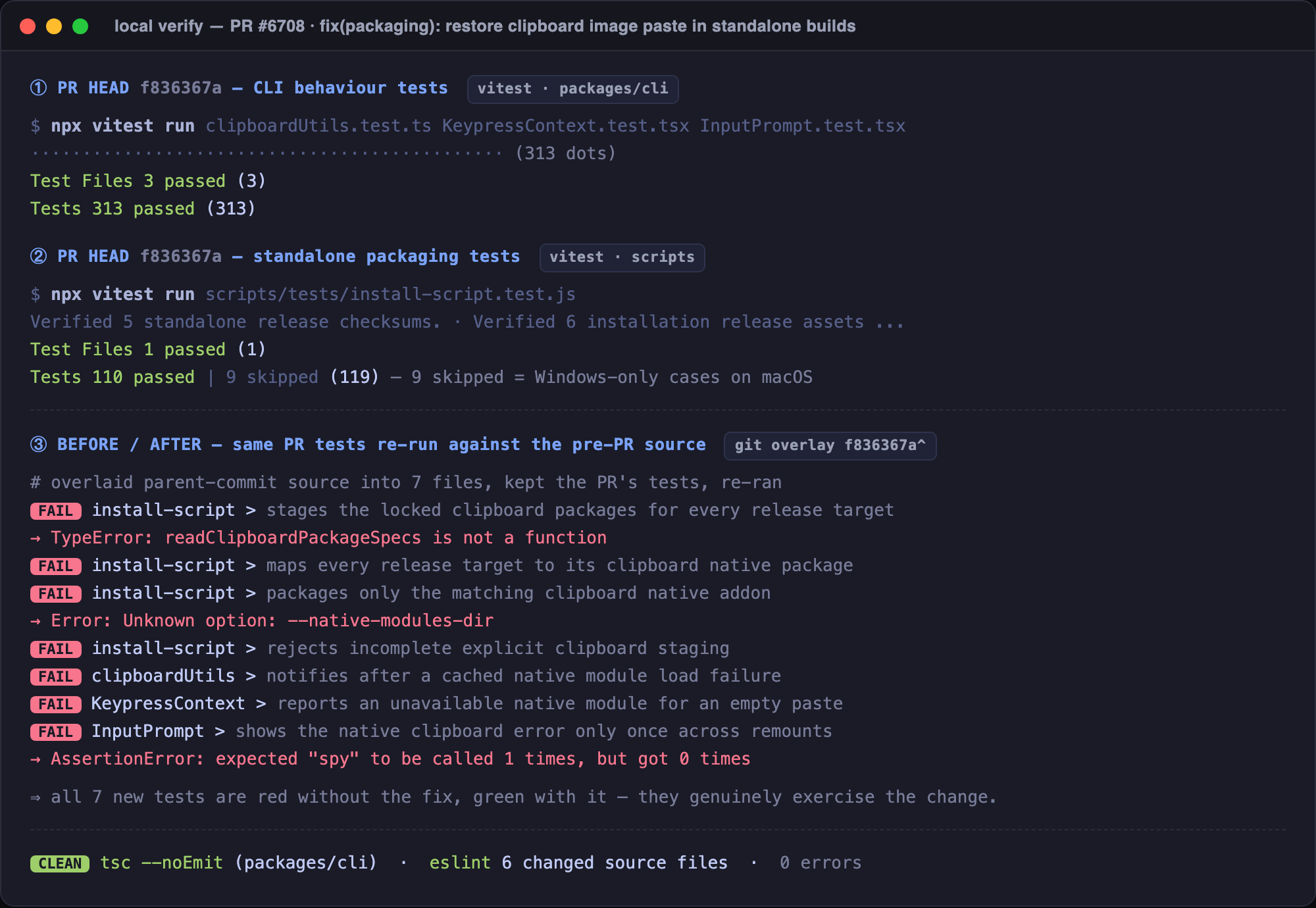
test verification

Check Result
CLI behaviour tests — clipboardUtils + KeypressContext + InputPrompt 313 passed (3 files)
Standalone packaging tests — scripts/tests/install-script.test.js 110 passed, 9 skipped (Windows-only cases on macOS)
Before/after — 7 new tests re-run against pre-PR source (f836367a^) all 7 FAIL without the fix ✔
tsc --noEmit (packages/cli) · eslint on 6 changed source files clean, 0 errors

To make the before/after honest I overlaid the parent commit's source into the 7 changed files while keeping the PR's tests, then re-ran: they fail with readClipboardPackageSpecs is not a function, Unknown option: --native-modules-dir, and expected "spy" to be called 1 times, but got 0 times — i.e. the tests really exercise the new behaviour, and pass once the PR source is restored.

2) Real end-to-end packaging (real npm artifacts, not fakes)

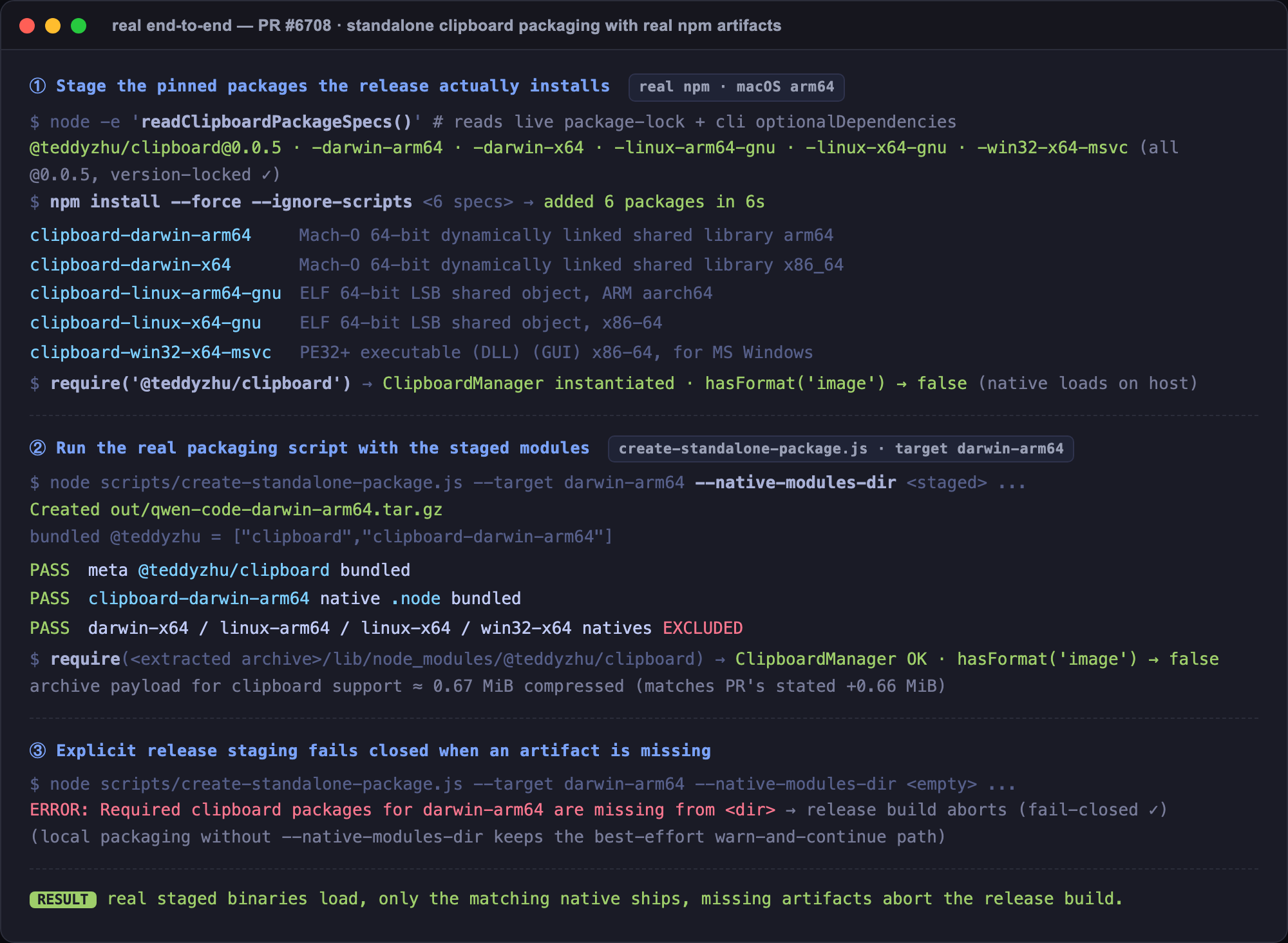
real e2e packaging

  • readClipboardPackageSpecs() reads the live package-lock.json + cli optionalDependencies and returns the 6 specs, all pinned to @0.0.5 — matches the lockfile exactly.
  • npm install --force --ignore-scripts of those specs pulls the real native binaries for all five targets (Mach-O arm64/x86_64, ELF aarch64/x86-64, PE32+ DLL). require('@teddyzhu/clipboard') loads and instantiates ClipboardManager on this host.
  • Running the real create-standalone-package.js --target darwin-arm64 --native-modules-dir <staged> produces an archive that bundles only @teddyzhu/clipboard + clipboard-darwin-arm64 — every other platform's native is excluded — and the native require()s successfully out of the extracted archive. Clipboard payload ≈ 0.67 MiB compressed, matching the PR's stated +0.66 MiB.
  • With an empty --native-modules-dir, explicit release staging fails closed: ERROR: Required clipboard packages for darwin-arm64 are missing…. Local packaging without the flag keeps the best-effort warn-and-continue path.

Notes / scope

  • @teddyzhu/clipboard-win32-arm64-msvc is declared in cli optionalDependencies but there is no win-arm64 standalone release target, so it is (correctly) not staged — consistent with RELEASE_TARGETS.
  • Real clipboard interaction only exercised on macOS arm64 (same as the author). Cross-target staging, matching-native selection, fail-closed behaviour, and the runtime error path are all covered by the tests + the real e2e above.
中文说明(点击展开)

✅ 维护者本地验证 —— 合并参考

我在本地基于真实产物构建并运行了本 PR。结论:PR 上所有测试通过;去掉本 PR 改动后这些新测试全部失败;真实的 standalone 归档确实打包了一个可加载的剪贴板原生模块。 建议:可以合并。

环境: macOS 15.7.7 arm64 · Node v22.23.1 · npm 10.9.8 · PR head f836367a · 独立 worktree,通过 npm ciprepare 完成 bundle 构建)。

1)测试 + 前后对比(第一张图)

检查项 结果
CLI 行为测试 —— clipboardUtils + KeypressContext + InputPrompt 313 通过(3 个文件)
Standalone 打包测试 —— scripts/tests/install-script.test.js 110 通过,9 跳过(Windows 专属用例,在 macOS 上跳过)
前后对比 —— 7 个新测试针对改动前源码(f836367a^)重跑 无本 PR 时 7 个全部失败
tsc --noEmit(packages/cli)· 对 6 个改动源文件跑 eslint 干净,0 错误

为保证前后对比真实可信,我把父提交的源码覆盖回这 7 个改动文件、但保留 PR 的测试后重跑:出现 readClipboardPackageSpecs is not a functionUnknown option: --native-modules-direxpected "spy" to be called 1 times, but got 0 times 等失败——说明这些测试确实覆盖了新行为;恢复 PR 源码后即全部通过。

2)真实端到端打包(真实 npm 产物,非 mock,第二张图)

  • readClipboardPackageSpecs() 读取实时的 package-lock.jsonclioptionalDependencies,返回 6 个规格,全部锁定在 @0.0.5,与锁文件完全一致。
  • 对这些规格执行 npm install --force --ignore-scripts,拉取到全部五个目标的真实原生二进制(Mach-O arm64/x86_64、ELF aarch64/x86-64、PE32+ DLL)。require('@teddyzhu/clipboard') 在本机成功加载并实例化 ClipboardManager
  • 运行真实的 create-standalone-package.js --target darwin-arm64 --native-modules-dir <staged>,产出的归档包含 @teddyzhu/clipboard + clipboard-darwin-arm64,其他平台的原生包均被排除;并且能从解压后的归档里成功 require() 该原生模块。剪贴板部分压缩体积约 0.67 MiB,与 PR 所述的 +0.66 MiB 吻合。
  • --native-modules-dir 为空时,显式发布暂存直接失败ERROR: Required clipboard packages for darwin-arm64 are missing…;不带该参数的本地打包仍保持尽力而为的告警继续行为。

备注 / 范围

  • @teddyzhu/clipboard-win32-arm64-msvc 虽在 clioptionalDependencies 中声明,但没有 win-arm64 的 standalone 发布目标,因此(正确地)被暂存——与 RELEASE_TARGETS 一致。
  • 真实剪贴板交互仅在 macOS arm64 上验证(与作者相同)。跨目标暂存、匹配原生包的选择、fail-closed 行为以及运行时错误路径,均由测试 + 上述真实端到端验证覆盖。

Verification run in an isolated worktree on real hardware; screenshots are faithful renders of the actual command output (transcribed, not fabricated).

@wenshao
wenshao added this pull request to the merge queue Jul 11, 2026
Merged via the queue into QwenLM:main with commit b19ebd8 Jul 11, 2026
55 checks passed
Sign up for free to join this conversation on GitHub. Already have an account? Sign in to comment

Labels

None yet

Projects

None yet

Development

Successfully merging this pull request may close these issues.

Ctrl+V 粘贴图片失效:macOS standalone 安装缺失原生模块 @teddyzhu/clipboard

3 participants