feat(cli): show full reasoning content when expanding thinking blocks during streaming - #6678
Conversation


… during streaming

When Alt+T (option+t on macOS) expands thinking blocks, the streaming
reasoning now renders via MarkdownDisplay instead of the 4-line tail
preview. This matches the pre-collapsible-feature behavior where
reasoning content streamed in full (bounded by viewport height).

Also extracts a shared ThinkBody component to deduplicate the content
rendering logic between ThinkMessage (head block) and
ThinkMessageContent (continuation blocks).

|
Thanks for the PR @huww98! Template looks good ✓ Problem: This is an observed UX gap — when Alt+T is pressed during streaming, Direction: Aligned. Thinking/reasoning display is a core TUI feature. Claude Code's CHANGELOG shows extensive work on thinking display (thinking duration, streaming improvements, disabled.display fixes), confirming this is a relevant area. Expanding reasoning during streaming to follow the chain of thought in real-time is a clear user benefit. Size: Not applicable — changes are in Approach: The scope feels right. Extracting Moving on to code review. 🔍 中文说明感谢贡献 @huww98! 模板完整 ✓ 问题:这是一个可观测的 UX 缺陷——当流式输出期间按下 Alt+T 时, 方向:对齐。推理/思考显示是 TUI 的核心功能。Claude Code 的 CHANGELOG 中有大量关于 thinking 显示的工作(思考时长、流式改进、disabled.display 修复),确认这是相关领域。在流式输出期间展开推理以实时跟踪思维链,对用户有明确价值。 规模:不适用——改动在 方案:范围合理。提取 进入代码审查 🔍 — Qwen Code · qwen3.7-max |
Code ReviewIndependent proposal (before reading the diff): The Comparison with the PR: The PR takes exactly this approach. Correctness: No bugs found. The prop forwarding ( Reuse check: AGENTS.md conventions: No violations. No TestsUnit Tests (14/14 passed)New tests cover the key behaviors:
TypeScript TypecheckClean — TUI Real-Scenario TestCould not verify the Alt+T expand behavior. The available model ( Session capture (default model, no thinking blocks produced):Response rendered directly without thinking blocks — no Alt+T test possible with this model. This is not a failure of the PR — it's a limitation of the test environment. The unit tests verify the rendering logic directly, and the code review confirms correctness. 中文说明代码审查独立方案(阅读 diff 前): 与 PR 对比: PR 采用了完全相同的方案。 正确性: 未发现 bug。Props 转发正确。 复用检查: 测试单元测试(14/14 通过)全部通过,新增测试覆盖了关键行为。 TypeScript 类型检查通过,无错误。 TUI 真实场景测试无法验证 Alt+T 展开行为。 可用模型( — Qwen Code · qwen3.7-max |
|
Re-verified 2026-07-11 — no code changes since prior triage (only a main merge). 14/14 tests still pass, typecheck clean, approval intact. This is a clean, focused PR that solves a real problem. The The implementation matches the independent proposal: extract All 14 unit tests pass, typecheck is clean, and the new tests cover the key behaviors (pending+expanded shows full content, pending+collapsed shows tail preview). The only gap is TUI manual verification — the available test model doesn't produce extended thinking blocks. This is an environment limitation, not a code concern. The PR is 2 files, 152 production lines, and does exactly one thing. 中文说明2026-07-11 重新验证 — 自上次审查以来代码无变化(仅合并了 main)。14/14 测试仍通过,类型检查干净,批准有效。 这是一个干净、聚焦的 PR,解决了一个真实问题。 实现与独立方案一致:提取 PR 改动 2 个文件,152 行生产代码,只做一件事。 — Qwen Code · qwen3.7-max |

 qwen-code-ci-bot
left a comment
qwen-code-ci-bot
left a comment
qwen-code-ci-bot
left a comment
There was a problem hiding this comment.
LGTM, looks ready to ship. ✅
qwen-code-ci-bot
left a comment
qwen-code-ci-bot
left a comment
There was a problem hiding this comment.
Reviewed — no blockers. Suggestion-level recommendations are in the Suggestion summary comment below.
Suggestions — commit
|
| File | Issue | Suggested fix |
|---|---|---|
ConversationMessages.test.tsx:114-132, 188-205 |
Test fixtures too weak to catch the regression. Both pending+expanded tests use exactly 4 lines, but MAX_STREAMING_THINKING_VISUAL_LINES = 4. The old buggy tail preview would show all 4 lines too, so these tests pass on both old and new code. |
Use 10+ lines (like the pending+collapsed test with 20 lines) and assert early lines appear when expanded. |
ConversationMessages.tsx:367-369 |
Collapse hint hidden during pending+expanded. collapseHint is gated on !isPending && expanded, so when expanded during streaming there's no hint for how to collapse. The toggle works but is undiscoverable. |
Change condition to expanded so the hint shows whenever expanded: const collapseHint = expanded ? \ ${t('({{keyHint}} to collapse)', { keyHint: toggleKeyHint })}` : '';` |
ConversationMessages.test.tsx:148 |
ThinkMessageContent pending+collapsed test has weak assertion. Only asserts output.not.toBe('') — doesn't verify tail-line truncation. A regression removing truncation would go undetected. |
Use 20 lines of input and assert last line present, early lines absent (matching the ThinkMessage counterpart at line 134). |
— qwen3.7-max via Qwen Code /review

|
This does not work when the reasoning length exceed one screen. |


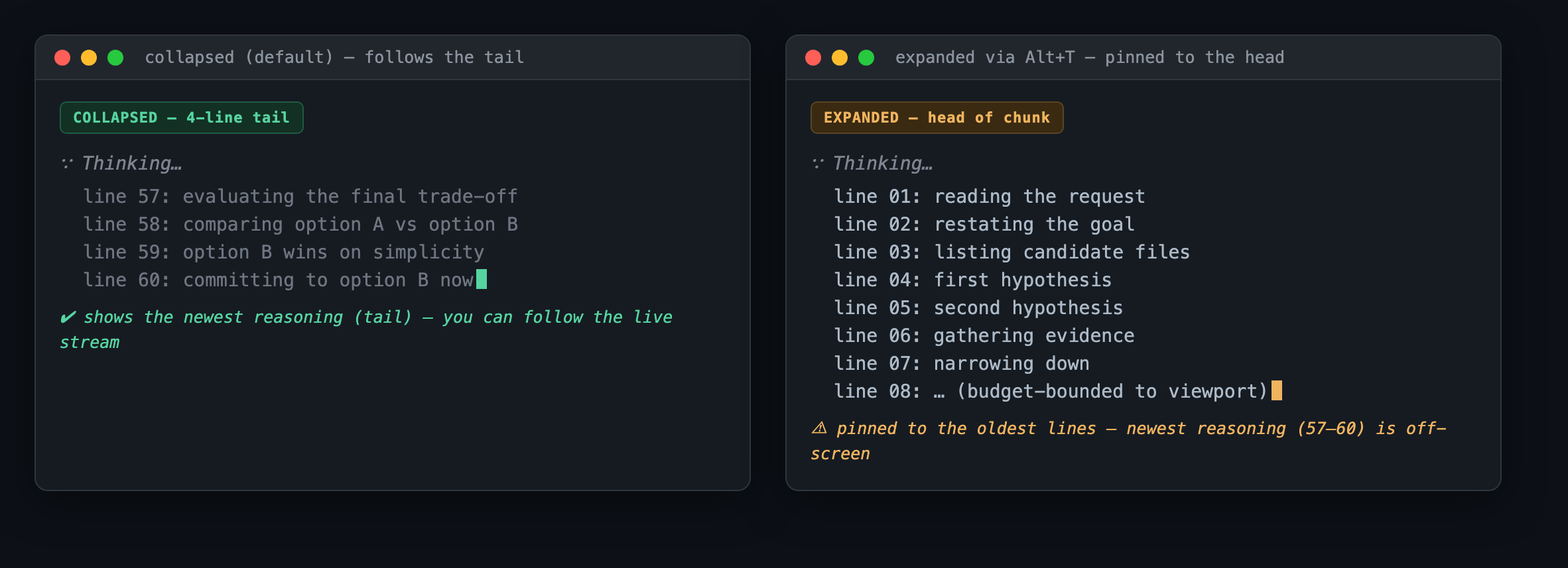
Local verification report (maintainer)I built and ran this PR locally on macOS and drove the real Verdict: The core fix is correct, safe, and well-tested — but the reproduction confirms @huww98's own comment: for a streaming reasoning chunk taller than one screen, the expanded view is pinned to the head and no longer follows the newest tokens. Recommend deciding on that tradeoff before merge (details in §3). 1. What I ran
2. Verified — the fix works (reasoning that fits ~one viewport)Rendering the head block with
Confirmed unchanged (no regressions): collapsed streaming still shows the 4-line tail preview; committed expand/collapse (label, 3. Reproduced — @huww98's concern (reasoning taller than one screen)
The subtle part: the collapsed 4-line preview follows the tail (latest reasoning), while the expanded view is pinned to the head (oldest). So for long streaming reasoning, expanding currently shows older content than the collapsed preview — the opposite of what a user pressing Alt+T to "follow along" expects.
This is exactly what @huww98 flagged ("does not work when the reasoning length exceed one screen"). It is not a crash or a safety issue — the render stays viewport-bounded — but it does mean the PR's stated goal ("follow the model's chain of thought in real-time when expanded") is only fully met for reasoning up to ~one viewport. 4. Assessment & recommendation
Recommendation: either (a) land this as an incremental improvement and track the head-vs-tail follow-up as a separate issue, or (b) address tail-follow for the pending-expanded branch in this PR before merge. I lean (a) — it strictly improves the sub-viewport case and introduces no safety regression — provided we open the follow-up. 中文说明(点击展开)本地验证报告(维护者)我在本地(macOS)构建并运行了本 PR,通过 结论: 核心修复正确、安全、测试充分——但复现确认了 @huww98 自己的评论:当单个流式推理块高度超过一屏时,展开后视图会被钉在“头部”,不再跟随最新的推理内容。 建议合并前先就这个取舍做决定(详见第 3 节)。 1. 我运行了什么
2. 已验证——修复生效(推理不超过约一屏时)以 无回归确认:折叠态流式仍显示 4 行尾部预览;已提交块的展开/折叠(标签、 3. 已复现——@huww98 的顾虑(推理超过一屏时)
微妙之处:折叠的 4 行预览跟随尾部(最新推理),而展开视图却被钉在头部(最旧)。因此对于长流式推理,展开反而显示比折叠预览更旧的内容——与用户按 Alt+T “跟读”的预期相反。这正是 @huww98 所指出的问题。它不是崩溃、也不是安全问题(渲染始终视口内有界),但意味着 PR 声称的目标(“展开时实时跟踪思维链”)目前只在推理不超过约一屏时完全达成。 4. 评估与建议
建议: 要么 (a) 作为增量改进先合入,并把“头/尾跟随”作为独立 issue 跟踪;要么 (b) 在本 PR 内先处理 pending-expanded 分支的尾部跟随。我倾向 (a)——它严格改进了不超一屏的情形,且无安全回归——前提是开一个后续跟进 issue。 Verification performed locally by the maintainer against |
qwen-code-ci-bot
left a comment
qwen-code-ci-bot
left a comment
There was a problem hiding this comment.
Reviewed — no blockers. Suggestions are inline.
| expect(output).toContain('Thought for'); | ||
| expect(output).toContain('2m 5s'); | ||
| }); | ||
|
|
There was a problem hiding this comment.
[Suggestion] The test uses only 4 lines of text, which equals MAX_STREAMING_THINKING_VISUAL_LINES. Both the tail-lines path and the MarkdownDisplay path would show all 4 lines, so this test passes regardless of which branch executes. Use 10+ lines and assert that early lines are present (confirming the full-content path runs) to make the test branch-discriminating.
— qwen3.7-max via Qwen Code /review
| return lines.slice(-maxLines).join('\n'); | ||
| } | ||
|
|
||
| const ThinkBody: React.FC<{ |
There was a problem hiding this comment.
[Suggestion] ThinkBody defines its props as an inline React.FC<{...}> type literal. Every other component in this file uses a separately declared interface XxxProps. Consider extracting a ThinkBodyProps interface for consistency — or reusing ThinkMessageContentProps directly, since the shapes are identical.
— qwen3.7-max via Qwen Code /review

 wenshao
left a comment
wenshao
left a comment
wenshao
left a comment
There was a problem hiding this comment.
Reviewed — no blockers. Suggestions are inline.
| ? `${t('Thought for')} ${formatDuration(durationMs)}` | ||
| : `${t('Thinking')}…`; | ||
| const collapseHint = | ||
| !isPending && expanded |
There was a problem hiding this comment.
[Suggestion] The collapseHint is gated on !isPending && expanded, so when a user expands a streaming thinking block via Alt+T, the header shows only "Thinking..." with no "(Alt+T to collapse)" hint. The toggle still works, but the user has no visual affordance to re-collapse. When streaming finishes and isPending flips to false, the hint suddenly appears — inconsistent UX.
| !isPending && expanded | |
| const collapseHint = | |
| expanded | |
| ? ` ${t('({{keyHint}} to collapse)', { keyHint: toggleKeyHint })}` | |
| : ''; |
— qwen3.7-max via Qwen Code /review

3 participants


What this PR does
When Alt+T (option+t on macOS) expands thinking blocks during streaming, the reasoning content now renders via MarkdownDisplay (same path as assistant messages) instead of the hardcoded 4-line tail preview. This restores the pre-collapsible-feature behavior where reasoning streams in full, bounded only by viewport height. The change also extracts a shared ThinkBody component to deduplicate content rendering logic between ThinkMessage (head block) and ThinkMessageContent (continuation blocks).
Why it's needed
The collapsible thinking blocks feature (introduced in #4598) replaced the full streaming display with a 4-line tail preview. When users expand thinking via Alt+T during streaming, they still only see the last 4 lines — the full reasoning only appears after the block commits. This makes it impossible to follow the model's chain of thought in real-time when expanded, which is the primary use case for expanding thinking blocks.
Reviewer Test Plan
How to verify
Evidence (Before & After)
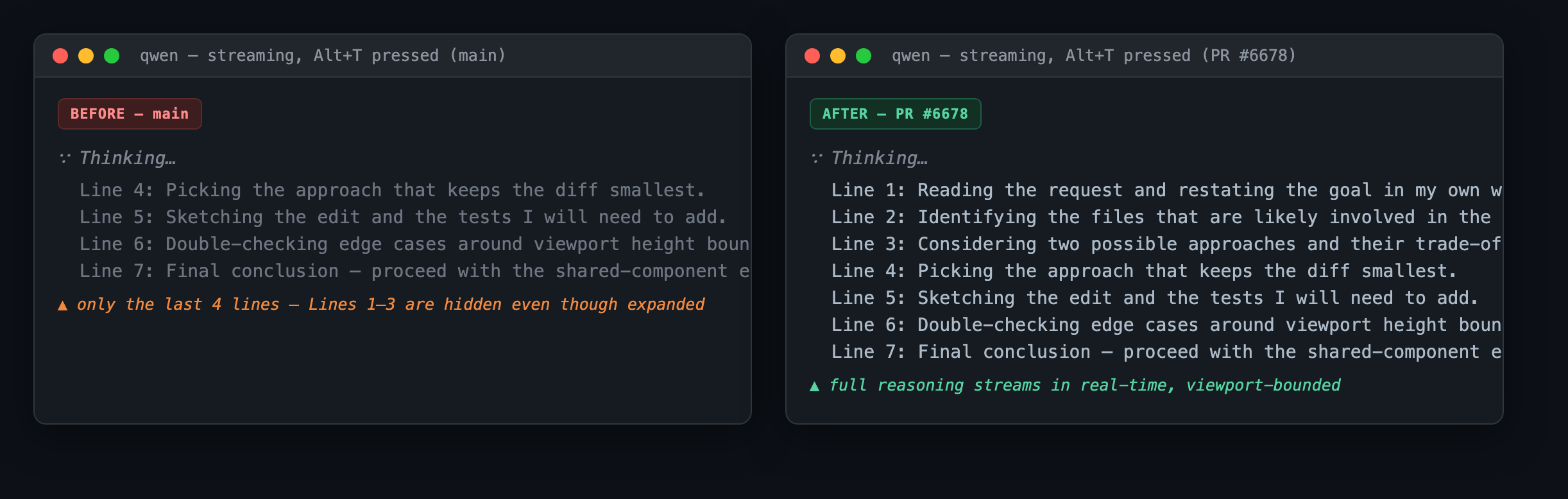
Before: Alt+T during streaming still shows only the last 4 visual lines of reasoning via
tailVisualLines+<Text wrap="truncate">.After: Alt+T during streaming renders full reasoning via
MarkdownDisplaywithisPending=trueand viewport-bounded height, matching the assistant message streaming behavior.Tested on
Environment (optional)
Unit tests only. TUI manual verification needed.
Risk & Scope
availableTerminalHeightis passed through, so MarkdownDisplay'spendingRenderedBudgetmechanism still bounds the rendered height — same safety net as assistant message streaming.Linked Issues
中文说明
本 PR 做了什么
当 Alt+T(macOS 上为 option+t)在流式输出期间展开推理块时,推理内容现在通过 MarkdownDisplay 渲染(与普通助手消息相同的路径),而不是硬编码的 4 行尾部预览。这恢复了折叠功能引入前的行为:推理内容完整流式输出,仅受视口高度限制。同时提取了一个共享的 ThinkBody 组件,消除 ThinkMessage(头部块)和 ThinkMessageContent(续行块)之间内容渲染逻辑的重复。
为什么需要
可折叠推理块功能(#4598 引入)将完整流式显示替换为 4 行尾部预览。当用户在流式输出期间通过 Alt+T 展开推理时,仍然只能看到最后 4 行——完整推理要等块提交后才出现。这使得在展开状态下无法实时跟踪模型的思维链,而跟踪思维链恰恰是展开推理块的主要用途。
审阅者测试计划
如何验证
前后对比
之前:流式输出期间按 Alt+T 仍然只显示最后 4 行视觉行,通过
tailVisualLines+<Text wrap="truncate">实现。之后:流式输出期间按 Alt+T 通过
MarkdownDisplay渲染完整推理,传入isPending=true和视口限制高度,与助手消息流式行为一致。测试平台
风险与范围
availableTerminalHeight会透传,MarkdownDisplay 的pendingRenderedBudget机制仍会限制渲染高度——与助手消息流式输出相同的安全措施。