feat(web-shell): add MCP mentions and iconized @ references - #6279
Conversation




|
Thanks for the PR! Template looks good ✓ On direction: this is well-aligned. MCP server mentions in On approach: the scope feels right. The diff follows the established Moving on to code review. 🔍 中文说明感谢贡献! 模板完整 ✓ 方向:高度对齐。在 方案:范围合理。diff 紧密遵循已有的 进入代码审查 🔍 — Qwen Code · qwen3.7-max |


|

Code ReviewIndependent proposal (before reading diff): I would have created a Comparison with the PR: The implementation matches this approach closely. The Reuse check: No critical blockers found. One observation: the icon rendering logic appears in both TestingAll 110 unit tests pass across 5 test suites. CLI TypeScript typecheck is clean. Web-shell has pre-existing typecheck errors in Note on interactive testing: The core feature ( 中文说明代码审查独立方案(读 diff 前): 我会创建一个镜像 与 PR 对比: 实现与此方案高度一致。 复用检查: 未发现关键阻塞问题。 一个观察:图标渲染逻辑同时出现在 测试5 个测试套件共 110 个单元测试全部通过。CLI TypeScript 类型检查通过。web-shell 在 交互测试说明: 核心功能( — Qwen Code · qwen3.7-max |
|
This is a clean, well-structured feature PR. The implementation mirrors the existing extension mention pattern so closely that reviewing it felt like reading a well-practiced playbook — The 110 tests pass. CLI typecheck clean. The web-shell typecheck errors are pre-existing and unrelated. My only mild reservation is that the interactive UX (grouped completion sections, SVG icons, inline tag rendering) couldn't be verified headlessly. But the unit tests cover every layer of the data flow — from completion source through tag serialization to prompt building — so the rendering layer is the only thing left to visual inspection, and the author tested it on macOS. Approving. ✅ 中文说明这是一个干净、结构良好的功能 PR。实现几乎完全镜像了已有的 extension mention 模式——
110 个测试通过。CLI 类型检查通过。web-shell 的类型错误是预先存在的,与此 PR 无关。 唯一的轻微保留是交互式 UX(分组补全 sections、SVG 图标、inline tag 渲染)无法在无头环境中验证。但单元测试覆盖了数据流的每一层——从补全源到 tag 序列化到 prompt 构建——所以剩下的只有渲染层需要视觉检查,而作者已在 macOS 上测试过。 批准。✅ — Qwen Code · qwen3.7-max |

 qwen-code-ci-bot
left a comment
qwen-code-ci-bot
left a comment
qwen-code-ci-bot
left a comment
There was a problem hiding this comment.
LGTM, looks ready to ship. ✅
BZ-D
changed the title

Code Coverage Summary
CLI Package - Full Text ReportCore Package - Full Text ReportFor detailed HTML reports, please see the 'coverage-reports-22.x-ubuntu-latest' artifact from the main CI run. |
| line-height: 1.2; | ||
| } | ||
|
|
||
| .tagLabel, |
There was a problem hiding this comment.
[Suggestion] Dead CSS declaration. This new .tagLabel, .tagValue { color: var(--chat-editor-text-primary) } block is overridden by later rules with equal specificity: .tagLabel { color: var(--chat-editor-accent-color) } (line 420) and .tagValue { color: var(--foreground, #e4e4e4) } (line 429). The color value here has no visible effect.
Consider removing this block or merging it with the existing .tagLabel, .tagValue block at line 413 (which sets min-width, overflow, etc.) to avoid two split selector blocks for the same elements.
— qwen3.7-max via Qwen Code /review
|
|
||
| const prompts = | ||
| config.getPromptRegistry?.()?.getPromptsByServer(serverName) ?? []; | ||
| const resources = |
There was a problem hiding this comment.
[Suggestion] The server name is interpolated into LLM context text without sanitizeDisplayText and without the (untrusted third-party content) marker that the analogous buildExtensionContextText in extension-mention.ts:76 includes. MCP servers are third-party code — a crafted server name in a shared config could inject text into the LLM prompt.
| const resources = | |
| export function buildMcpServerContextText( | |
| config: Config, | |
| serverName: string, | |
| ): string { | |
| const sanitized = sanitizeDisplayText(serverName) ?? serverName; | |
| const lines = [ | |
| `--- MCP Server: ${sanitized} (untrusted third-party content) ---`, | |
| `The user explicitly mentioned this MCP server. Prefer using tools and resources from this server when relevant for this turn. This is advisory context, not a hard restriction.`, | |
| ]; |
— qwen3.7-max via Qwen Code /review
| @@ -473,6 +499,24 @@ export function getComposerTagDisplay(tag: WebShellComposerTag): string { | |||
| return getComposerTagValue(tag) || getComposerTagLabel(tag) || tag.id; | |||
| } | |||
|
|
|||
There was a problem hiding this comment.
[Suggestion] buildAtReferenceTag and the pickedCompletion inline-tag creation listener (lines 1861-1889) have zero test coverage. This is the core UX feature of the PR — turning a completion pick into a visual inline tag. Any regression in the range calculation, annotation detection, or tag construction would silently break the feature.
Also, the new mcp-server-mention.ts module exports four pure functions with no dedicated test file, and #resolveMcpServerMentionParts in Session.ts only has happy-path coverage (unknown server debug branch, empty getMcpServers() early return, and duplicate mention dedup are all untested).
— qwen3.7-max via Qwen Code /review

| height: 0; | ||
| margin: 6px 10px 3px; | ||
| padding: 0 !important; | ||
| height: auto; |

There was a problem hiding this comment.
[Suggestion] This global change from height: 0 to height: auto applies to ALL autocomplete dropdowns, not just @ completion. Slash command (/) completion also uses <completion-section> elements — renderCommandSectionHeader in slashCompletion.ts:233 creates empty elements (no text content, only aria-label) that rely on the previous height: 0 CSS to stay visually hidden while preserving accessibility.
After this change, those empty elements render as ~7px padded spacers with a border-bottom, producing visible blank divider lines in the / command dropdown — a visual regression for every user of slash commands.
Consider scoping the visible-section-header CSS to @-completion sections only, or add a counteracting rule for slash completion headers:
completion-section.cm-command-section-header {
  height: 0 !important;
  padding: 0 !important;
}
completion-section.cm-command-section-header:first-of-type {
  display: none !important;
}
— qwen3.7-max via Qwen Code /review

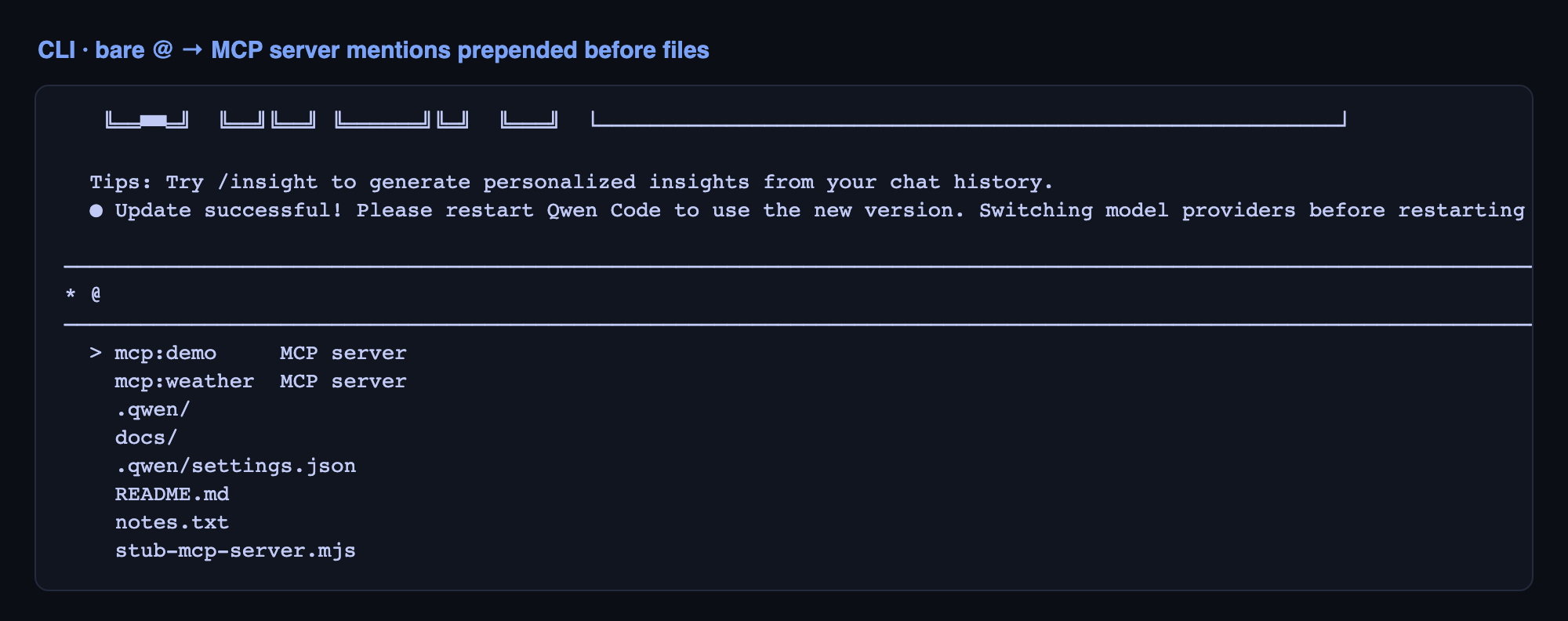
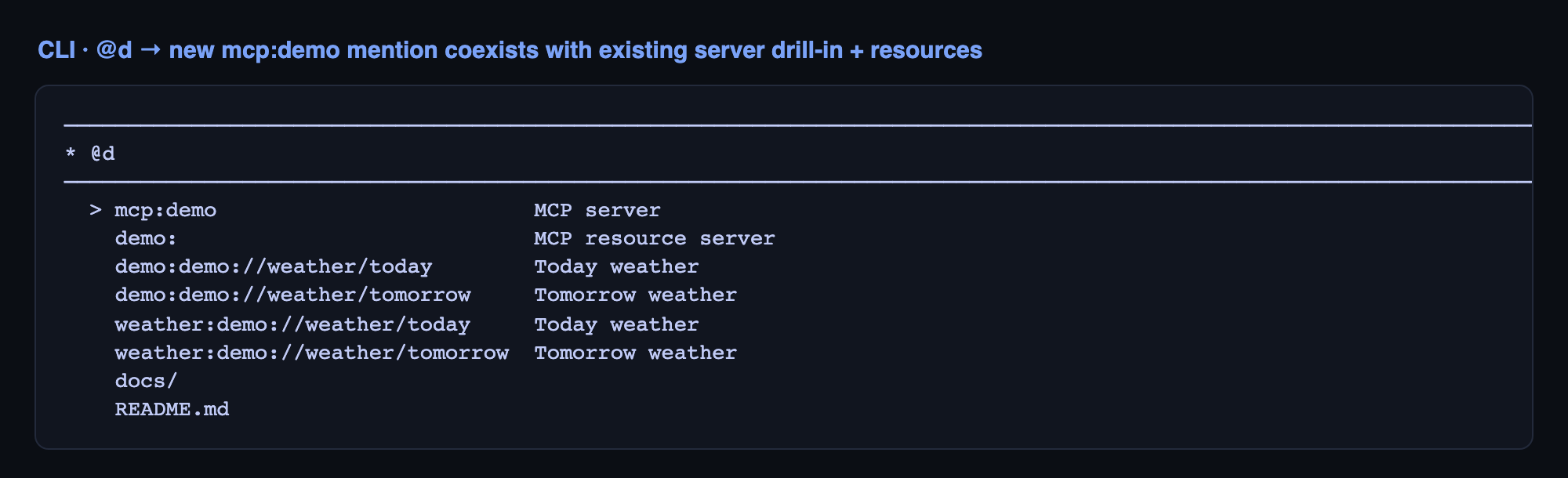
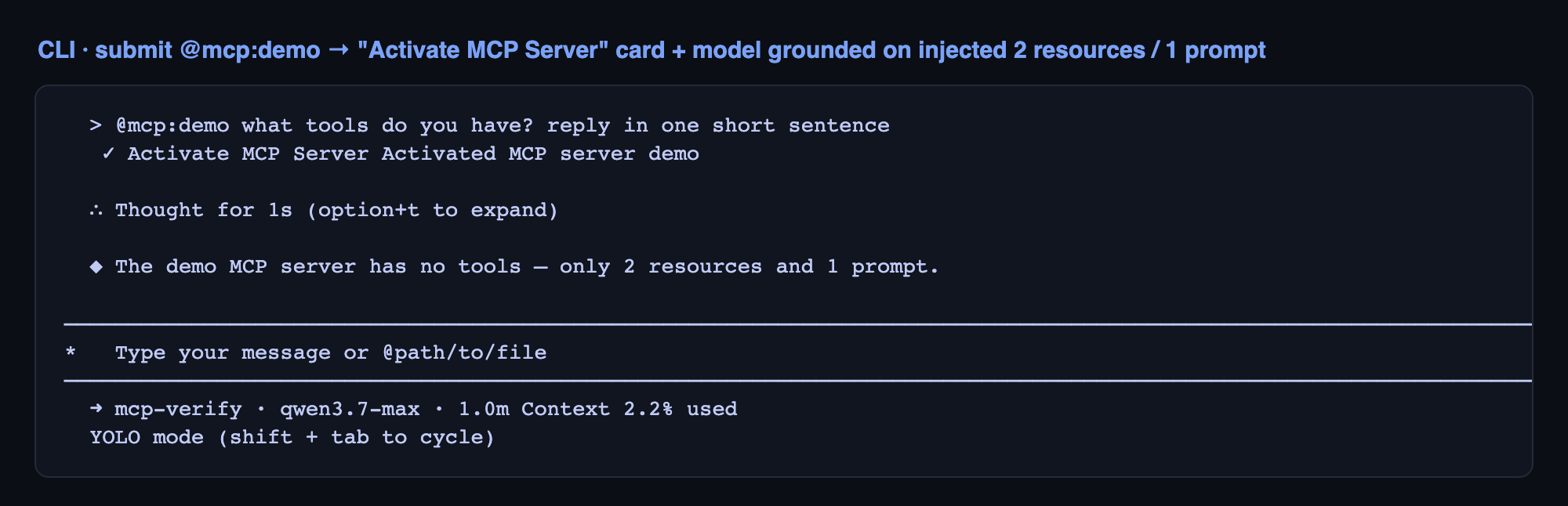
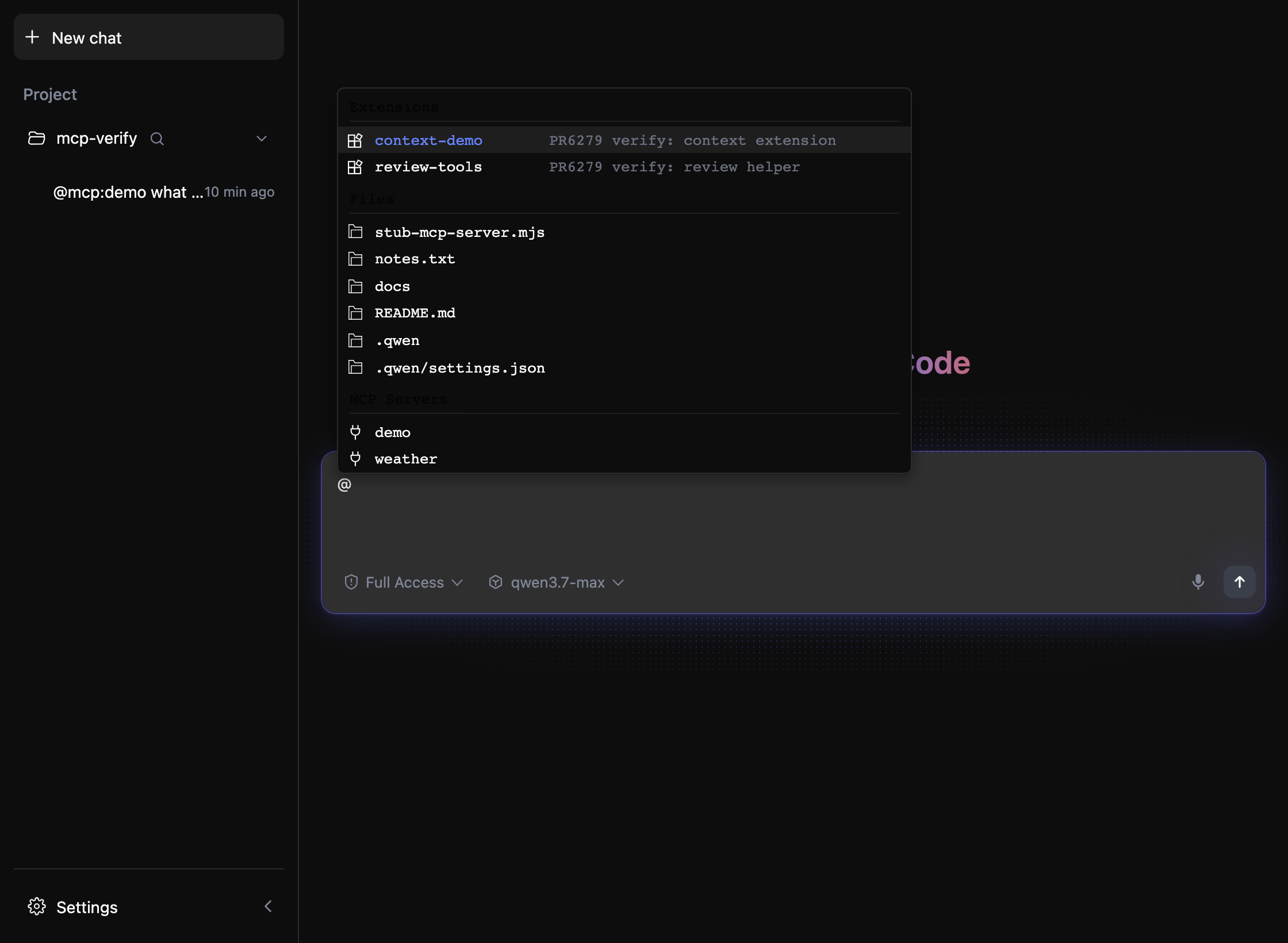
✅ Local real-build verification — PR #6279 (head
|

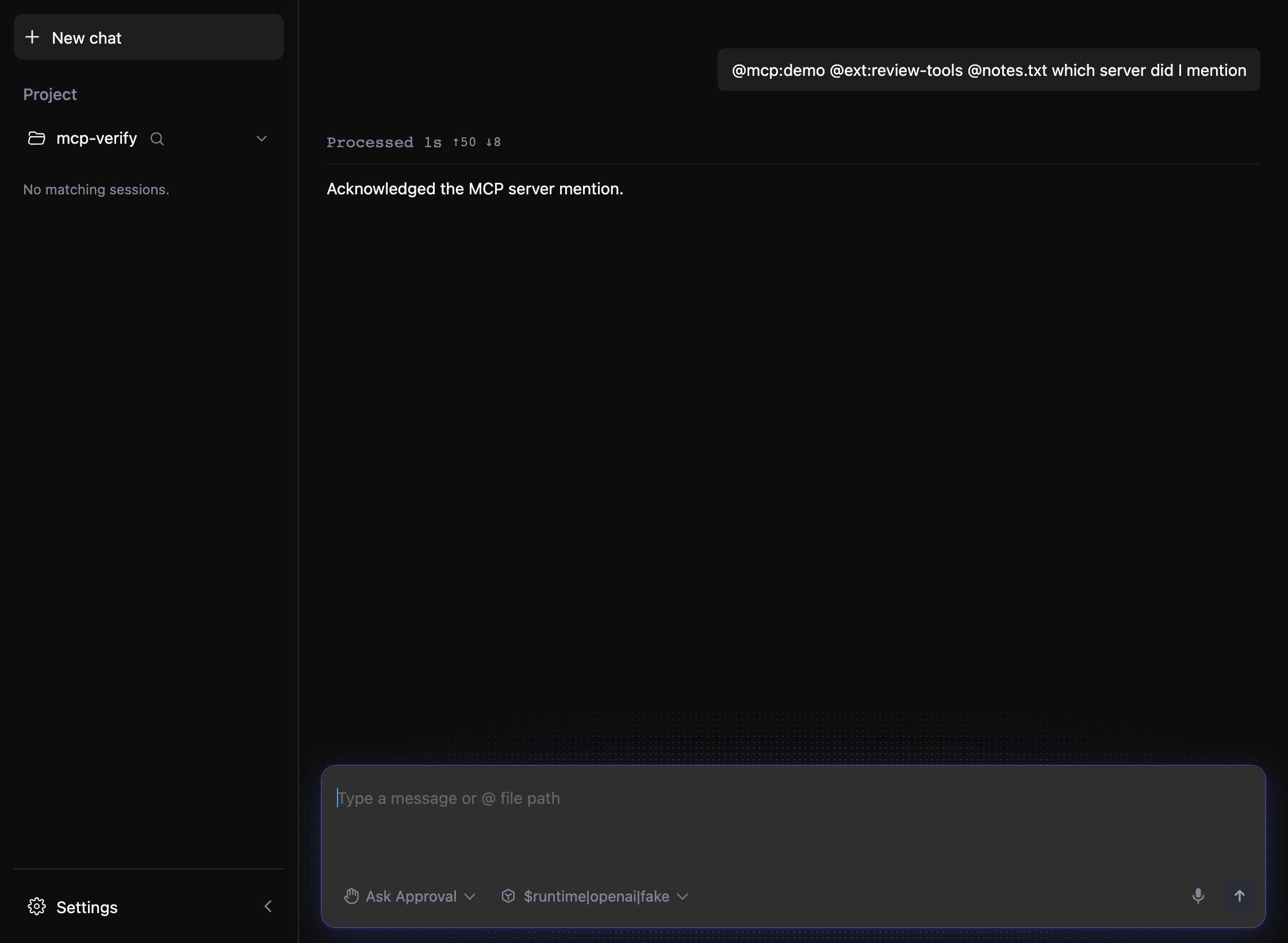


3 participants


What this PR does
This PR adds MCP server mentions to
@completion, restores bare-@MCP discoverability in the CLI, and upgrades the web-shell@experience with grouped results, icons, cleaner labels, and inline tag rendering after a mention is accepted.In the web-shell,
@results are grouped into extensions, files, and MCP servers, show icons instead of noisy textual prefixes in the picker, and render accepted references as iconized inline tags while still preserving the canonical underlying reference text.Why it's needed
The previous experience made MCP server mentions harder to discover than extensions and files, especially in the web-shell. Users sometimes had to know the explicit
mcp:prefix, group visibility was inconsistent, and accepted mentions still looked like raw protocol text rather than UI-native references.This change improves discoverability in both surfaces, reduces the amount of syntax users need to parse, and gives the web-shell a clearer and more navigable
@picker without losing the underlying mention semantics.Reviewer Test Plan
How to verify
@and confirm that extension mentions, file references, MCP server mentions, and MCP resource drill-in entries all appear together.@and confirm that the menu shows grouped sections for extensions, files, and MCP servers, with a compact outer height and an internally scrollable list when content exceeds the available space.@ext:/@mcp:/@prefixes.Evidence (Before & After)
Before: MCP server mentions were harder to discover, web-shell
@groups could be visually cramped or inconsistent, and accepted references remained close to raw prefixed text.After: MCP server mentions are discoverable from bare
@in both the CLI and web-shell, web-shell@results are grouped and iconized, accepted references render as inline tags, and the menu keeps a compact outer height while the internal list scrolls naturally.Tested on
Environment (optional)
Local web-shell build plus targeted vitest coverage for completion and composer behavior, and targeted CLI vitest coverage for
@completion behavior.Risk & Scope
Linked Issues
N/A
中文说明
What this PR does
这个 PR 为
@补全增加了 MCP server mention 支持,恢复了 CLI 中 bare@对 MCP 的可发现性,并进一步升级了 web-shell 的@交互,包括分组展示、图标展示、简化后的菜单文案,以及 mention 被选中后的 inline tag 渲染。在 web-shell 中,
@结果现在会按扩展、文件和 MCP 服务器分组展示,菜单中使用图标替代冗长的前缀文本,并且在用户选中 mention 后渲染为带图标的 inline tag,同时仍然保留底层 canonical reference 语义。Why it's needed
之前的体验里,MCP server mention 的发现成本高于扩展和文件,尤其是在 web-shell 中。用户在某些场景下需要显式知道
mcp:前缀,分组可见性也不够一致,而被接受后的 mention 仍然更像原始协议文本,而不是更贴合 UI 的引用表达。这次改动提升了两个交互面的 discoverability,减少了用户需要自己解析的语法噪音,也让 web-shell 的
@选择器更清晰、更易导航,同时不丢失底层 mention 语义。Reviewer Test Plan
How to verify
@,确认 extension mention、file reference、MCP server mention、以及 MCP resource drill-in 项会一起出现。@,确认菜单会按扩展、文件和 MCP 服务器分组展示;菜单外层保持紧凑高度,而当内容超过可用空间时,内部列表应能正常滚动。@ext:/@mcp:/@前缀文本。Evidence (Before & After)
Before:MCP server mention 较难发现,web-shell 中
@的分组显示可能较拥挤或不一致,而被接受后的引用仍然接近原始前缀文本。After:MCP server mention 可以直接从 CLI 和 web-shell 的 bare
@中发现,web-shell 的@结果支持分组与图标,accepted references 会以 inline tag 展示,同时菜单保持紧凑外层高度并允许内部列表自然滚动。Tested on
Environment (optional)
本地 web-shell build,以及针对 completion 与 composer 行为的 vitest 定向测试,外加针对 CLI
@completion 行为的定向 vitest 测试。Risk & Scope
Linked Issues
N/A