feat(tui): Ctrl+O frozen transcript view and unified tool output rendering - #5666
Conversation


|
多轮无方向设计审计后,我认为方向与原始需求基本匹配:取消全局 compact/detail,把 Ctrl+O 改成 Claude 风格的 transcript/detail 查看入口,这一点是对的。但当前设计还不能算“完全可实施/预期效果可保证”,建议先收敛下面几个问题:
结论:设计的产品方向 match 原始需求,但需要补上这些实现约束后才算完全可行;尤其是 Ctrl+C 短路位置、滚动/虚拟化底座、以及 core 截断与 UI 详显之间的边界。 |

 chiga0
left a comment
chiga0
left a comment
chiga0
left a comment
There was a problem hiding this comment.
审计总结
经 8 个并行审计 agent 交叉验证(含 Claude Code 和 Gemini CLI 源码比对),发现 12 个 Critical + 12 个 Suggestion。整体设计方向正确,架构思路清晰,但有几处需要在实现前解决:
最核心发现:用户原始需求是"ctrl+o 仅作用于某些块的详细展示"(per-block),但设计实现全屏 transcript toggle(所有块同时展开)。建议显式确认此交互模型选择。
其他关键 Critical 项:
- alt-screen 生命周期管理遗漏(
process.on('exit')清理、死锁防护范围仅覆盖WaitingForConfirmation但 DialogManager 有 5+ 种阻塞弹窗) ToolMessage.tsx:785,800的isDim逻辑遗漏(删除CompactModeContext后编译错误)- web-shell 独立
CompactModeContext在删除 settings schema 后静默破坏 - ink 版本声明有误(gemini-cli 用
@jrichman/ink@6.6.9,非 7.0.3) - 测试计划缺少
AlternateScreen和shouldForceFullDetail单测
详细 findings 见下方行内评论。
— qwen3.7-max via Qwen Code /review

|
感谢审计,已逐条处理并推送 commit [P0] Ctrl+C 短路位置 ✅ 已修。核实现有 [P0/P1] 滚动/虚拟化底座 [P1] core 截断 vs UI 详显 ✅ 已修。区分两层:core 层 [P1] 主屏渲染模型矛盾 ✅ 已定一种策略:layout 在 [P2] tipRegistry 旧提示 ✅ 已补入清理清单( 方向已确认 match 原始需求;上述实现约束补齐后方案可实施。仍为 draft,待评审通过后在本分支追加实现 commit。 |


Remove round borders from ToolGroupMessage, CompactToolGroupDisplay, and
InlineParallelAgentsDisplay. Completed tools now default to a single
collapsed header line with dimColor styling. Executing/error/confirming
tools continue to show their full result block.

Part of QwenLM#4588 (Track 3: Simplify tool-call rendering).

Generated with AI

Co-authored-by: Qwen-Coder <qwen-coder@alibabacloud.com>
- Only collapse completed tool results in compact mode, preserving
  full visibility in non-compact mode
- Subtract 2 from innerWidth to account for ToolMessage paddingX={1}
- Update snapshots to reflect removed borders

Generated with AI

Co-authored-by: Qwen-Coder <qwen-coder@alibabacloud.com>
- Gate isDim on compact mode so non-compact tools stay fully styled
- Add paddingX={1} to CompactToolGroupDisplay for left-edge alignment
- Delete Border Color Logic test block (borders removed)
- Add compact-mode test coverage for Error/Executing/Pending/forceShowResult
- Clean up stale border references in comments

Generated with AI

Co-authored-by: Qwen-Coder <qwen-coder@alibabacloud.com>
Replace the dual compact/normal mode tool output with a single unified
mode. Completed tools always show a semantic overview line
("Read 3 files, edited 2 files") instead of dumping full results.

- Add buildToolSummary() for category-based semantic summaries
- Remove compactMode gate from shouldCollapse and isDim in ToolMessage
- Make all-completed tool groups use CompactToolGroupDisplay
- Remove unused useCompactMode hook calls from ToolMessage

Generated with AI

Co-authored-by: Qwen-Coder <qwen-coder@alibabacloud.com>
- Add 10 dedicated unit tests for buildToolSummary covering edge cases
- Fix stale comment referencing old compactMode gate logic

Generated with AI

Co-authored-by: Qwen-Coder <qwen-coder@alibabacloud.com>
- Add Canceled status to allComplete check in ToolGroupMessage
- Move memory-only group rendering before showCompact to prevent
  them being swallowed by CompactToolGroupDisplay
- Fix LLM summary duplication: absorbedCallIds now tracks completed
  groups in non-compact mode; HistoryItemDisplay no longer bypasses
  summaryAbsorbed when !compactMode
- Update StandaloneSessionPicker test for new compact rendering
- Fix design doc category order example and add missing rendering rules

Generated with AI

Co-authored-by: Qwen-Coder <qwen-coder@alibabacloud.com>
- Add SHELL_COMMAND_NAME and @ file-reference pseudo-tools to
  TOOL_NAME_TO_CATEGORY mapping for correct category classification
- Fix height calculation test to use Executing status so expanded
  path is actually exercised
- Update stale comment about empty toolCalls behavior

Generated with AI

Co-authored-by: Qwen-Coder <qwen-coder@alibabacloud.com>
Fixes CI build failure caused by TS6133 (noUnusedLocals) — the
compactMode destructure became dead code after the summary gating
was moved to summaryAbsorbed.

Generated with AI

Co-authored-by: Qwen-Coder <qwen-coder@alibabacloud.com>
Generated with AI

Co-authored-by: Qwen-Coder <qwen-coder@alibabacloud.com>

0913ce4 to
b877134
Compare
已处理本轮全部 review + 解决冲突冲突:已 merge 最新 评论:19 条 review 线程已逐条回复并 resolve。要点:
@wenshao 麻烦得空再复审,CHANGES_REQUESTED 的几点(Ctrl+C 顺序、VP 模式、refreshStatic scrollback、复用 AlternateScreen、消息队列、estimatedItemHeight)均已在设计文档处理。仍为 draft。 |


 qwen-code-ci-bot
left a comment
qwen-code-ci-bot
left a comment
qwen-code-ci-bot
left a comment
There was a problem hiding this comment.
Hi @chiga0 — thanks for the detailed design doc! The Ctrl+O transcript view concept and the analysis of compact mode vs Claude Code's model is clearly well thought out.
However, the PR body doesn't follow the PR template. The template headings are all missing:
- What this PR does — no English prose summary
- Why it's needed — motivation is only in Chinese, not in the template format
- Reviewer Test Plan — no "How to verify", no "Evidence (Before & After)", no "Tested on" table
- Risk & Scope — not present (the design doc §7 covers risks, but the PR body itself needs this section)
- Linked Issues — not present
- 中文说明
<details>block — not present (the body is primarily Chinese but not in the template's bilingual structure)
The template exists so reviewers can quickly find what they need. Could you restructure the PR body to fill in the template? The design document itself is great — this is just about making the PR wrapper conform to the project's review process.
Also worth noting: the PR body says "当前为 draft" but the PR is no longer marked as draft, and the diff contains code changes (deletions in keyBindings.ts, settingsSchema.ts, etc.) beyond just the design document. Please clarify the intended scope — is this a design-only PR or does it include implementation?
中文说明
@chiga0 你好——设计方案写得很详细,Ctrl+O transcript 视图和对 compact mode vs Claude Code 模型的分析显然经过了深入思考。
但 PR 正文没有按照 PR 模板 填写,所有模板标题都缺失:
- What this PR does — 没有英文概述
- Why it's needed — 动机仅在中文部分,未按模板格式
- Reviewer Test Plan — 没有 "How to verify"、"Evidence (Before & After)"、"Tested on" 表格
- Risk & Scope — 缺失(设计文档 §7 涵盖了风险,但 PR 正文本身需要此部分)
- Linked Issues — 缺失
- 中文说明
<details>块 — 缺失(正文以中文为主但未使用模板的双语结构)
模板的目的是让 reviewer 快速找到需要的信息。请按模板重新组织 PR 正文。设计文档本身很好,这只是让 PR 外包装符合项目的审查流程。
另外注意:PR 正文说"当前为 draft"但 PR 已不是 draft 状态,且 diff 包含代码改动(keyBindings.ts、settingsSchema.ts 等的删除),不仅仅是设计文档。请明确预期范围——这是纯设计 PR 还是包含实现?
— Qwen Code · qwen3.7-max
qwen-code-ci-bot
left a comment
qwen-code-ci-bot
left a comment
There was a problem hiding this comment.
[Suggestion] 多处注释仍引用已删除的 compact mode 概念(ToolGroupMessage.tsx:95,412-417、should-force-full-detail.ts:80-83):引用了 compact-mode gate、compact batch、ToolGroupMessage.showCompact 等已删除的代码路径。forceShowResult prop 仍有实际用途(绕过 shell 输出行数上限),但注释描述了不存在的代码路径,建议更新。
[Suggestion] workflow-orchestrator.test.ts 和 modelCommand.test.ts 包含约 100 行纯格式化改动,与 compact mode 移除无关。建议拆到独立 PR。
[Nice to have] 低置信度发现(仅供人工复查):
MainContent.tsx:371,502:as HistoryItem类型转换将HistoryItemWithoutId伪装为HistoryItem,函数签名应放宽ToolGroupMessage.test.tsx:765:测试名 "in compact mode" 和 helperrenderCompact使用过时术语- i18n locale 文件中残留 compact mode 翻译字符串
基于 #5661 最终实现的设计审计#5661(type-based partition + targeted result collapse)已定稿,以下是本设计文档需要同步更新的偏差点,防止实现时走偏。 1.
|
已据 #5661 partition 基线重构设计(commit 488a1bf)感谢这份审计——核对 #5661 真实代码后已整体刷新设计叙事为「在 #5661 partition 基线之上叠加 transcript + 鼠标点击展开」。逐条对应:
|
… + mouse click-to-expand

Design-only. Stacks on QwenLM#5661 (type-based tool partition baseline) and
QwenLM#5751 (VP mouse foundation). Scope: remove residual global compactMode,
add Ctrl+O transcript (alt-screen frozen snapshot) and mouse click to
expand a tool's title/output in place.

Generated with AI

Co-authored-by: Qwen-Coder <qwen-coder@alibabacloud.com>
…artition baseline)

Builds on QwenLM#5661's type-based tool partition. Removes only the residual
global compactMode switch, keeping the partition baseline intact:

- ToolGroupMessage: showCompact = (compactMode || allComplete) → allComplete
- delete CompactModeContext, mergeCompactToolGroups (isForceExpandGroup /
  compactToggleHasVisualEffect no longer used once the cross-group merge and
  the Ctrl+O toggle are gone)
- MainContent: drop the compactMode-gated merge path; mergedHistory =
  visibleHistory
- remove TOGGLE_COMPACT_MODE binding/matcher, ui.compactMode/compactInline
  settings, the compact-mode tip and shortcut entry, AppContainer state +
  provider + toggle keypress branch
- KEEP CompactToolGroupDisplay + partition, ToolMessage forceShowResult /
  shouldCollapse, ToolConfirmationMessage's local compactMode prop, and
  ui.compactMode in WEB_SHELL_SETTINGS (web shell is a separate surface)

typecheck + affected suites green (224 tests). Ctrl+O is a temporary no-op
until the TranscriptView lands.

Generated with AI

Co-authored-by: Qwen-Coder <qwen-coder@alibabacloud.com>
488a1bf to
3169f52
Compare
Adds the keyboard half of the Ctrl+O redesign on top of the QwenLM#5661 partition
baseline:

- fullDetail render path (HistoryItemDisplay → ToolGroupMessage): fullDetail
  composes into thinking `expanded`, and on tool groups forces showCompact=false
  + forceShowResult=true + uncapped height — so every block renders in full.
- new TranscriptView: an AlternateScreen overlay (disabled in VP mode where
  Ink already owns the alt screen) rendering a frozen snapshot
  (history length + a pending copy) through ScrollableList with fullDetail,
  reusing QwenLM#5751's keyboard/wheel/scrollbar scrolling. Adaptive
  estimatedItemHeight for the taller full-detail rows.
- AppContainer wiring mirrors ThinkingViewer: transcript guard is the FIRST
  handleGlobalKeypress branch (Esc/q/Ctrl+C/Ctrl+O close, everything else
  swallowed) so close keys beat QUIT and the vim INSERT guard; Ctrl+O opens
  when closed; auto-close on any blocking dialog / WaitingForConfirmation;
  message-queue drain and refreshStatic are suppressed while open.
- Command.TOGGLE_TRANSCRIPT bound to Ctrl+O.

typecheck + 8 suites (268 tests) green. Mouse click-to-expand (per-tool)
follows in a later commit. Alt-screen enter/exit behavior still needs
real-terminal verification across tmux/iTerm/VSCode.

Generated with AI

Co-authored-by: Qwen-Coder <qwen-coder@alibabacloud.com>

…ranslated

Two small review nits:

- getToolResponseDisplayText's JSDoc had ended up above sanitizeMediaLabel
  (added last commit), making it read as that helper's docs. Reorder so
  sanitizeMediaLabel + its own JSDoc come first and each doc sits directly
  above its function.

- Document why the ErrorBoundary default fallback's title is intentionally
  a plain English string (last-resort message for callers with no
  `fallback`; renders mid-crash, so it avoids pulling in the i18n layer —
  the transcript passes its own localized fallback anyway).

Generated with AI

Co-authored-by: Qwen-Coder <qwen-coder@alibabacloud.com>
qwen-code-ci-bot
left a comment
qwen-code-ci-bot
left a comment
There was a problem hiding this comment.
Qwen Code Review — PR #5666
Deterministic analysis: 0 findings (typecheck clean, eslint clean).
Build: Passes. All test failures are pre-existing environment issues (QWEN_HOME override), not caused by this PR.
Summary
This is a well-structured feature PR that adds the Ctrl+O frozen transcript view with full-detail tool output rendering. The security sanitization pipeline (three-pass: ANSI escape + bare C0 + BIDI override) is thorough and well-tested. The compact mode removal is cleanly executed with no dangling references. The fullDetail prop threading is complete across all component layers. The transcript freeze snapshot pattern is memory-efficient.
Strengths:
- Three-pass sanitization in
ToolMessage.tsxcorrectly handles raw tool output isCollapsibleToolgate properly limitsdetailedDisplayextraction to read/search/list tools- Anti-deadlock auto-close and post-close repaint are well-engineered
- All 9 locale files have consistent i18n key coverage
ErrorBoundaryaround transcript content is a sound defensive measure- compactMode/mergeCompactToolGroups cleanup is complete (verified via cross-file search)
Key concerns (all Suggestion-level):
- AlternateScreen robustness —
writeRawcalls lack try/catch; no tmuxalternate-screen offdetection;process.on('exit')handler accumulates across open/close cycles. - Sanitization consistency — ErrorBoundary errorFallback applies only 1 of 3 passes;
sanitizeMediaLabelstrips C0/C1 but not BIDI override chars; nestedfunctionResponse.parts[].textpasses throughgetToolResponseDisplayTextunsanitized. - ThinkingViewer fall-through — Empty
else ifbranch relies on code below the guard; adding areturninside it silently breaks Ctrl+O from the thinking viewer. - Test coverage gaps — Transcript close repaint effect (counter-based trigger with deferred timing) has no test. ThinkingViewer swap on Ctrl+O untested.
isHistoryItemVisibleAfterRestorefilter untested. - Stale test descriptions — Several
describeblocks and comments still reference deletedcompactMode/mergeCompactToolGroups.
Full details in inline comments below.
| } | ||
| // eslint-disable-next-line no-control-regex | ||
| const cleaned = value.replace(/[\x00-\x1f\x7f-\x9f<>]/g, '').trim(); | ||
| return cleaned.length > 0 ? cleaned : undefined; |
There was a problem hiding this comment.
[Suggestion] sanitizeMediaLabel strips C0/C1 control bytes and angle brackets but does not strip Unicode BIDI override characters (U+200E, U+200F, U+202A–U+202E, U+2066–U+2069). A crafted MIME type like image/\u202Egnp would pass through with the RLO character intact.
Currently mitigated by the render-time three-pass sanitization in ToolMessage.tsx, but getToolResponseDisplayText is an exported function from core — any future consumer that renders its return value without applying the ToolMessage sanitization would be vulnerable to Trojan Source attacks (CVE-2021-42572).
Suggested fix — defense-in-depth at the extraction point:
const BIDI_OVERRIDE_CHARS_REGEX = /[\u200e\u200f\u202a-\u202e\u2066-\u2069]/g;

function sanitizeMediaLabel(value: unknown): string | undefined {
  if (typeof value !== 'string') return undefined;
  const cleaned = value
    .replace(/[\x00-\x1f\x7f-\x9f<>]/g, '')
    .replace(BIDI_OVERRIDE_CHARS_REGEX, '')
    .trim();
  return cleaned.length > 0 ? cleaned : undefined;
}
Similarly, nested text parts (line ~118) are pushed to segments without any sanitization. Consider either applying the same stripping or adding a JSDoc warning that callers MUST sanitize the return value before terminal rendering.
| */ | ||
| export function getToolResponseDisplayText( | ||
| parts: Part[] | undefined, | ||
| ): string | undefined { |
There was a problem hiding this comment.
[Suggestion] The JSDoc states "Does NOT apply any character cap — the bound is whatever core already applied (truncateToolOutput / per-tool paging)." However, older session records (from qwen-code versions before truncateToolOutput was introduced) may contain unbounded tool outputs. On session resume, getToolResponseDisplayText is called for every historical collapsible tool call in resumeHistoryUtils.ts, which could produce very large detailedDisplay strings (e.g., a 500K file read from an old session).
Consider adding a defensive cap:
const MAX_DISPLAY_TEXT = 100_000;
// After joining segments:
return result.length > MAX_DISPLAY_TEXT
  ? result.slice(0, MAX_DISPLAY_TEXT) + '\n...(truncated)'
  : result;
This protects against edge cases where core's truncation was bypassed or doesn't apply.
| if (thinkingViewerData) { | ||
| if (keyMatchers[Command.QUIT](key) || keyMatchers[Command.EXIT](key)) { | ||
| closeThinkingViewer(); | ||
| } else if (keyMatchers[Command.TOGGLE_TRANSCRIPT](key)) { |
There was a problem hiding this comment.
[Suggestion] This empty else if branch relies on code below the ThinkingViewer guard to handle Ctrl+O (the openTranscript() handler at line ~3475). If a future maintainer adds a return inside this branch (the natural pattern used by every other branch in this guard), Ctrl+O silently stops working when the thinking viewer is open — no error, no feedback, just a swallowed keypress.
Suggested fix — make the branch self-contained:
} else if (keyMatchers[Command.TOGGLE_TRANSCRIPT](key)) {
  closeThinkingViewer();
  openTranscript();
  return;
}
This eliminates the cross-block coupling and makes the intent explicit. The openTranscript callback already calls setThinkingViewerData(null), so this is functionally equivalent but more robust against future refactoring.
- Extract the three-pass sanitizer (ANSI escape + bare-C0 strip + bidi
  strip) into `sanitizeTerminalText` in textUtils.ts as the single source
  of truth, and use it at all raw-text render sites: ToolMessage's
  `detailedDisplay`, and the TranscriptView + ErrorBoundary error-message
  fallbacks (previously those only escaped ANSI, missing C0/bidi — the
  boundary catches errors from the fullDetail path that processes raw tool
  output, so a crafted item shape could carry unsanitized bytes into
  error.message). Removes the duplicated regex consts from ToolMessage.

- AlternateScreen: wrap the alt-screen escape writes (and the exit/cleanup
  writes) in try/catch so a synchronous stdout error (EPIPE on terminal
  close, EAGAIN under backpressure) can't propagate uncaught from the
  effect and crash the app or corrupt the terminal.

Generated with AI

Co-authored-by: Qwen-Coder <qwen-coder@alibabacloud.com>
qwen-code-ci-bot
left a comment
qwen-code-ci-bot
left a comment
There was a problem hiding this comment.
Code Review Summary
Verdict: Comment (suggestions only, no blocking issues)
This is a well-structured PR that cleanly removes the global compactMode toggle and replaces it with a Ctrl+O frozen transcript view. Build passes, all 408 tests pass. The architecture choices — alternate screen buffer via manual DEC 1049, frozen snapshot semantics, unified buildToolSummary — are sound.
Inline Comments (4 suggestions)
All 4 are test coverage gaps for newly added utility/security functions:
textUtils.ts:314—sanitizeTerminalTextis a security boundary (ANSI/C0/C1/bidi stripping) but has no dedicated unit testAlternateScreen.tsx:44—safeWritecatch block (EPIPE/EAGAIN guard) is untestedtypes.ts:666—isHistoryItemVisibleAfterRestoreis a shared predicate with no test coverageuseReactToolScheduler.ts:344—detailedDisplayextraction lacks a negative test confirming it's undefined for non-collapsible tools
Needs Human Review (6 items)
These are lower-confidence observations for maintainer judgment — not posted as inline comments:
isCollapsibleToolcross-layer import:useReactToolScheduler.tsimportsisCollapsibleToolfromCompactToolGroupDisplay.tsx(a display component). Consider extracting to a shared utils module to avoid the hook→component dependency.detailedDisplaymemory for large tool outputs: Non-collapsible tool results skipdetailedDisplaystorage, but collapsible tools (read_file, glob, grep) can produce very large strings. The memory compaction incompactOldItemsclears it, but the window between creation and compaction could be significant.compactOldItemspredicate duplication: The(t.resultDisplay != null && ...) || t.detailedDisplay != nullpredicate appears 3 times inuseHistoryManager.ts. A small extracted helper would reduce drift risk.- Counter-based close effect:
AppContainer.tsx:1020-1057uses a counter to trigger the transcript close effect. This works around StrictMode double-invoke but is fragile — a boolean ref with explicit reset might be clearer. buildToolSummaryusesascast:generateContentResponseUtilities.tscasts to a structural type instead of importingFunctionResponse. This avoids a cross-package import but loses type safety at the boundary.- Mouse event TTY guard:
useMouseEvents.tsaddsBoolean(stdout.isTTY)guard — good defensive change, but worth verifying it doesn't silently disable mouse support in environments where it would otherwise work (e.g., some CI terminals).
— qwen3.7-max via Qwen Code /review
| * ansi-regex misses, keeping only TAB/LF; (3) strip bidi override/isolate chars | ||
| * (Trojan Source). Single source of truth so every render site stays aligned. | ||
| */ | ||
| export function sanitizeTerminalText(value: string): string { |
There was a problem hiding this comment.
[Suggestion] sanitizeTerminalText is a security-critical function (ANSI escape stripping, C0/C1 control byte removal, Unicode bidi override stripping for Trojan Source CVE-2021-42572), but there's no dedicated unit test for it.
Consider adding a textUtils.test.ts case covering:
- ANSI escape sequences (
\x1b[31m,\x1b]8;url\x07) - Bare C0/C1 control bytes (
\x00,\x7f,\x80-\x9f) - Bidi override characters (U+202A–U+202E, U+2066–U+2069)
- Combined/mixed input
— qwen3.7-max via Qwen Code /review
| // terminal closes mid-render, EAGAIN under backpressure). An uncaught throw | ||
| // from this effect / its cleanup would crash the app or leave the terminal | ||
| // in a corrupt state; swallow it — a failed escape write is best-effort. | ||
| const safeWrite = (data: string) => { |
There was a problem hiding this comment.
[Suggestion] The safeWrite wrapper catches EPIPE/EAGAIN from writeRaw, but the catch branch is untested. A unit test that stubs process.stdout.write to throw would verify the silent-catch behavior and guard against regressions.
— qwen3.7-max via Qwen Code /review
| * filter on this, so keep the single source of truth here to prevent the two | ||
| * surfaces from diverging. | ||
| */ | ||
| export const isHistoryItemVisibleAfterRestore = ( |
There was a problem hiding this comment.
[Suggestion] isHistoryItemVisibleAfterRestore is exported as a shared utility used by both MainContent and AppContainer, but has no test coverage. Since it determines which history items survive a transcript freeze/restore cycle, a unit test would help prevent regressions if the visibility rules change.
— qwen3.7-max via Qwen Code /review
| // large (~25K char) string on every edit/write/command/agent call | ||
| // that the renderer would never use. Mirrors ToolMessage's | ||
| // `usingDetailedDisplay` gate, which also keys off the display name. | ||
| detailedDisplay: isCollapsibleTool(displayName) |
There was a problem hiding this comment.
[Suggestion] The detailedDisplay extraction is gated on isCollapsibleTool(displayName), which is correct. Consider adding a negative test confirming that detailedDisplay is undefined for non-collapsible tools (edit, write, command, agent) — this would lock in the memory optimization and catch regressions if the gate is accidentally removed.
— qwen3.7-max via Qwen Code /review
 wenshao
left a comment
wenshao
left a comment
wenshao
left a comment
There was a problem hiding this comment.
No current-diff issues found. LGTM!
— GPT-5 via Qwen Code /review

|
@qwen-code /triage |
qwen-code-ci-bot
left a comment
qwen-code-ci-bot
left a comment
There was a problem hiding this comment.
LGTM, looks ready to ship. ✅
✅ Local real-terminal (tmux) verification — READY TO MERGEVerified at head Merge signals now: What changed since the last review (2 commits)
The extraction is byte-identical to the old inline pass (same regexes, same order), so 1) Real tmux lifecycle E2E (200×50, all four exit keys)Boot 3 s, turn complete 2 s; fake server logged the forced
2) Sanitizer — the core of this delta (three independent observers agree)Fixture: a mostly-text file with one sparse attack line carrying bare C0 bytes, an alt-screen-exit In-transcript render of the attack line:
The alt-screen-exit 3) Tests / build (at head
|
| 提交 | 类型 | 摘要 |
|---|---|---|
85fc9beed |
docs | 移动 sanitizeMediaLabel 的 JSDoc,使其正确挂到 getToolResponseDisplayText;说明 ErrorBoundary 默认兜底文案有意不做 i18n。纯代码搬移,无行为变化。 |
d3b39ba50 |
fix(tui) | (1) 把三遍净化抽取为 textUtils.ts 中共享的 sanitizeTerminalText();(2) 将 TranscriptView + ErrorBoundary 的错误兜底从「仅 ANSI」升级为完整三遍;(3) 给 AlternateScreen 的原始写入加保护,吞掉同步 EPIPE/EAGAIN 抛错。 |
抽取后的函数与原内联三遍逐字节一致(同样的正则、同样的顺序),故 ToolMessage 行为不变,两个错误兜底只是「多做」净化 —— 无回归面。
1)真实 tmux 生命周期 E2E(200×50,四个退出键)
冷启 3 秒、单轮完成 2 秒;伪服务器记录到被强制的 read_file 调用及其结果。
| 退出键 | alternate_on 前→开→后 |
关闭后面板 | 主视图残留 transcript 行 |
|---|---|---|---|
Esc |
0 → 1 → 0 | 存活 | 0 |
q |
0 → 1 → 0 | 存活 | 0 |
Ctrl+O |
0 → 1 → 0 | 存活 | 0 |
Ctrl+C |
0 → 1 → 0 | 存活(不退出程序) | 0 |
- 主视图把读取折叠成一行:
✓ Read 1 file。 - Ctrl+O transcript(用
capture-pane -a -p从备用缓冲区抓取)逐个展开:✓ ReadFile notes.txt+ 完整 7 行文件内容 + 底栏Esc/q to close · Shift+↑↓ to scroll · PgUp/PgDn · Ctrl+Home/End。 - 重绘修复稳固:四种关闭方式后普通缓冲区均无残留全详情行(无需 resize)。
2)净化器 —— 本次改动的核心(三种独立观测互相印证)
测试样本:一个基本为纯文本的文件,其中一行稀疏地嵌入裸 C0 字节、退出备用屏的 ESC[?1049l、OSC-52、一个 BIDI override,以及一个合法 TAB。
transcript 中该攻击行的渲染:
ATTACKLINE bel== bs== vt== ff== so== si==            <- 裸 C0 被剥除(BEL/BS/VT/FF/SO/SI)
  ansi=�[31mRED�[0m= alt=�[?1049l=     <- ANSI 与退出备用屏被转义成「可见文本」,绝不落地为原始字节
  osc=�]52;c;SGVsbG8=�= rlo=REVERSED=       <- OSC-52 被转义;BIDI override 被剥除(文本不被反序)
  iso=ISO= tab=<TAB>=KEEP END_ATTACKLINE             <- TAB 被保留(多行结构完好)
- 确定性证明(import 构建后的
sanitizeTerminalText):PASS —— 无原始ESC、C0 被剥、BIDI 被剥、TAB 保留。对照:仅escapeAnsiCtrlCodes会漏掉 BEL0x07与 U+202E —— 证明额外两遍是承重的、非冗余。 - 运行时 A/B 变异(把真实
ToolMessage调用点改成原始detailedDisplay,npm run bundle重打包,在原始 node-pty 字节捕获下重跑):- ON(head):
bel== bs== vt== ff== so== si==——VERDICT: CLEAN(字节被剥) - OFF(变异):
bel=<0x07>= bs=<0x08>= vt=<0x0b>= ff=<0x0c>= so=<0x0e>= si=<0x0f>=—— 6 个裸 C0 字节全部原样泄漏;BIDI 泄漏为被压坏的字形(rlo=.REVERSED,=)。VERDICT: LEAK。
- ON(head):
退出备用屏的 ESC[?1049l 被渲染成可见文本 �[?1049l,因此恶意仓库的文件内容无法顶掉 transcript 的备用屏。
3)测试 / 构建(head d3b39ba50)
- CLI 本 PR 触及的套件:477 通过 / 0 失败(17 个组件/hook 套件 = 448,加
textUtils= 29)。含AlternateScreen(TTY 与 VP-禁用跳过路径)、ToolMessage(9 个净化用例:ANSI/OSC-52 被转义、裸 C0 被剥、BIDI 被剥、TAB/LF 保留)、TranscriptView、TranscriptView.errorFallback、ErrorBoundary。 - Core:262 通过 / 0 失败(
coreToolScheduler225 +generateContentResponseUtilities37)。 npm run build+npm run bundle干净;core 与 cli 的typecheck干净(0 个 TS 错误)。
次要、不阻塞合并的观察(可作为后续 follow-up)
- 抽取出的
sanitizeTerminalText在textUtils.test.ts中没有专门的单测 —— 其行为已由ToolMessage.test.tsx完整覆盖,但对该共享函数直接加测能防未来改动回归。 AlternateScreen新增的safeWrite吞抛保护没有被直接单测(现有 3 个测试只覆盖 TTY/禁用的「跳过」路径)。加一个让writeRaw抛EPIPE并断言不崩溃的测试可锁定意图。
建议:合并。 Ctrl+O transcript、主视图折叠、重绘修复、以及三遍终端净化器在当前 head 的真实终端上均已确认工作;测试/构建/类型检查全绿;分支处于 APPROVED / CLEAN 且无未解决线程。
wenshao
left a comment
wenshao
left a comment
There was a problem hiding this comment.
Another verification round at head d3b39ba (post "share terminal-sanitize pipeline"): 1 critical + 7 suggestions, each independently verified against the current branch state before posting.
Highlights: the Ctrl+O open path lacks the guards its sibling branches have (embedded-shell focus; blocking dialogs), non-TTY stdout gets an invisible modal plus duplicated <Static> replay per open/close cycle (reproduced against the repo's patched ink), and the alt-screen enter ordering paints the first frame into the normal buffer. Also checked and NOT raised (found effectively bounded/handled at head): detailedDisplay memory retention (compactOldItems clears it; core truncation caps it) and SessionPreview extraction cost (one-shot per explicit preview open).
中文说明
针对 head d3b39ba("share terminal-sanitize pipeline" 之后)的又一轮核验:1 条 critical + 7 条建议,每条发布前都单独对照当前分支状态验证过。
要点:Ctrl+O 打开路径缺少兄弟分支已有的守卫(嵌入 shell 聚焦;阻塞对话框);非 TTY stdout 下会出现隐形模态且每次开/关重复输出一份 <Static> 历史(已用仓库打补丁的 ink 复现);alt-screen 进入时序会把第一帧画进普通缓冲区。以下候选经核验后【未】提出(在 head 已被有效约束/处理):detailedDisplay 内存滞留(compactOldItems 会清理;core 截断有上限)、SessionPreview 抽取成本(仅显式预览时一次性构建)。
|
|
||
| // Ctrl+O: open the transcript full-detail screen. (Close while open is | ||
| // handled by the transcript guard at the very top of this handler.) | ||
| if (keyMatchers[Command.TOGGLE_TRANSCRIPT](key)) { |
There was a problem hiding this comment.
[Critical] Ctrl+O opens the transcript even while the embedded shell is focused, hijacking interactive PTY apps mid-edit.
With shell focus active (Ctrl+F) and e.g. nano running, Ctrl+O (nano's save key) is broadcast to both consumers: ShellInputPrompt forwards \x0f to the PTY (it only filters Ctrl+F), and this branch simultaneously calls openTranscript(). The transcript then replaces <App/>, unmounting ShellInputPrompt, so nano stops receiving keys entirely — the user's next Esc/Enter closes the transcript instead of answering nano's save prompt.
The ESCAPE branch below already handles exactly this (// Skip if shell is focused... → if (embeddedShellFocused) return;). The old Ctrl+O compact-mode branch was equally unguarded, but its side effect was a cosmetic toggle; a full-screen modal that severs PTY input is a much sharper edge.
Suggested fix: mirror the ESCAPE guard here — if (embeddedShellFocused) { return; } before openTranscript() (embeddedShellFocused is already in this callback's dep array).
中文说明
[Critical] 嵌入式 shell 处于聚焦状态时,Ctrl+O 仍会打开 transcript,把正在交互的 PTY 应用劫持掉。
在 Ctrl+F 聚焦 shell 并运行 nano 时,Ctrl+O(nano 的保存键)会被广播给两个消费者:ShellInputPrompt 把 \x0f 转发进 PTY(它只过滤 Ctrl+F),而这个分支同时调用 openTranscript()。transcript 随即替换 <App/>,卸载 ShellInputPrompt,nano 从此收不到任何按键——用户接下来按的 Esc/Enter 关闭的是 transcript,而不是在回答 nano 的保存提示。
下方的 ESCAPE 分支已经处理了同样的情形(// Skip if shell is focused... → if (embeddedShellFocused) return;)。旧的 Ctrl+O compact-mode 分支同样没有这个守卫,但它的副作用只是一个外观开关;而切断 PTY 输入的全屏模态要锋利得多。
建议:镜像 ESCAPE 的守卫——在 openTranscript() 之前加 if (embeddedShellFocused) { return; }(embeddedShellFocused 已在该回调的依赖数组里)。
| // Ctrl+O: open the transcript full-detail screen. (Close while open is | ||
| // handled by the transcript guard at the very top of this handler.) | ||
| if (keyMatchers[Command.TOGGLE_TRANSCRIPT](key)) { | ||
| openTranscript(); |
There was a problem hiding this comment.
[Suggestion] Guard the Ctrl+O open path while blocking input is pending.
Pressing Ctrl+O while a tool-approval confirmation (WaitingForConfirmation) or any dialog is up calls openTranscript() unguarded; the anti-deadlock effect (if (needsBlockingInput && isTranscriptOpen) closeTranscript()) then closes it in the same effect flush — intentional and covered by the "auto-closes when a blocking confirmation appears" test, but each press still (1) swaps the whole main tree for TranscriptView for one commit (the confirmation prompt unmounts), (2) writes the alt-screen enter/exit escapes (?1049h on AlternateScreen mount, ?1049l on unmount) producing a visible flash, and (3) trips the close-transition repaint — ansiEscapes.clearTerminal (whose [3J erases real terminal scrollback) plus a full <Static> remount replay.
Net: exactly when a user wants to inspect prior tool output to decide an approval, Ctrl+O is a destructive no-op with no feedback (the removed compact-mode Ctrl+O did work during approvals — "Tool approval prompts are never hidden, even in compact mode").
Suggested fix: early-return in this branch (or at the top of openTranscript) when blocking input is pending, keeping the anti-deadlock effect as a backstop for prompts that appear while the transcript is already open.
中文说明
[Suggestion] 存在阻塞输入(确认框/对话框)时,应在 Ctrl+O 打开路径上加守卫。
在工具审批确认(WaitingForConfirmation)或任意对话框弹出时按 Ctrl+O,openTranscript() 会无守卫地执行;随后防死锁 effect(if (needsBlockingInput && isTranscriptOpen) closeTranscript())在同一轮 effect flush 里把它关掉——这是有意为之且有测试覆盖("auto-closes when a blocking confirmation appears"),但每按一次仍会:(1) 整棵主树被 TranscriptView 替换一个 commit(确认提示被卸载);(2) 写入 alt-screen 进出转义(挂载写 ?1049h,卸载写 ?1049l),产生可见闪屏;(3) 触发关闭重绘——ansiEscapes.clearTerminal(其中 [3J 会抹掉真实终端 scrollback)加整个 <Static> 重放。
结果:恰恰在用户最想查看既往工具输出来决定是否批准时,Ctrl+O 变成一个有破坏性的空操作且无任何反馈(被删除的 compact-mode Ctrl+O 在审批期间是可用的——"Tool approval prompts are never hidden, even in compact mode")。
建议:在此分支(或 openTranscript 顶部)当有阻塞输入时提前返回;防死锁 effect 保留,作为"transcript 已打开时才弹出确认"场景的兜底。
| // rendering (AlternateScreen skips its escapes on non-TTY), so emitting | ||
| // `clearTerminal` here would leak raw control bytes into the captured | ||
| // output without ever having taken over a screen to repaint. | ||
| if (!stdout.isTTY) { |
There was a problem hiding this comment.
[Suggestion] The !stdout.isTTY bail-out here is right (clearTerminal bytes can't reconcile a pipe), but the duplicate it leaves behind is real: with interactive stdin and piped stdout (qwen | tee session.log), every Ctrl+O open/close cycle swaps <App/> out and back in (render ternary at ~4312), freshly mounting MainContent's <Static> — and in Ink's non-interactive mode each new Static mount writes ALL committed history items to stdout again. Verified with a minimal repro against this repo's patched ink 7.0.3: a Static-bearing subtree swapped out for an overlay and back emits the full item set twice into the pipe.
Net effect: each Ctrl+O toggle appends a complete duplicate of the conversation to the captured log. Worse, the transcript itself is invisible in this mode — Ink never streams the dynamic frame to a non-TTY, so Ctrl+O becomes an unseen modal that swallows all keys until closed.
Since the transcript can't render usefully on piped stdout anyway, consider gating open on it, mirroring AlternateScreen's guard: in the TOGGLE_TRANSCRIPT branch (or at the top of openTranscript), early-return when !stdout.isTTY. That removes both the invisible modal and the per-cycle history duplication.
中文说明
[Suggestion] 这里的 !stdout.isTTY 提前返回本身是对的(clearTerminal 字节无法"撤销"管道里已写出的内容),但它留下的重复输出是真实的:stdin 交互、stdout 接管道时(qwen | tee session.log),每次 Ctrl+O 开/关都会把 <App/> 换出再换回(约 4312 行的渲染三元),重新挂载 MainContent 的 <Static>——Ink 非交互模式下,每次新挂载的 Static 都会把全部已提交历史再写一遍到 stdout。已用本仓库打过补丁的 ink 7.0.3 做最小复现证实:带 Static 的子树换成 overlay 再换回,管道里会出现两份完整条目。
净效果:每次 Ctrl+O 开关都往捕获日志追加一份完整对话副本。更糟的是,此模式下 transcript 本身不可见——Ink 不向非 TTY 输出动态帧,Ctrl+O 变成一个看不见的模态,吞掉所有按键直到关闭。
既然 transcript 在管道 stdout 上无法有意义地渲染,建议在打开时就加门:在 TOGGLE_TRANSCRIPT 分支(或 openTranscript 顶部)当 !stdout.isTTY 时提前返回,与 AlternateScreen 的守卫对齐。这同时消除隐形模态和每周期的历史重复。
| // best-effort terminal control; ignore transient I/O errors | ||
| } | ||
| }; | ||
| safeWrite(ENTER_ALT_SCREEN + CLEAR_SCREEN + HIDE_CURSOR); |
There was a problem hiding this comment.
[Suggestion] The first TranscriptView frame is flushed to the NORMAL screen before this effect writes ENTER_ALT_SCREEN + CLEAR_SCREEN: Ink emits frames in resetAfterCommit, which runs before mount effects, and the leading edge of Ink's render throttle fires synchronously when the app was idle. So every legacy-mode open paints a full-height transcript frame into the normal buffer/scrollback first.
After the switch, the alt screen starts blank, and Ink 7 skips rewriting when the next commit produces an identical output string (output !== this.lastOutput || this.log.isCursorDirty() in renderInteractiveFrame) — writeRaw bypasses Ink so lastOutput still holds the pre-switch frame, and refreshStatic is suppressed while the transcript is open. In practice VirtualizedList's post-mount measurement usually changes the output so the alt screen paints a tick later, but a transcript whose measured heights equal the estimates (e.g. a single short message that fits the viewport) would stay blank until a keypress changes the frame.
Suggested fix: gate children on an entered state flipped inside this effect (render children only after the escapes are written). That keeps the first painted frame off the normal buffer AND guarantees the post-flip commit differs, forcing Ink to draw into the alt screen.
中文说明
[Suggestion] TranscriptView 的第一帧会在本 effect 写入 ENTER_ALT_SCREEN + CLEAR_SCREEN 之前刷到普通屏幕:Ink 在 resetAfterCommit 阶段输出帧,先于挂载 effect 运行,且应用空闲时 Ink 渲染节流的前沿是同步触发的。因此 legacy 模式每次打开都会先把一整屏 transcript 帧画进普通缓冲区/scrollback。
切换之后 alt screen 是空白的,而 Ink 7 在下一次 commit 产出完全相同的输出串时会跳过重写(renderInteractiveFrame 中的 output !== this.lastOutput || this.log.isCursorDirty())——writeRaw 绕过 Ink,lastOutput 仍是切换前的帧;transcript 打开期间 refreshStatic 又被抑制。实践中 VirtualizedList 挂载后的测量通常会改变输出,alt screen 会晚一拍画出来;但若测得高度恰好等于估计值(例如单条短消息且未超出视口),alt screen 会一直空白,直到按键改变帧内容。
建议:用本 effect 内翻转的 entered state 来门控 children(转义写完后才渲染 children)。这样既不会把第一帧画到普通缓冲区,又保证翻转后的 commit 必然与之前不同,强制 Ink 在 alt screen 里绘制。
| // large (~25K char) string on every edit/write/command/agent call | ||
| // that the renderer would never use. Mirrors ToolMessage's | ||
| // `usingDetailedDisplay` gate, which also keys off the display name. | ||
| detailedDisplay: isCollapsibleTool(displayName) |
There was a problem hiding this comment.
[Suggestion] The new full-detail plumbing classifies tools by display-name string in three places: isCollapsibleTool(displayName) here, isCollapsibleTool(toolCall.name) in resumeHistoryUtils.ts, and usingDetailedDisplay = fullDetail && isCollapsibleTool(name) in ToolMessage.tsx — all resolving through TOOL_NAME_TO_CATEGORY[toolName] ?? 'other', whose accreted aliases ('Read File', 'Read File(s)', 'SearchFiles', 'FindFiles', 'ReadFolder') show how names drift.
Any read/search/list-shaped tool whose name misses that map — a future builtin, an MCP tool with readOnlyHint: true (which core already types as Kind.Read in mcp-tool.ts), or a resumed record where getTool(config, fc.name) fails so name falls back to the internal fc.name like read_file — silently gets no detailedDisplay, so Ctrl+O shows only the count summary (e.g. "Read 1 file") instead of full content, live and on resume, and no test fails because tests enumerate known names.
The structural signal is already in scope at both derivation sites: this success branch has trackedCall.tool.kind, and resumeHistoryUtils.ts already resolves const tool = getTool(config, fc.name) when building the placeholder the later gate reads. Consider populating an optional kind on IndividualToolCallDisplay at these two sites and letting the collapse/detail gates prefer kind (Read/Search) when present, keeping the display-name map solely as fallback for records unresolvable at resume time. (Summary phrasing can stay name-keyed — this is only about the collapse/detail classification; if extending collapse to Kind.Read MCP tools is a behavior change you'd rather gate separately, start with just the detailedDisplay extraction.)
中文说明
[Suggestion] 新的 full-detail 链路在三处用显示名字符串做分类:此处的 isCollapsibleTool(displayName)、resumeHistoryUtils.ts 的 isCollapsibleTool(toolCall.name)、ToolMessage.tsx 的 usingDetailedDisplay = fullDetail && isCollapsibleTool(name)——都经由 TOOL_NAME_TO_CATEGORY[toolName] ?? 'other' 解析,而该映射里累积的别名('Read File'、'Read File(s)'、'SearchFiles'、'FindFiles'、'ReadFolder')正说明显示名会漂移。
任何名字不在映射里的 read/search/list 形态工具——未来新增的内置工具、readOnlyHint: true 的 MCP 工具(core 在 mcp-tool.ts 已将其归为 Kind.Read)、或 resume 时 getTool(config, fc.name) 解析失败而回退到内部名(如 read_file)的记录——都会静默拿不到 detailedDisplay:Ctrl+O 只显示计数摘要(如 "Read 1 file")而非完整内容,live 与 resume 双路径皆然,且不会有测试失败(测试枚举的都是已知名字)。
结构化信号在两个派生点都已在作用域内:此处 success 分支有 trackedCall.tool.kind;resumeHistoryUtils.ts 在构建占位符时也已解析 const tool = getTool(config, fc.name)。建议在这两处往 IndividualToolCallDisplay 填一个可选 kind,让折叠/详情判定优先用 kind(Read/Search),显示名映射只作为 resume 时无法解析的旧记录的回退。(摘要措辞可以继续按名字;这里只针对折叠/详情分类。若担心把折叠扩展到 Kind.Read MCP 工具算行为变化,可以先只改 detailedDisplay 抽取。)
| isCollapsibleTool(toolCall.name) | ||
| ) { | ||
| toolCall.detailedDisplay = getToolResponseDisplayText( | ||
| (record.toolCallResult.responseParts as Part[] | undefined) ?? |
There was a problem hiding this comment.
[Suggestion] record.toolCallResult.responseParts is dead code today: no producer persists responseParts into toolCallResult. recordToolResult (chatRecordingService.ts) stores its 1st arg into record.message and only the 2nd arg into record.toolCallResult, and every call site — coreToolScheduler.ts and all five ACP Session.ts sites — passes only { callId, status, resultDisplay, error, errorType }. So this ?? always falls through to record.message?.parts, and the comment's "Fall back to message.parts for older records" inverts reality: message.parts is the sole live source for ALL records.
Concrete risk: if someone later trims/sanitizes tool_result record.message at recording time (mirroring sanitizeToolCallResultForRecording on resultDisplay — a natural move since full read outputs can be large), Ctrl+O detail on resume silently dies, and the unit tests here won't catch it because they synthesize records directly (the "derives from toolCallResult.responseParts" test exercises a shape no writer produces).
Suggested fix: read record.message?.parts as the primary (documented) source — keeping toolCallResult.responseParts at most as a forward-compat override — correct the comment, and add a premise-guard test that runs the real recordToolResult and asserts the resume path still extracts full detail from what it actually persists.
中文说明
[Suggestion] record.toolCallResult.responseParts 目前是死代码:没有任何生产者把 responseParts 持久化进 toolCallResult。recordToolResult(chatRecordingService.ts)把第 1 个参数存进 record.message,只把第 2 个参数存为 record.toolCallResult;所有调用点——coreToolScheduler.ts 和 ACP Session.ts 的五处——传的都只有 { callId, status, resultDisplay, error, errorType }。所以这个 ?? 永远落到 record.message?.parts,注释里的 "Fall back to message.parts for older records" 与现实相反:message.parts 是所有记录(新旧皆然)唯一的活数据源。
具体风险:将来若有人在录制时裁剪/消毒 tool_result 的 record.message(对照 resultDisplay 已有的 sanitizeToolCallResultForRecording,这是很自然的下一步,因为完整读取输出可能很大),resume 后的 Ctrl+O 详情会静默失效,而这里的单测抓不住——它们直接手造记录("derives from toolCallResult.responseParts" 那条测试构造的是任何写入方都不会产出的形状)。
建议:把 record.message?.parts 作为主要(且如实注释的)数据源——toolCallResult.responseParts 至多留作向前兼容的覆盖位——修正注释,并补一条前提守卫测试:跑真实的 recordToolResult,断言 resume 路径能从实际持久化的内容中抽出完整详情。
| committedItems: historyForTranscriptRef.current.filter( | ||
| isHistoryItemVisibleAfterRestore, | ||
| ), | ||
| pendingItems: [...pendingForTranscriptRef.current], |
There was a problem hiding this comment.
[Suggestion] The freeze snapshot copies pending items verbatim, so a tool that is Executing at Ctrl+O time is frozen with status: Executing + executionStartTime. In the transcript, ToolMessage still mounts <ToolElapsedTime status={status} executionStartTime={executionStartTime}/>, which runs a 1s setInterval computing Date.now() - executionStartTime — and since the frozen status can never change, the "frozen" view shows a live counter that keeps growing past the freeze moment (open the transcript during a 4s shell command, read for two minutes: the row still says Executing with an elapsed of 2m+, long after the tool finished in the background), and every tick forces Ink to rewrite the alt-screen frame once per second for as long as the view is open, even when the app is otherwise idle.
Consider freezing time too: capture Date.now() in the snapshot and render a static elapsed (frozenAt - executionStartTime) — e.g. pass a frozenAt/disableTicker prop through fullDetail so ToolElapsedTime skips the interval — or simply suppress the elapsed indicator for snapshot items. The stale Executing glyph itself is fine (it is a snapshot), but the wall-clock ticker contradicts the freeze semantics and keeps the terminal redrawing.
中文说明
[Suggestion] 冻结快照原样复制 pending 项,所以 Ctrl+O 时刻处于 Executing 的工具会带着 status: Executing + executionStartTime 被冻结。transcript 里 ToolMessage 仍会挂载 <ToolElapsedTime status={status} executionStartTime={executionStartTime}/>,它以 1 秒 setInterval 计算 Date.now() - executionStartTime——而冻结的 status 永远不会变,于是"冻结"视图里出现一个持续增长、越过冻结时刻的活计时器(在一条 4 秒的 shell 命令执行中打开 transcript,阅读两分钟:该行仍显示 Executing,elapsed 已到 2m+,而工具早在后台完成),且每次 tick 都迫使 Ink 每秒重写一次 alt-screen 帧,即使应用本身已空闲。
建议把时间也一并冻结:快照里记录 Date.now(),渲染静态 elapsed(frozenAt - executionStartTime)——比如经 fullDetail 传一个 frozenAt/disableTicker prop 让 ToolElapsedTime 跳过 interval——或者干脆对快照项隐藏 elapsed 指示。静止的 Executing 字形本身没问题(这就是快照),但墙钟计时器与冻结语义相悖,还让终端持续重绘。
| * ansi-regex misses, keeping only TAB/LF; (3) strip bidi override/isolate chars | ||
| * (Trojan Source). Single source of truth so every render site stays aligned. | ||
| */ | ||
| export function sanitizeTerminalText(value: string): string { |
There was a problem hiding this comment.
[Suggestion] This adds a 4th parallel C0/C1+bidi sanitizer. Core's packages/core/src/utils/terminalSafe.ts already owns these character classes and its header says its regexes are "Exported via @qwen-code/qwen-code-core so the CLI sanitizer can re-use them" (customBanner.ts already imports TERMINAL_OSC_REGEX etc. from the barrel).
The copies have already drifted: BIDI_OVERRIDE_CHARS_REGEX here is /[\u200e\u200f\u202a-\u202e\u2066-\u2069]/g while core's stripDisplayControlChars strips only 0x202a-0x202e + 0x2066-0x2069 (no LRM/RLM), and the comment here cites CVE-2021-42572 where core correctly cites CVE-2021-42574 (Trojan Source). Likewise BARE_C0_CONTROL_CHARS_REGEX is a new flavor of the C0/C1 class next to stripUnsafeCharacters (line ~98, keeps CR+DEL) and FILENAME_CONTROL_CHARS_REGEX (~464) in this same file.
Suggest: export the bidi class (and a C0/C1 base class) as shared consts from terminalSafe.ts, have both stripDisplayControlChars and sanitizeTerminalText compose them (resolving the LRM/RLM disagreement deliberately, one way), and keep only the per-surface whitespace exemptions local. Otherwise future hardening must touch 4+ places and will miss some.
中文说明
[Suggestion] 这里新增了第 4 份并行的 C0/C1+bidi 消毒实现。core 的 packages/core/src/utils/terminalSafe.ts 已经拥有这些字符类,其文件头写明这些正则 "Exported via @qwen-code/qwen-code-core so the CLI sanitizer can re-use them"(customBanner.ts 已从 barrel 导入 TERMINAL_OSC_REGEX 等)。
副本已经出现漂移:此处 BIDI_OVERRIDE_CHARS_REGEX 是 /[\u200e\u200f\u202a-\u202e\u2066-\u2069]/g,而 core 的 stripDisplayControlChars 只剥 0x202a-0x202e + 0x2066-0x2069(不含 LRM/RLM);此处注释引用 CVE-2021-42572,core 正确引用的是 CVE-2021-42574(Trojan Source)。同理,BARE_C0_CONTROL_CHARS_REGEX 是 C0/C1 类的又一变体,与同文件的 stripUnsafeCharacters(约 98 行,保留 CR+DEL)和 FILENAME_CONTROL_CHARS_REGEX(约 464 行)并存。
建议:把 bidi 类(和 C0/C1 基础类)作为共享常量从 terminalSafe.ts 导出,stripDisplayControlChars 与 sanitizeTerminalText 都基于它们组合(顺带把 LRM/RLM 的分歧有意识地统一掉),各表面只保留各自的空白字符豁免。否则未来每次加固都要改 4+ 处,而且一定会漏。
Resolve conflicts in three files:

- CompactToolGroupDisplay.tsx: combine this branch's i18n count-phrase
  summaries with main's single-tool description display (QwenLM#6448). Kept the
  localized {{count}} phrases for the multi-tool / no-description paths and
  added English verb prefixes (pastVerb/activeVerb) for the single-tool
  "Read a.ts" case, since the description it precedes is a language-neutral
  path/command and bare-verb i18n keys would collide with existing entries.
- resumeHistoryUtils.ts: keep both import groups (isCollapsibleTool and
  main's history-gap-notice helpers).
- AppContainer.tsx: call main's shouldDrainMessageQueue() guard and keep this
  branch's extra guard that suppresses queue draining while the transcript is
  open.

Generated with AI

Co-authored-by: Qwen-Coder <qwen-coder@alibabacloud.com>
|
Merged latest
|
qwen-code-ci-bot
left a comment
qwen-code-ci-bot
left a comment
There was a problem hiding this comment.
No critical issues found — the implementation is solid with strong security hardening, good performance, and thorough test coverage. Downgraded from Approve to Comment: CI has a failing check (Test ubuntu-latest, Node 22.x) and a pending check (review-pr). Suggestion-level recommendations are in the Suggestion summary comment below.
— qwen3.7-max via Qwen Code /review

Suggestions — commit
|
| File | Issue | Suggested fix |
|---|---|---|
packages/cli/src/ui/AppContainer.tsx:4449 |
App unmount/remount on transcript toggle. The conditional {transcriptFreeze ? <TranscriptView /> : <App />} fully unmounts <App /> when the transcript opens and remounts from scratch on close. The post-close repaint relies on a setTimeout(0) to restore the normal buffer. While this works today, any rendering race or StrictMode cleanup could leave stale content. |
Render <TranscriptView> as an overlay sibling of <App /> (both mounted), hiding <App /> via display="none" or zero-height box. This avoids the full unmount/remount cycle and eliminates the post-close repaint race. |
packages/cli/src/ui/utils/textUtils.ts |
sanitizeTerminalText has no dedicated unit test. This security-critical function (ANSI escape neutralization, C0/C1 stripping, bidi override stripping) is used in three render paths but only tested indirectly through ToolMessage component tests. A regression in any individual pass would not be caught. |
Add a sanitizeTerminalText describe block in textUtils.test.ts covering ANSI escape neutralization, bare C0 stripping, C1 range stripping, bidi override stripping, TAB/LF preservation, and composition of all three passes. |
packages/core/src/utils/generateContentResponseUtilities.ts |
getToolResponseDisplayText returns unsanitized raw output. Sanitization is only applied at render time in ToolMessage.tsx via sanitizeTerminalText. Any future consumer that reads detailedDisplay without sanitization would render attacker-controlled terminal output. The defense-in-depth pattern is fragile. |
Apply sanitizeTerminalText (or at minimum escapeAnsiCtrlCodes) inside getToolResponseDisplayText before returning, so all consumers receive pre-sanitized text. Alternatively, document the "raw, unsanitized" contract with a branded type. |
packages/mobile-mcp/ (14 files, ~3000 lines) |
Unrelated formatting churn. Nearly all changes in packages/mobile-mcp/ are Prettier reformatting (double→single quotes, tab→2-space indent). These inflate the PR diff, pollute git blame, and increase merge-conflict risk with concurrent PRs. |
Split into a separate style(mobile-mcp): apply Prettier formatting PR so the feature PR stays focused and blame stays clean. |
packages/web-shell/client/components/messages/SettingsMessage.tsx:55 |
Dead compactInline references. compactInline was removed from the settings schema but HIDDEN_SETTING_KEYS still lists it, and orphaned i18n entries remain in web-shell/client/i18n.tsx. |
Remove 'ui.compactInline' from HIDDEN_SETTING_KEYS and the corresponding i18n entries. |
packages/cli/src/ui/components/messages/ToolMessage.tsx:711-726 |
detailedDisplay bypasses MAXIMUM_RESULT_DISPLAY_CHARACTERS cap. The summary resultDisplay path is capped at 1M chars, but detailedDisplay has no character cap. While core's truncateToolOutput bounds individual outputs to ~25K chars, a buggy or custom MCP tool could return unbounded text. |
Add a defensive cap (e.g., detailedDisplay.slice(0, MAXIMUM_RESULT_DISPLAY_CHARACTERS)) before sanitization, with a [truncated] suffix. |
packages/cli/src/ui/components/messages/CompactToolGroupDisplay.tsx:219 |
isCollapsibleTool is a hidden three-way gate. This function in a UI component file now controls three behaviors: UI partition, result-collapse, AND detailedDisplay extraction (via useReactToolScheduler.ts and resumeHistoryUtils.ts). Adding a tool to COLLAPSIBLE_CATEGORIES silently enables raw-output storage. |
Move isCollapsibleTool and COLLAPSIBLE_CATEGORIES to a shared utils file (e.g., packages/cli/src/ui/utils/toolCategories.ts) with a docstring enumerating all three consumers. |
packages/cli/src/ui/AppContainer.tsx:1123 |
transcriptCloseCountRef mutation during render is a React anti-pattern. The counter increment executes during the render phase, which React docs warn against for concurrent rendering compatibility. The logic is carefully idempotent today, but fragile under future React/Ink changes. |
Move the close-transition detection into a useEffect with cleanup-based pattern, or use useReducer to track close events as state rather than ref mutation during render. |
— qwen3.7-max via Qwen Code /review
Resolve conflicts around the thinking-block interaction model. main QwenLM#6079
("VP mode — inline thought expand on click") deleted the full-screen
ThinkingViewer modal and replaced click-to-open with per-thought inline
expansion keyed by head id (`ThoughtExpandedContext` now exposes
`{ allExpanded, expandedHeadIds, toggle }` instead of a bare boolean).

- HistoryItemDisplay.tsx: adopt main's per-group inline toggle; keep this
  branch's `fullDetail` (Ctrl+O forces every thought expanded, layered on top
  of main's toggle set). Drop the now-obsolete `thinkingFullText` prop (it fed
  the retired modal viewer; inline expansion shows the full text in place).
- AppContainer.tsx: keep the Ctrl+O transcript machinery (transcriptFreeze,
  the transcript input-owns-input branch, TranscriptView render) and main's
  new per-thought expansion state; remove the retired ThinkingViewer modal
  wiring (state, open/close callbacks, provider, render branch, imports). Do
  not reintroduce main's CompactModeProvider — this branch removes compact
  mode. ThinkingViewer.tsx / .test / context deletions from main are kept.

tsc clean; HistoryItemDisplay, AppContainer, MainContent tests green (154).

Generated with AI

Co-authored-by: Qwen-Coder <qwen-coder@alibabacloud.com>
|
Merged latest #6079 ("VP mode — inline thought expand on click") deleted the full-screen Resolution — defer to main and keep only this PR's headline feature on top:
Note on the prior red |
qwen-code-ci-bot
left a comment
qwen-code-ci-bot
left a comment
There was a problem hiding this comment.
Reviewed — no blockers. Suggestion-level recommendations are in the Suggestion summary comment below.
|
@qwen-code /triage |
qwen-code-ci-bot
left a comment
qwen-code-ci-bot
left a comment
There was a problem hiding this comment.
LGTM, looks ready to ship. ✅
✅ Local real-terminal (tmux) re-verification at
|
| build | alternate_on after press |
pane before vs after | settings.json ui.compactMode |
|---|---|---|---|
origin/main |
0 |
byte-identical (cmp, colours included) |
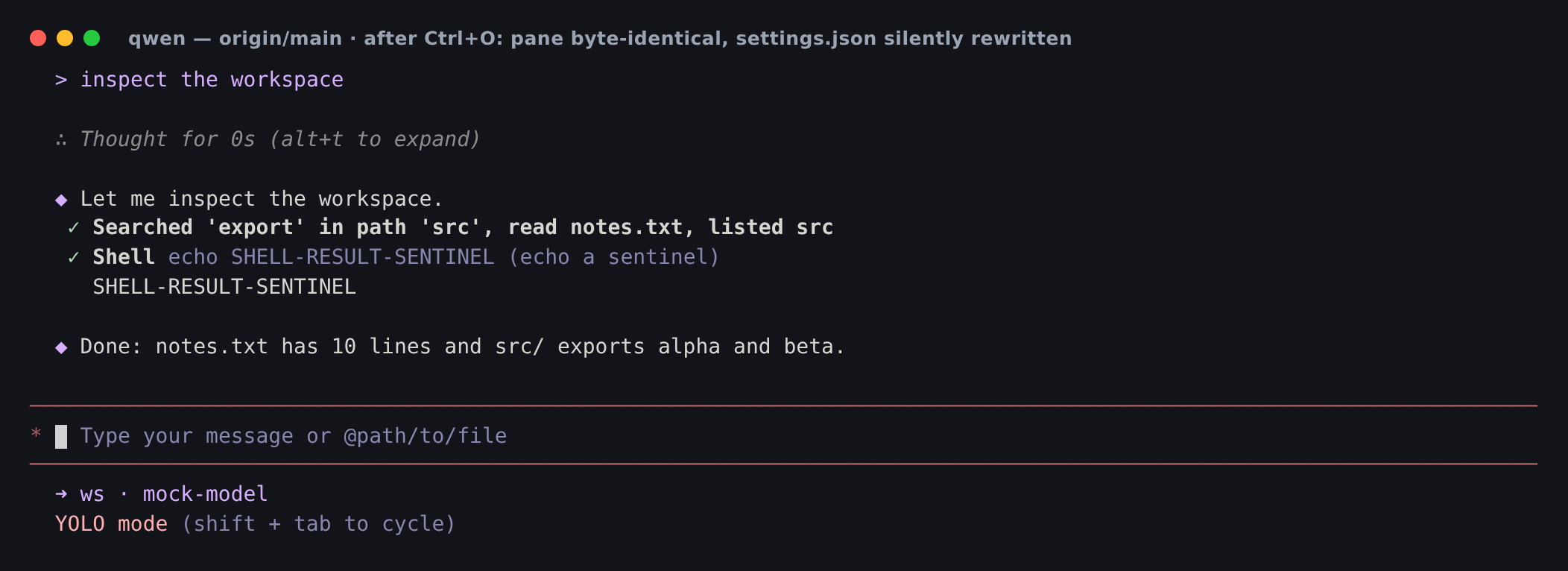
false → true (silently rewritten) |
PR 052047bb1 |
1 |
transcript takes over | false → false (untouched) |
So today Ctrl+O rewrites the user's settings file and can trigger a full screen clear + scrollback remount, in exchange for zero rendering change. Removing compactMode isn't just cleanup — it deletes a live papercut.
Also confirmed: ui.compactMode: true left in settings.json produces no error and no warning at boot, and the TUI renders identically to false. The PR's migration claim holds.
2) Ctrl+O lifecycle — all four exit keys, no scrollback damage
One turn: thought + 4 tool calls spanning three collapsible categories (read/search/list) and one non-collapsible (command).
| exit key | alternate_on before → open → after |
pane after close | stale full-detail rows leaked into normal buffer |
|---|---|---|---|
Esc |
0 → 1 → 0 | alive | 0 |
q |
0 → 1 → 0 | alive | 0 |
Ctrl+O |
0 → 1 → 0 | alive | 0 |
Ctrl+C |
0 → 1 → 0 | alive (does not quit) | 0 |
After every close the normal buffer contains exactly one user row and one shell-result row — no duplicated <Static> replay, no resize needed. The repaint fix holds.
3) §4.9 full tool-detail passthrough has landed — screenshot re-recorded
The PR body flags that its Ctrl+O screenshot still showed summary-level results (Listed N / Found N) and would be re-recorded once the data-layer passthrough landed. It has landed. Here is the current behaviour.
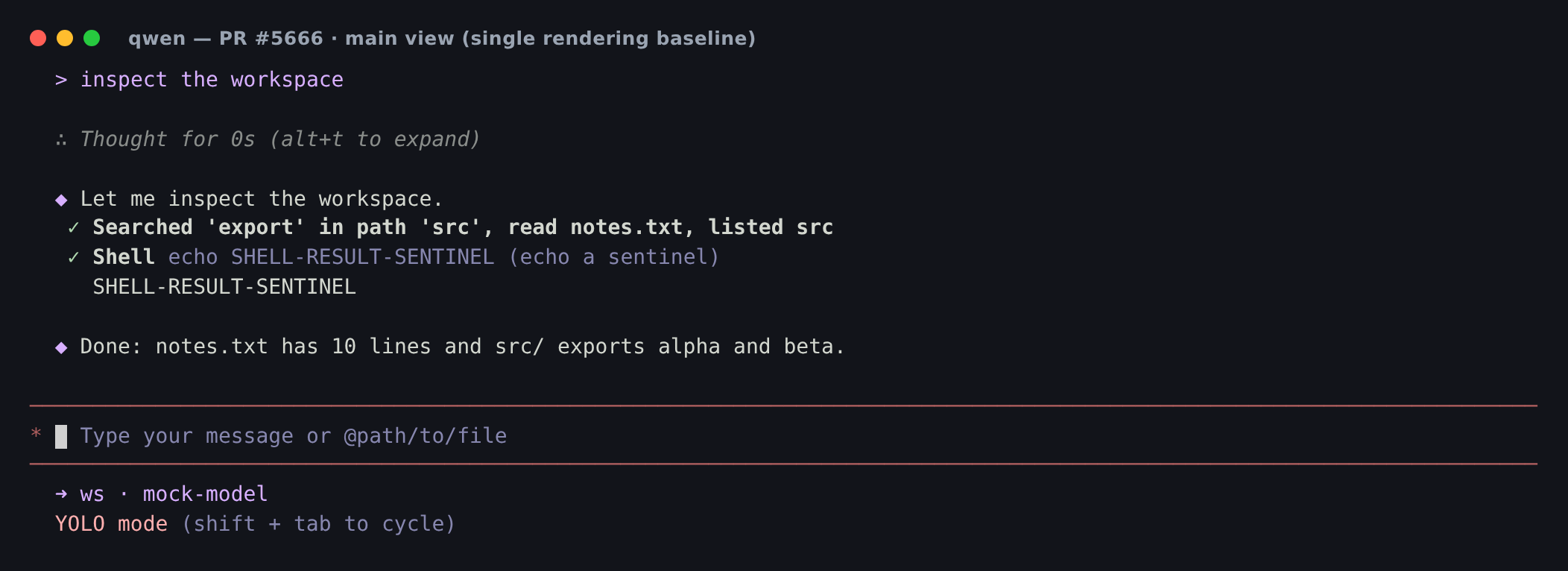
Main view — the three read/search/list tools fold into one semantic summary row; the non-collapsible Shell renders individually with its result; the thought is collapsed:
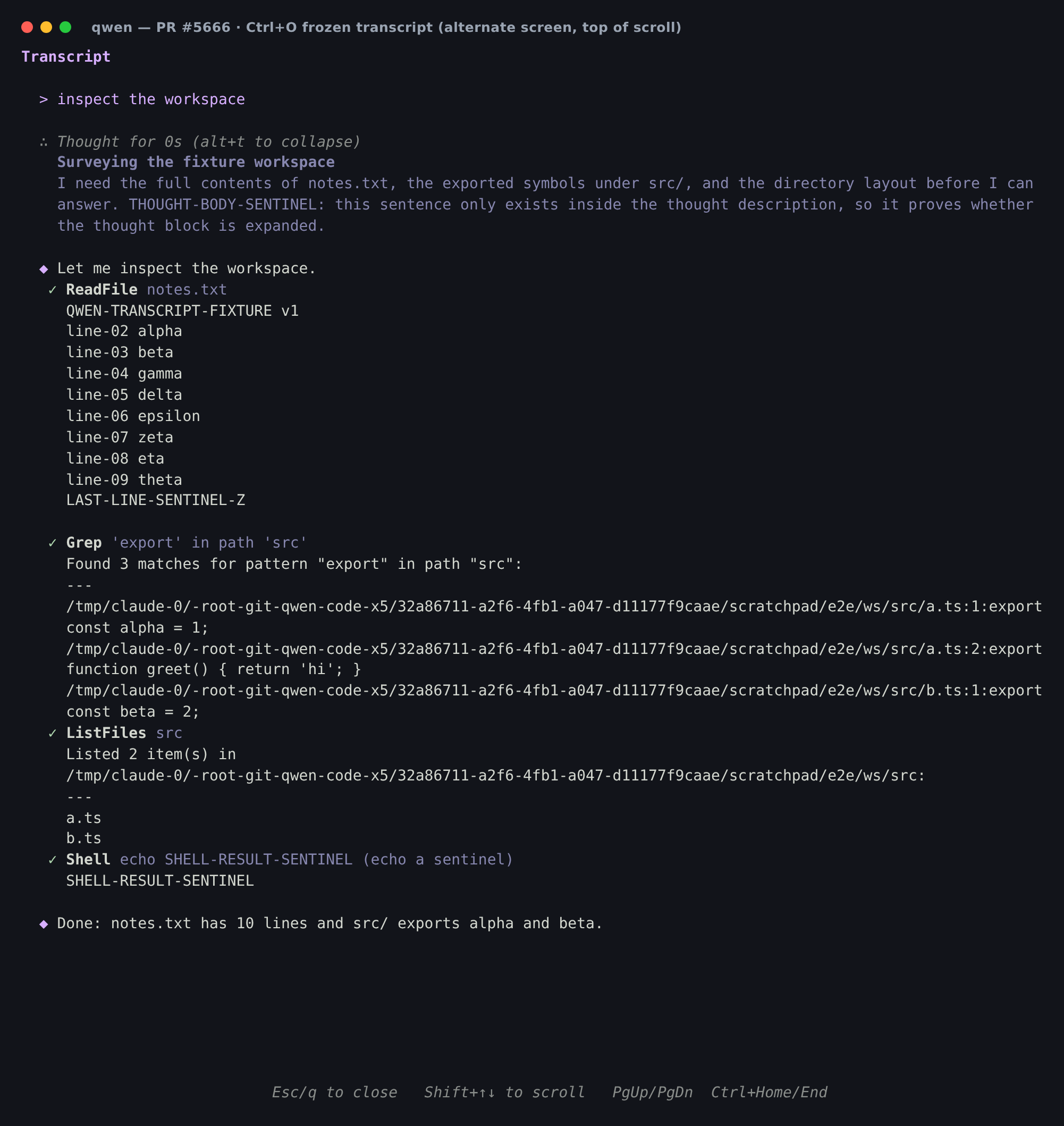
Ctrl+O transcript — alternate screen; every tool broken out with its complete result (full file contents through LAST-LINE-SENTINEL-Z, all 3 grep hits, the directory entries), and the thought forced expanded:
4) The two merge resolutions behave correctly
vs #6079 (ThinkingViewer deleted, per-thought inline expand):
- Main view: thought collapsed as
∴ Thought for 0s (alt+t to expand);Alt+Texpands it and toggles it back off — main's per-group inline toggle is intact. - Transcript:
fullDetailforces the thought expanded with no keypress (THOUGHT-BODY-SENTINELvisible above).
vs #6448 (CompactToolGroupDisplay single-tool description):
- Single tool with a concrete description renders as
read notes.txt/listed src/Searched 'export' in path 'src'— the English verb + language-neutral description path. safeDescription()sanitization is preserved; non-collapsibleShellstill renders its own row and result.
Static checks: npm run typecheck → exit 0. Touched suites (TranscriptView, AlternateScreen, ErrorBoundary, HistoryItemDisplay, MainContent, ToolGroupMessage, ToolMessage, AppContainer, useMouseEvents, resumeHistoryUtils, keyMatchers): 12 files / 357 tests pass. Worth noting ci.yml runs lint + test:ci but not tsc, so the typecheck above is not covered by PR CI.
5) The new non-TTY guards are load-bearing (counterfactual run)
The useMouseEvents guard (&& Boolean(stdout.isTTY)) is new in 052047bb1. I ran the TUI with stdin on a pty but stdout redirected to a file (qwen > log), pressed Ctrl+O, and audited every byte written:
| build | ?1049h |
?1002h |
?1006h |
\e[2J |
\e[3J |
|---|---|---|---|---|---|
PR 052047bb1 |
0 | 0 | 0 | 0 | 0 |
PR with only the two isTTY guards reverted |
1 | 1 | 1 | 0 | 0 |
origin/main |
0 | 0 | 0 | 1 | 1 |
Two things fall out. The guards are not decorative — remove them and alt-screen + SGR mouse-tracking escapes go straight into the captured file. And origin/main is currently worse here: its Ctrl+O → refreshStatic() writes an unguarded clearTerminal (\e[2J\e[3J) into non-TTY stdout. The PR writes zero control bytes.
Non-finding: Ctrl+O duplicates the conversation in a non-TTY capture — but so does main
With stdout redirected, pressing Ctrl+O makes the committed history appear twice in the captured stream (Ink re-renders its append-only <Static> region when the tree unmounts/remounts). Measured 1 → 2 occurrences on both the PR and origin/main, so it is pre-existing Ink behaviour, not a regression from this PR. Likewise the write EIO at process exit (from Ink's own cliCursor.show against a torn-down pty) reproduces identically on origin/main.
6) Sanitizer holds at the byte level
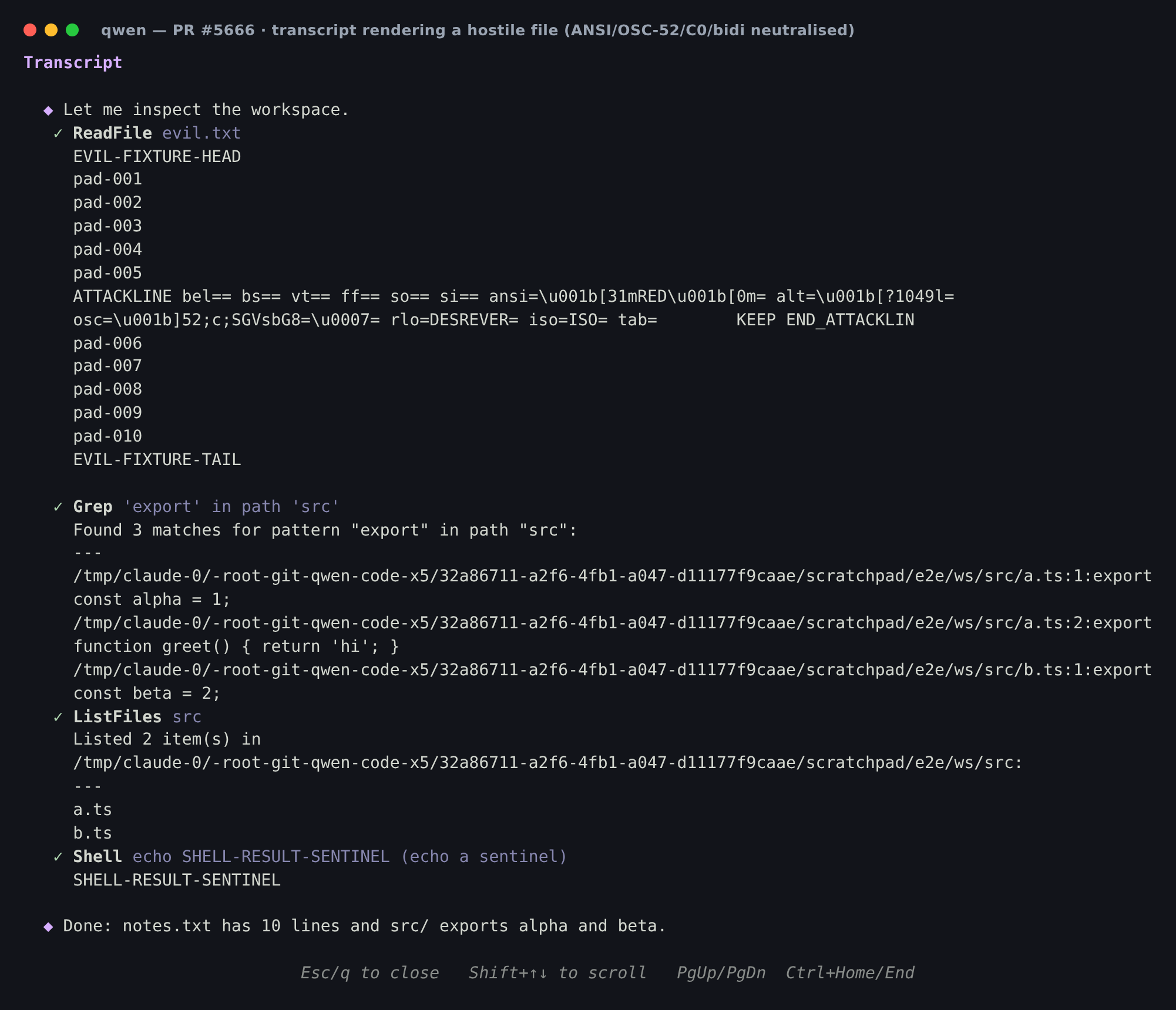
Fixture: an otherwise-ordinary file with one hostile line carrying bare C0 bytes (BEL/BS/VT/FF/SO/SI), a real SGR sequence, an alt-screen-exit \e[?1049l, an OSC-52 clipboard write, a bidi override (U+202E) and isolate (U+2066), plus a legitimate TAB.
Raw pty bytes actually delivered to the terminal, from just before Ctrl+O through close:
| sequence | count | expected |
|---|---|---|
\e[?1049h / \e[?1049l |
1 / 1 | AlternateScreen's own enter/exit |
OSC-52 \e]52; |
0 | file's clipboard write never executed |
raw SGR \e[31m |
0 | |
raw BEL \x07 |
0 | |
bidi U+202E, U+2066‑2069 |
0 |
alternate_on stayed 1 for the whole render — the file's embedded \e[?1049l never took effect. The payload surfaces only as inert escaped text, TAB survives, and the bidi text is not visually reordered (rlo=DESREVER=).
7) Corrections to the automated review
- ❌ “
detailedDisplaybypassesMAXIMUM_RESULT_DISPLAY_CHARACTERS.” Not true.effectiveResultDisplayflows throughuseResultDisplayRenderer→type === 'string'→<StringResultRenderer>(ToolMessage.tsx:826), which applies the same 1 M-char cap atToolMessage.tsx:472that the summary path uses. No separate bypass exists. ⚠️ “Unrelatedmobile-mcpformatting churn.” Correct that it's churn, but it is provably only churn: I extracted all 14 files atorigin/main, ranprettier --writewith the repo's own.prettierrc.json(prettier 3.6.1), and compared against the PR's versions — 0 / 14 differ, byte for byte. Zero semantic change; fix(mobile-mcp): strip bounds from UI hierarchy dump #6568's bounds fix survives intact. Root cause is thatpackages/mobile-mcpis not in.prettierignore, somainis currently prettier-dirty and any contributor runningnpm run formatreproduces this diff. Cleanest fix is a separatestyle(mobile-mcp)commit or adding the package to.prettierignore— not a merge blocker (CI runsprettier --write, not--check).- ✅ “Dead
ui.compactInlinereferences.” Confirmed. The key is gone fromsettingsSchema.tsand the VS Code schema, butweb-shell/client/components/messages/SettingsMessage.tsx:55still lists it inHIDDEN_SETTING_KEYSandweb-shell/client/i18n.tsx:3369-3370still carries its label/description. Harmless (the settings list is schema-driven) but dead. - ✅ “
sanitizeTerminalTexthas no dedicated unit test.” Confirmed — no reference intextUtils.test.ts. Behaviourally covered by §6 above, but a direct unit test is cheap insurance for a security-critical function.
One new nit of my own: inside the transcript the thought header renders (alt+t to collapse), but AppContainer's transcript branch swallows every key except the close set — so Alt+T there is a no-op (verified: pane byte-identical before/after the keypress). Suggest suppressing that hint when fullDetail is set.
Verdict
Approve — merge. The feature works exactly as described at 052047bb1, the two main merges are correctly resolved, the non-TTY guards are proven load-bearing, the sanitizer is airtight at the byte level, and removing compactMode fixes a toggle that currently rewrites the user's settings file for no visual benefit.
Nothing above is a blocker. The four follow-ups — mobile-mcp formatting split (or .prettierignore), dead ui.compactInline refs, a sanitizeTerminalText unit test, and the misleading alt+t hint in the transcript — are all cosmetic and fine as a follow-up PR.
中文版
✅ 本地真实终端(tmux)复验 052047bb1 —— 可以合并
在 Linux 上用真实构建产物从头复验(npm ci → npm run build → npm run bundle → node dist/cli.js),通过 mock OpenAI 端点驱动真实的 read_file / grep_search / list_directory / run_shell_command 调用以及一段 reasoning_content 思考,在真实 tmux 终端里跑,并做了原始 pty 字节抓取。
本报告取代我在 d3b39ba50 的那份。此后合入了两次 main(67635c624、052047bb1),所以我重点验证这两次合并改了什么 —— 即与 #6448(CompactToolGroupDisplay)和 #6079(删除 ThinkingViewer / 逐条思考行内展开)的冲突解决 —— 并在其之上重跑了完整的生命周期与安全矩阵。
合并信号: mergeable=MERGEABLE · 115 条 review 线程 0 条未解决 · Test (ubuntu, Node 22.x) 绿 · reviewDecision=REVIEW_REQUIRED(我此前的 approve 被两次合并作废,基于本次复验重新 approve)。
1)核心结论:main 上的 Ctrl+O 是一个「有副作用的死开关」
这是支持本 PR 最有力的证据,且可稳定复现。
在 origin/main 上,compactMode 在渲染树里只有一个消费者 —— SettingsDialog。MainContent、HistoryItemDisplay、ToolGroupMessage 全都不读它(对每个文件 grep -rn compactMode:0 命中)。但 AppContainer 的 TOGGLE_COMPACT_MODE 分支仍会翻转状态、把 ui.compactMode 持久化写入用户的 ~/.qwen/settings.json(SettingScope.User),并在会话含思考块时调用 refreshStatic()(clearTerminal + <Static> 重挂载)。
隔离 A/B —— 全新 HOME、ui.compactMode: false、按一次 Ctrl+O:
| 构建 | 按键后 alternate_on |
面板前后对比 | settings.json 的 ui.compactMode |
|---|---|---|---|
origin/main |
0 |
逐字节相同(cmp,含颜色) |
false → true(被静默改写) |
PR 052047bb1 |
1 |
transcript 接管屏幕 | false → false(未改动) |
也就是说,今天按 Ctrl+O 会改写用户的配置文件、可能触发整屏清除与 scrollback 重绘,而换来的渲染变化是零。删除 compactMode 不只是清理,而是修掉了一个实际存在的痛点。
另确认:settings.json 里保留 ui.compactMode: true 启动时既不报错也不告警,TUI 渲染与 false 完全一致。PR 的迁移说明成立。
2)Ctrl+O 生命周期 —— 四个退出键,无 scrollback 破坏
一轮对话:思考 + 4 个工具调用,覆盖三个可折叠类别(read/search/list)与一个不可折叠类别(command)。
| 退出键 | alternate_on 打开前 → 打开 → 关闭后 |
关闭后会话 | 泄漏到普通缓冲区的全详情残留行 |
|---|---|---|---|
Esc |
0 → 1 → 0 | 存活 | 0 |
q |
0 → 1 → 0 | 存活 | 0 |
Ctrl+O |
0 → 1 → 0 | 存活 | 0 |
Ctrl+C |
0 → 1 → 0 | 存活(不退出程序) | 0 |
每次关闭后,普通缓冲区中用户消息行恰好 1 条、shell 结果行恰好 1 条 —— 没有 <Static> 重复回放,也无需 resize。重绘修复有效。
3)§4.9 工具全量详情透传已落地 —— 截图已重录
PR 描述里说明其 Ctrl+O 截图当时仍只显示摘要级结果(Listed N / Found N),待数据层透传落地后重录。现已落地,当前行为如上方英文部分的两张截图:
- 主视图:三个 read/search/list 工具折叠成一行语义摘要;不可折叠的
Shell单独渲染并带结果;思考块折叠。 Ctrl+Otranscript:备用屏幕;每个工具单独展开并显示完整结果(文件全文直到LAST-LINE-SENTINEL-Z、3 条 grep 命中、目录条目),思考块强制展开。
4)两处冲突解决行为正确
对 #6079(ThinkingViewer 删除、逐条思考行内展开):
- 主视图:思考折叠为
∴ Thought for 0s (alt+t to expand);Alt+T可展开并可再次收起 —— main 的按组行内开关完好。 - Transcript:
fullDetail无需按键即强制展开思考(截图中可见THOUGHT-BODY-SENTINEL)。
对 #6448(CompactToolGroupDisplay 单工具描述):
- 单工具且有具体描述时渲染为
read notes.txt/listed src/Searched 'export' in path 'src'—— 英文动词 + 语言中立描述这条路径生效。 safeDescription()的净化逻辑保留;不可折叠的Shell仍单独成行并显示结果。
静态检查: npm run typecheck → exit 0。改动涉及的测试套件共 12 个文件 / 357 个用例全部通过。注意 ci.yml 只跑 lint + test:ci,不跑 tsc,所以上面这次 typecheck 并不在 PR CI 覆盖范围内。
5)新增的非 TTY 保护是「真起作用」的(反事实验证)
useMouseEvents 的 && Boolean(stdout.isTTY) 是 052047bb1 新增的。我让 stdin 挂在 pty 上、stdout 重定向到文件(qwen > log),按下 Ctrl+O,并审计写出的每一个字节:
| 构建 | ?1049h |
?1002h |
?1006h |
\e[2J |
\e[3J |
|---|---|---|---|---|---|
PR 052047bb1 |
0 | 0 | 0 | 0 | 0 |
PR 仅回退这两处 isTTY 保护 |
1 | 1 | 1 | 0 | 0 |
origin/main |
0 | 0 | 0 | 1 | 1 |
由此得到两点结论。其一,这两处保护并非装饰性的 —— 去掉后,alt-screen 与 SGR 鼠标追踪的转义序列会直接写进被捕获的文件。其二,origin/main 在这里反而更差:它的 Ctrl+O → refreshStatic() 会把未加保护的 clearTerminal(\e[2J\e[3J)写进非 TTY 的 stdout;而本 PR 写入零控制字节。
非问题: stdout 重定向时按
Ctrl+O会让已提交历史在捕获流中出现两次(Ink 在树卸载/重挂载时重绘其 append-only 的<Static>区域)。实测 PR 与origin/main都是 1 → 2,属 Ink 既有行为,非本 PR 引入。同理,进程退出时的write EIO(来自 Ink 自身的cliCursor.show对已销毁 pty 的写入)在origin/main上同样复现。
6)净化器在字节层面站得住
Fixture:一个整体正常的文件,其中一行携带裸 C0 字节(BEL/BS/VT/FF/SO/SI)、真实 SGR 序列、alt-screen 退出序列 \e[?1049l、OSC-52 剪贴板写入、bidi 覆盖符(U+202E)与隔离符(U+2066),以及一个正常的 TAB。
从按下 Ctrl+O 前到关闭为止,终端实际收到的原始 pty 字节:
| 序列 | 次数 | 预期 |
|---|---|---|
\e[?1049h / \e[?1049l |
1 / 1 | AlternateScreen 自身的进入/退出 |
OSC-52 \e]52; |
0 | 文件里的剪贴板写入从未执行 |
裸 SGR \e[31m |
0 | |
裸 BEL \x07 |
0 | |
bidi U+202E、U+2066‑2069 |
0 |
整个渲染过程中 alternate_on 始终为 1 —— 文件内嵌的 \e[?1049l 从未生效。攻击载荷只以惰性的转义文本形式出现,TAB 被保留,bidi 文本没有被视觉重排(rlo=DESREVER=)。
7)对自动化 review 的更正
- ❌ 「
detailedDisplay绕过了MAXIMUM_RESULT_DISPLAY_CHARACTERS」 —— 不成立。effectiveResultDisplay经useResultDisplayRenderer→type === 'string'→<StringResultRenderer>(ToolMessage.tsx:826),而后者在ToolMessage.tsx:472施加了与摘要路径相同的 100 万字符上限。不存在单独的绕过路径。 ⚠️ 「无关的mobile-mcp格式化噪音」 —— 「是噪音」这点正确,但可证明它仅仅是噪音:我取出origin/main上全部 14 个文件,用仓库自己的.prettierrc.json(prettier 3.6.1)跑prettier --write,再与 PR 版本比较 —— 14 个文件 0 个存在差异,逐字节一致。语义零变化,fix(mobile-mcp): strip bounds from UI hierarchy dump #6568 的 bounds 修复完好。根因是packages/mobile-mcp不在.prettierignore里,因此main目前处于 prettier-dirty 状态,任何贡献者跑npm run format都会复现这份 diff。最干净的处理是单独提一个style(mobile-mcp)commit,或把该包加入.prettierignore—— 不构成合并阻塞(CI 跑的是prettier --write而非--check)。- ✅ 「
ui.compactInline残留引用」 —— 确认存在。该键已从settingsSchema.ts和 VS Code schema 移除,但web-shell/client/components/messages/SettingsMessage.tsx:55仍把它列在HIDDEN_SETTING_KEYS中,web-shell/client/i18n.tsx:3369-3370仍保留其 label/description。无害(设置列表由 schema 驱动),但已是死代码。 - ✅ 「
sanitizeTerminalText缺少专门单测」 —— 确认,textUtils.test.ts中没有任何引用。虽已由上文 §6 做了行为级覆盖,但对这样一个安全关键函数,补一个直接单测成本很低。
我另外发现的一个小问题: 在 transcript 内部,思考块头部渲染的是 (alt+t to collapse),但 AppContainer 的 transcript 分支会吞掉除关闭键之外的所有按键 —— 所以此处 Alt+T 是空操作(已验证:按键前后面板逐字节相同)。建议在 fullDetail 时隐藏该提示。
结论
Approve —— 可以合并。 在 052047bb1 上功能完全符合描述,两次 main 合并的冲突解决正确,非 TTY 保护经反事实验证确实起作用,净化器在字节层面无懈可击,而移除 compactMode 顺带修掉了一个「会改写用户配置文件却毫无视觉收益」的开关。
以上没有任何阻塞项。四个后续项 —— mobile-mcp 格式化拆分(或加入 .prettierignore)、ui.compactInline 死引用、sanitizeTerminalText 单测、transcript 中误导性的 alt+t 提示 —— 均为表面问题,放到后续 PR 处理即可。
4 participants


What this PR does
This PR overhauls the tool output rendering and adds a Ctrl+O frozen transcript view in the TUI. It consists of four interrelated improvements:
buildToolSummary), replacing the previous per-tool ad-hoc rendering with a consistent, type-based approach.compactModetoggle and its propagation through props/context are removed entirely. The main view now has a single, consistent rendering baseline.Esc/q/Ctrl+C/Ctrl+O. Whenstdoutis not a TTY (piped/redirected/CI), the alt-screen escapes are skipped and the transcript renders in the normal buffer instead of taking over the screen.Why it's needed
The existing compact/detailed mode toggle forced users to choose between information density and readability. This binary switch affected the entire view uniformly, which was a poor fit — users typically want compact output for routine read operations but full detail for mutations and errors.
The new approach eliminates this false choice: the main view is always clean and scannable, while Ctrl+O provides instant access to the full transcript on demand. This is both simpler (one rendering path, no mode switching) and more powerful (full detail available without leaving context).
Reviewer Test Plan
How to verify
npm run devand start a conversation with several tool calls (read_file, grep_search, edit, run_shell_command).settings.jsonare ignored (no migration error).Evidence (Before & After)
Captured on this branch's build (
node dist/cli.js --yolo) in a fixed 1400×900 / FontSize 14 virtual terminal via VHS, on one session: list files → readREADME.md→ grepexport→ one-sentence summary (three collapsible read/search/list tools). Reproducible tape committed alongside the design doc.Main view (default baseline) — the three read/search/list tools fold into one summary row, thinking blocks collapsed:
Ctrl+O transcript — alt-screen view; each tool is broken out into its own row (vs the main view's single merged summary), thinking blocks expanded, header/footer chrome localized. Note: in this screenshot read/search/list tools still show summary-level results (
Listed N/Found N); surfacing their full detail (directory entries, grep hits, file content) is the data-layer passthrough tracked as a merge blocker (design §4.9) and the screenshot will be re-recorded once it lands:Tested on
Risk & Scope
compactModesetting is silently ignored — no migration error, but users who relied on compact mode will see the new unified rendering.Linked Issues
Depends on #5661 (tool output type-based partitioning).
中文说明
本 PR 做了什么
本 PR 重构了 TUI 中的工具输出渲染方式,并新增了 Ctrl+O 冻结 transcript 视图。包含四个相互关联的改进:
buildToolSummary为工具结果生成语义摘要,取代之前每种工具各自独立的渲染方式,实现一致的、基于类型的展示。compactMode开关及其在 props/context 中的传播链路。主视图现在只有单一、一致的渲染基线。Esc/q/Ctrl+C/Ctrl+O退出。当stdout不是 TTY(管道/重定向/CI)时,跳过 alt-screen 转义序列,transcript 在普通缓冲区内渲染,而不接管整个屏幕。为什么需要这个改动
现有的 compact/detailed 模式开关强制用户在信息密度和可读性之间二选一。这种全局切换的方式用户体验不佳——用户通常希望常规读操作紧凑显示,但对 mutation 和错误保留完整详情。
新方案消除了这个假选择:主视图始终简洁可扫描,Ctrl+O 则按需即时查看完整 transcript。既更简单(单一渲染路径,无需模式切换),也更强大(完整详情随时可用,不丢失上下文)。
风险与范围
compactMode设置将被静默忽略——不会报错,但依赖 compact 模式的用户将看到新的统一渲染效果。🤖 Generated with Qwen Code