SKR Pro 1.1: WiFi support, clarify onboard/lcd SD#17531
Conversation


|
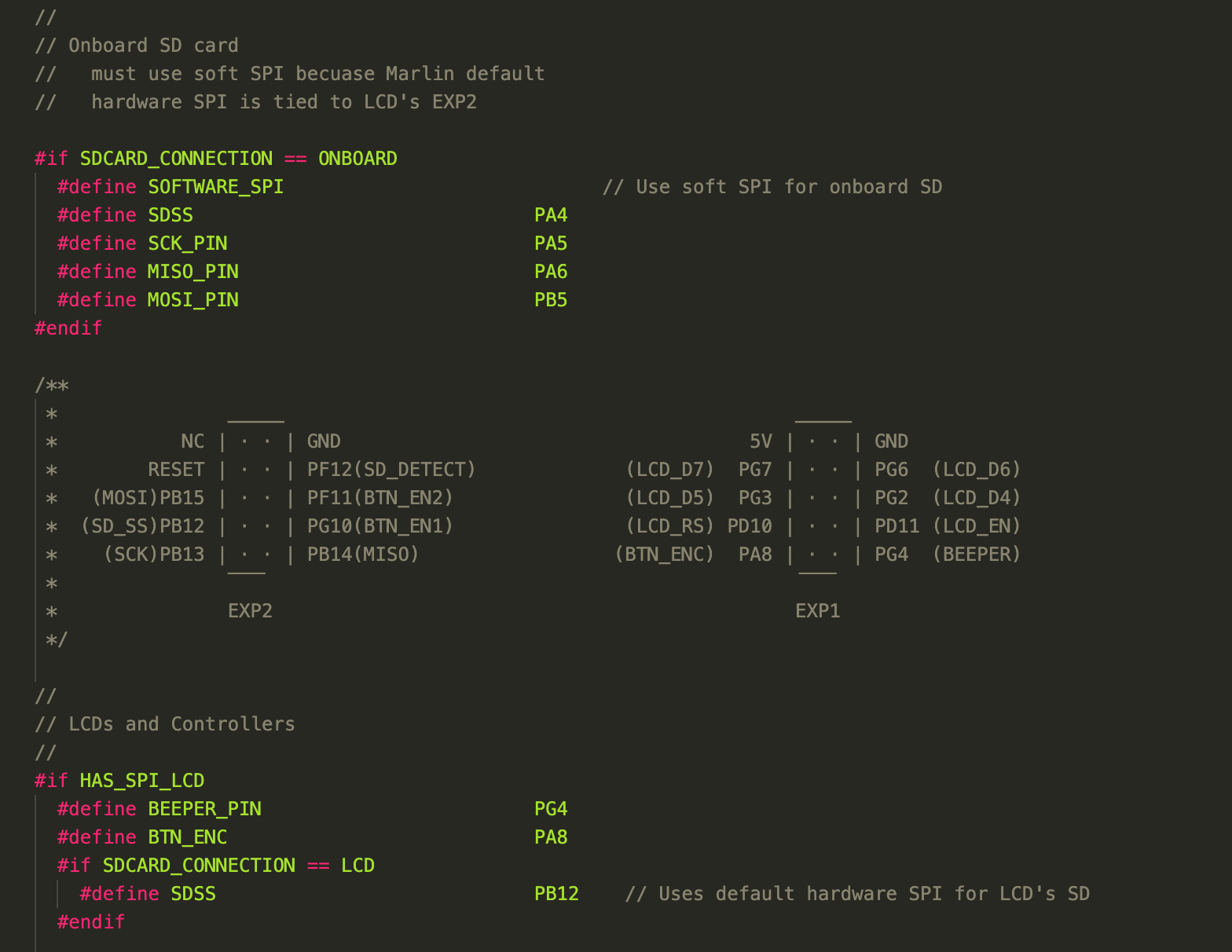
Hi Bob, if I compile with this: I've got a lot of problems: If I comment this 3 lines, there is no problems:
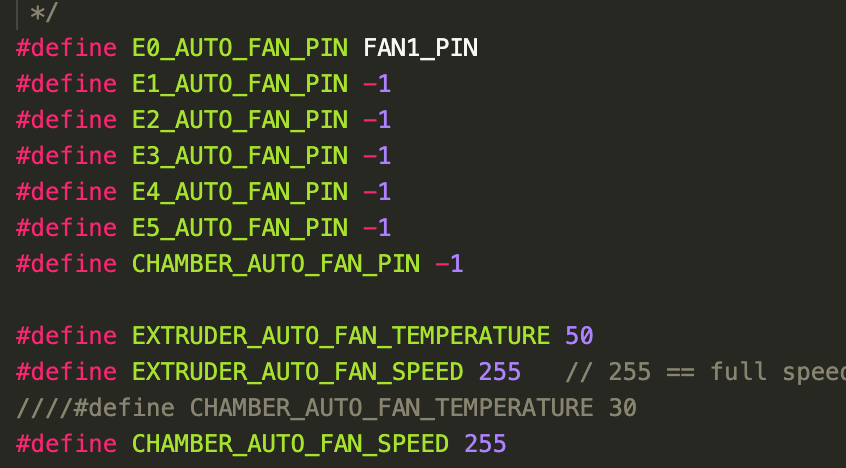
There is also the addition of E0_AUTO_FAN_PIN as PC9, I have the same problem described before because I'm using E0_AUTO_FAN_PIN with FAN1_PIN like this:
|

|
I confirm, ONBOARD SD card works correctly if I comment If I uncomment it, the SD card is not detected. |


|
@BastR thanks for testing, ill try to finish rebuild my 3d printer this week so i could also test it. |
|
@Keltere no I can't test this because I guess I must have a wi-fi module on the board and I don't have one. I just tested on octoprint and the SD card is visible, running a gcode also |

|
There is something strange going on with the declarations for LCD, ONBOARD and CUSTOM_CABLE. They were not defined in the version of bugfix 2.0.x I started with so only the ONBOARD SD worked. When I manually added the defines then I could switch back and forth using the Configuration_adv.h file. When I went to submit the PR the dif showed that the current bugfix already had them present but the next day I tried to compile using the latest bugfix and the declarations had apparently disappeared. I remember they were in an unusual location so maybe I'm fooling myself. That E0_AUTO_FAN_PIN "fun" will always be with us as long as the config file is used to declare it. Some people love it that way, some don't. I figure the safest thing to do is declare it in the pins_BTT_SKR_PRO_V1_1.h file and let the compiler complain. That ensures the user has thought about how to handle it. Besides the changes to the pins_BTT_SKR_PRO_V1_1.h file, the only other Marlin changes I needed to do to support WIFI was to set SERIAL_PORT_2 to 6 and to enable ESP3D_WIFISUPPORT. I also enabled WEBSUPPORT and OTASUPPORT but I have not tested to see if either or both are needed. The WIFI module I used was a $2 8 pin ESP8266 module. By far the hardest part was getting the firmware into the module. My first attempt followed a YouTube video. It provided a correct way to program the module but it pointed me at the wrong repository. Using the programming info from the video and the link in Configuration_adv.h resulted in a functioning module. |

|
LCD SD vs. Onboard: E0_AUTO_FAN_PIN: I don't have a wifi module to test with, but the functional onboard SD is a much needed feature, and I can confirm it works on mine as well. Thank you! |
 thinkyhead
changed the title
thinkyhead
changed the title

|
Oops! I forgot in a few pins files that the macro |
thinkyhead
force-pushed
the
BTT-SKR-PRO-WIFIF-and-LCD-SD-support
branch
4 times, most recently
from
6554a3f to
2538ea6
Compare

 thinkyhead
force-pushed
the
BTT-SKR-PRO-WIFIF-and-LCD-SD-support
branch
from
thinkyhead
force-pushed
the
BTT-SKR-PRO-WIFIF-and-LCD-SD-support
branch
from
2538ea6 to
2a1a544
Compare
|
I think I got all the kinks out, but please submit any followup patches and I'll get to them asap. |

|
Does this patch include or work with:
#16260
It seems like this patch was not fully merged.
It would be nice to update the firmware on the SKR Pro by some kind of
remote means like through Octoprint firmware updater or using the WiFi
module! So far neither has worked for me. This work is awesome.
…-DroneMang
On Thu, Apr 16, 2020, 4:56 AM Scott Lahteine ***@***.***> wrote:
I think I got all the kinks out, but please submit any followup patches
and I'll get to them asap.
—
You are receiving this because you are subscribed to this thread.
Reply to this email directly, view it on GitHub
<#17531 (comment)>,
or unsubscribe
<https://github.com/notifications/unsubscribe-auth/AIZZJSHVKMSLVEIPJT5AVGDRM3B4LANCNFSM4MHDSFQQ>
.
|
|
I tried to upload firmware.bin via the WIFI but gave up after 5 failures. |

|
@Bob-the-Kuhn My understanding is that ESP3D_WIFISUPPORT is for enabling ESP3DLib, which is slightly different from ESP3D. Both use the ESP3D_webUI, but ESP3DLib is specifically for running on ESP32 microprocessor being used for Marlin itself. ESP3D is for running on a separate ESP8266 or ESP32 connected to a microprocessor (such as STM32F1 or ATMEGA2560) running Marlin. ESP3D communicates with the Marlin microprocessor via UART. I could be wrong, so best to ask @luc-github who is the author of both ESP3D and ESP3DLib. |

|
yes @vivian-ng comment is correct, ESP3D_WIFISUPPORT and others related wifi settings are for esp32 boards hosting marlin not for daughter wifi board, as mentioned https://github.com/MarlinFirmware/Marlin/blob/2.0.x/Marlin/Configuration_adv.h#L3044 |
|
@Bob-the-Kuhn As mentioned by @luc-github, the WiFi support options in @DroneMang For OTA:
For the daughterboard to boot up properly, the pins EN, RST, IO0, and IO15 need to be in certain states. I don't have a SKR Pro 1.1 board, so I cannot check, but if you have one on hand, can you check what is the default states for these pins to see if they are in the right configuration? Most manufacturers should already have set these connections to the right state (HIGH or LOW) using pull-up and pull-down resistors, so setting them via firmware is usually not required. |

|
is there a specific reason why your E0_AUTO_FAN_PIN is set to PC9 I have it on PE5 FAN1_PIN PC9 is a pin from the Extension-1 port |

|
I have updated to the latest bugfix2 which includes this PR but I am stumped. My esp01s works fine when plugged into the back of my tft3v2 and I access via eps3d but plugged into the skr pro i get nothing. I have checked the 3.3v and enable (3.3v) are there. I also double checked that it hadn't switched into AP mode. IP scanner not finding it at all. I have set serial_port_2 to 6 (also tried serial_port). Does it need to receive something before it fires up? |
|
@jimhiggs I do not have SKR pro but I had same issue with BTT TFT a I hope it help |

|
@luc_github. Thanks for the ideas. My problem is actually the reverse of what you had.The ESP01 work perfectly on the TFT, it is on the SKR Pro main board that it does not work. The latest bugfix defines the pin for EN and pulls it high and I have measured that there is 3.3v on the EN pin when it is plugged into the Pro. I will test the ESP01s to make sure the EN pin is wired to the header pin. I also have a second ESP01S which I would like to load fw and test. I got my esp01s from BTT. |
|
@jimhiggs my mistake I missed the tft3v2 part on your previous post, though you mentioned the flash device
For ESP3D related issues please go to https://github.com/luc-github/ESP3D as they should not be related to Marlin FW, even less when TFT is involved |
|
Will do. |
|
Thats great to hear. I bought an i2c memory card from aliexpress, only a couple $. That works great. |
|
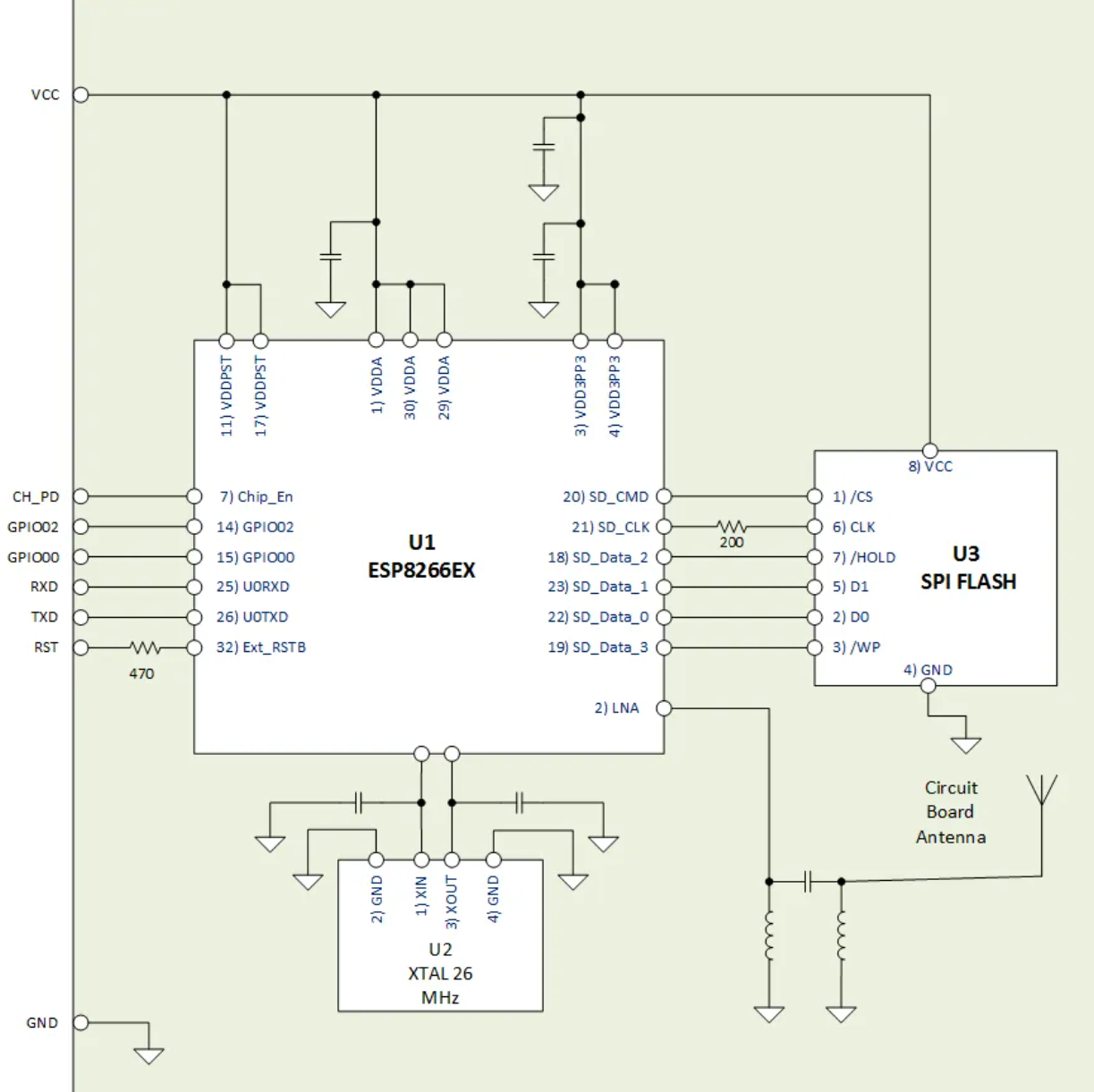
Your comments on driving the WIFI interface lines made me nervous so I did some further checking. The SKR PRO does not have pullups on the lines in question so I went looking for an ESP01 schematic. Below is the schematic I found that matches my board. The GPIO0 and GPIO2 pins are software configurable for pullup, pulldown or none. I never did find anything in the ESP8266EX docs on leaving the external reset pin open. I'm going to submit a PR that will init the pins if they are defined. That way it'll get looked at and someone will yell if it's totally off base. FYI - both schematics I looked at had the ESP8266's MTDO pin as not connected to anything.
|
|
I could not find a schematic for the 3.5TFTv2 I have. I wonder could that have pullups or sw pullups defined? Which could explain why my ESP01S works in the TFT but not on the Pro. |
|
I'l started PR #17679 to allow the user to initialize the GPIO pins to logic high if desired. |
@Bob-the-Kuhn Ok I understood my error, with this PR FLASH_EEPROM_EMULATED is enabled by default and doesn't allow to save the eeprom on the SD card, once commented it works correctly.
Thanks |

If your ESP01 is set for 192.168.0 then it'll never show up as a client on your home network. Does it show up on your home network if it is installed in the 3.5TFTv2? If yes then I expect the 3.5TFTv2 is changing the ESP01's SSID at powerup but not saving the changes. You might try this:
|
|
@Bob-the-Kuhn |
|
Does the ESP3D show up in the home router's client list? When things are working on my system the status line on the LCD, after a reset, will show connected after 10-15 seconds followed a few seconds later by the IP address being used by the ESP3D. Are you seeing any of this? |
|
It always shows up in the client list when plugged into the TFT. It did when plugged into the pro when i changed router ip to 0 and it did after i changed it back to 1 - for a brief while, then it stopped showing??? The IP shows in the lcd when plugged into tft but did not show when plugged into pro. |
|
Just to confuse matters, I inserted a new esp01s (I originally bought 2) into the pro and flashed the ESP3D (esp3d.bin) software from bigtreetech pro github firmware page and I am able to see it fine on 192.168.1. x. Edit: I cycled the power on the pro with the new esp and the same thing happened as previously. I can no longer connect to it. Put it in the TFT and it works fine. |
|
@Bob-the-Kuhn |
|
Sorry, I just realised you have already defined them in #17679 If I can work out how to merge them in with my local clone I will , otherwise I will make the changes manually. Actually looks like manually may be easier for me. |
|
I can confirm with your PR #17679 applied I can now use the ESP01S and ESP3D on my SKR Pro. Thank you. |

|
Do these improvements also apply for SKR 1.4? |
|
They apply to all boards that use the ESP01. |
Could you outline the steps needed to get this working on the SKR PRO? Trying to get this working myself. Thanks! |

|
Hello DroneMang. Do you still need help with this? |
|
Yes please.
What I understand so far is to follow the guide here to configure marlin:
https://github.com/luc-github/ESP3DLib
and then configure a UI from here:
https://github.com/luc-github/ESP3D
Which version of the UI did you use? Any setup tips for the UI?
Do you have some config files you can share with the wifi features
enabled for the SKR PRO?
Thanks!
…On Wed, May 20, 2020 at 3:43 AM oldman4U ***@***.***> wrote:
Hello DroneMang.
Do you still need help with this?
—
You are receiving this because you were mentioned.
Reply to this email directly, view it on GitHub
<#17531 (comment)>,
or unsubscribe
<https://github.com/notifications/unsubscribe-auth/AIZZJSDGCQVPWS5OJ3HHZM3RSOCZHANCNFSM4MHDSFQQ>
.
|
|
@DroneMang for this PR and this usage you must not use https://github.com/luc-github/ESP3DLib For SKP Pro just follow https://github.com/luc-github/ESP3D and https://github.com/luc-github/ESP3D-WEBUI |
|
Installation In regards to the above from the install section, how do you actually flash new firmware onto the wifi module for the SKR PRO? It would be really helpful if someone could post their config files for an SKR PRO with the wifi module working. Thanks! |
|
Hello Master Luc. @DroneMang Please make sure you have a ESP01S and NOT a ESP01 (without S) WIFI board and a SKR Pro v1.1 and that the ESP01S board is correctly installed to the SKR board. If so the installation is very easy and if you want, i will guide you the same way i used. For this download the software provided here first: https://github.com/bigtreetech/BIGTREETECH-SKR-PRO-V1.1/tree/master/firmware/esp-01s |
|
I just tried the esp3d.bin file on SD card on a SKR PRO 1.1 that has a working ESP01S. The lights flashed and the file was renamed to ESP3D.CUR. It came up with the old ESP3D config (client mode, logged onto my WIFI). I then uploaded the other 3 files in the Github directory which resulted in the Dashboard and ESP3D pages being available. Unfortunately the ESP01 no longer talks to the SKR PRO. I had no idea that the esp3d.bin method was available. Is there any Marlin documentation on this? |

|
@Bob-the-Kuhn It has nothing to do with Marlin. That is SKR's bootloader doing. |
|
Is it the ROM based or secondary bootloader on the STM32 that handles the esp3d.bin file? Is this a generic function that will examine all xxxx.bin files? Is this function also on the LPC1768 systems? |

|
It's definitely the BTT-bootloader (secondary). Found the string.
No. We non't know much about the BTT-bootloader for the SKR PRO 1.1 - the source is not public.
I don't think so. At least i have never heard about that. |

14 participants


BTT_SKR_PRO_V1_1 has a connector for an 8 pin ESP8266 WIFI module. This PR adds support for that module.
Changes:
I didn't see an obvious home for the WIFI_init routine. I put it in the file WIFI_init.cpp in the \Marlin\src\HAL\shared directory. I have no objection to moving it somewhere else.
The SD card logic was modified in pins_BTT_SKR_PRO_V1_1.h
TESTING
The web page provided by the WIFI module is fully functional. I've moved steppers, uploaded files to the SD card and changed the extruder temperature.
The LCD changes were tested with a REPRAP_DISCOUNT_FULL_GRAPHIC_SMART_CONTROLLER and a MKS MINI12864.