[2.0.x] Autobuild update & add PlatformIO support for AT90USB boards#10779
Conversation


 Bob-the-Kuhn
added
PR: Improvement
PR: Configurations
T: HAL & APIs
Bob-the-Kuhn
force-pushed
the
autobuild-update-2.0.x
branch
from
Bob-the-Kuhn
added
PR: Improvement
PR: Configurations
T: HAL & APIs
Bob-the-Kuhn
force-pushed
the
autobuild-update-2.0.x
branch
from
0933533 to
8187867
Compare


almost missed some changes

improved open file

change to open file at cursor
 thinkyhead
force-pushed
the
autobuild-update-2.0.x
branch
from
thinkyhead
force-pushed
the
autobuild-update-2.0.x
branch
from
8187867 to
70c5941
Compare

|
Better all the time! I've updated |

|
@Bob-the-Kuhn — What is the expectation here for Printrboard Rev F users ? Selecting How would a Printrboard owner know not to use this entry and instead use Teensy2pp ?: Am I missing something fundamental here ? :) -=dave |

|
I'm out of state & my responses are going to be spotty for another 2 weeks at least. That error is because the new board definition JSON didn't get copied to the correct platformio directory. The auto build script will automatically do the copy. My desire/hope is for the AT90USB users to use only the auto build script. It'll find all the needed info, copy the file(s) as needed and then do the build/upload. The correct enviromnent for a given board is in the comments in the pins.h file. That's how the script connects the board to the correct environment. |
Okay.
So you're saying that moving forward users will need to run some script to build Marlin and can't use PIOcore in other IDEs ? Seems a bit of a step the a ditch, no ? If true, the "Environment" should probably be changed to something like "autobuild-only-AT90USB_DFU" or something that indicates it is not for generic use for that board. Where do we find info on this fancy new auto build script ? -=dave |
http://marlinfw.org/docs/basics/install_platformio.html#auto-build |
|
Auto Build is not a replacement/requirement for anything. It's a method of automating the PlatformIO build & upload process. I did add some hooks for the USB boards so they'd also be part of the automated process. Your current method is still available and is unchanged. Easy access to the Auto Build script has been implemented in Atom, Sublime & VS code. It can be manually kicked off using a terminal.
I need to spend some serious time documenting Auto Build. |
I'm trying to reconcile these two statements above. How can we fix it to support those that do not use the auto build scripts then ? |
|
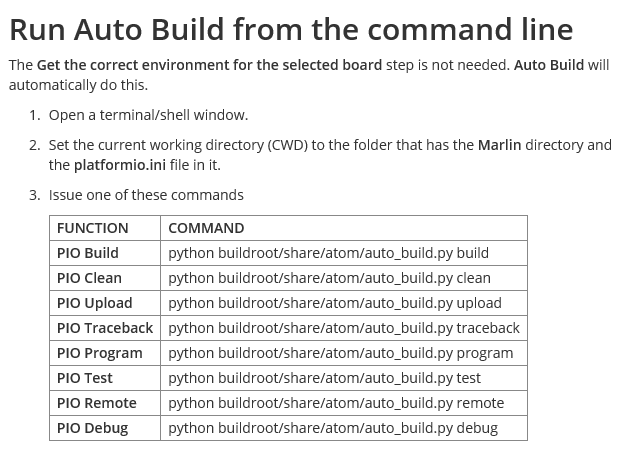
Here's an excerpt from my proposed doc update. It's talking about AT90USB boards when using the PlatformIO CLI. One additional step is needed to use this method with the other AT90USB based boards that have CDC or DFU bootloaders. PlatformIO does not currently have a useable board definition for these board so Marlin has created a new board JSON. This JSON needs to be copied to a PlatformIO directory. Without it PlatformIO will issue an error message saying the board was not found. The file at90USB1286.json needs to end up in the directory .platformio/boards. The boards subdir may not exist under .platformio so the easiest method is to copy the boards subdir from the Marlin directory buildroot/share/PlatformIO to the .platformio directory Another method would be to run Auto Build from the command line:
|
|
python buildroot/share/atom/auto_build.py build |
|
Now that |
|
The fully scriptable and extendable power of PIO is to not require this antiquated manual copying of files here and there. The Environment entry should be fixed to require neither a manual, nor manual file manipulation, so it supports all methods of using PIO, not just 2 specific pet IDEs. |
|
We have three "pets". I hope to document Sublime in the next few days if things calm down here. The Auto Build stuff started out as me getting tired of going through all the steps and scrolling needed to switch boards. Then I thought that this would be an easier method for people to get started with Marlin 2.0. It's been growing ever since. I definitely want to hear your ideas. I have a problem with RTFM so I know there are options/methods that I'm not aware of.
Please explain further. I'm not following what you are saying. |
My guess is he's saying that "new board definition JSON didn't get copied to the correct platformio directory" is something that the |
|
Yes, that's what I mean. I haven't tried it in order to determine precedence ordering, but it would be pretty silly of PIO to make it so the board definition file must exist prior to doing any extra_scripts processing (in at least some fashion). New requirement for me to commute into the office daily has prevented me from having any time anymore, but will try to look at it at some point. (Bay Area traffic is a mind-numbing motivation killer btw 😭) Regarding "Sublime" usage, I'm sure your autobuild integration will be useful, but it's still just a (great) editor. The DevIoT plugin for Sublime is what allows easy PIO build automation without any customization. It does it in a way that mimics how Arduino IDE does (for better or worse) but I find it pretty excellent (after the initial stumbling blocks Scott and I had with due to bugs that the dev later fixed). UPDATE: okay, did a quick google and none of this copying hoopla should even be necessary since http://docs.platformio.org/en/latest/projectconf/section_platformio.html#projectconf-pio-boards-dir I gave it a quick shot by adding an entry into the I'm guessing it may have a different base folder or can only be used in a specific section of the PIO INI. I'll try to play around with it later to figure it out. BTW- Self-driving cars cannot come soon enough ! 😉 |
|
For your consideration: #11079 Bob- Can you give this a try in all your auto-build environments to ensure it still works as expected ? |
3 participants


Added the following to the right click popup in autobuild:
Open Selected as FileOpen File at Cursor - turns theselected textline where the insert cursor is at into a file name and tries to open it. This only works for files in the project directory. Will open it in a preferred editor if one is running. Otherwise opens it with the system default app. The preferred editors are:Notepad++
Sublime
Atom
Added support for the AT90USB boards in PlatformIO. This was done by:
The affected boards are:
AT90USB1286 boards using CDC bootloader
AT90USB1286 boards using DFU bootloader
Teensy++20 is not affected by this change,
The CDC bootloader system may not be working. This may be because I have the wrong bootloader on my Brainwave Pro. I have a TeensyLU on order but it'll be a month before I get it.
The problems I've seen are: