generated from amazon-archives/__template_Custom
-
Notifications
You must be signed in to change notification settings - Fork 105
create first Nginx Integration bundle #1442
New issue
Have a question about this project? Sign up for a free GitHub account to open an issue and contact its maintainers and the community.
By clicking “Sign up for GitHub”, you agree to our terms of service and privacy statement. We’ll occasionally send you account related emails.
Already on GitHub? Sign in to your account
Merged
Merged
Changes from 3 commits
Commits
Show all changes
9 commits
Select commit
Hold shift + click to select a range
6894e06
Add publish snapshots to maven via GHA (#1417) (#1423)
opensearch-trigger-bot[bot] 7059fad
2.6 release notes (#1424)
derek-ho e8b6fd4
Support sso metrics & traces schema (#1427)
YANG-DB 704fb6e
creare first Nginx Integration bundle
YANG-DB e303bf2
add integration API flow documentation
YANG-DB 916eed4
Merge remote-tracking branch 'origin/Nginx_Integration' into Nginx_In…
YANG-DB 9267012
add flow diagrams images
YANG-DB 606ce33
add documentation and remove redundant observability schema specs
YANG-DB 64eb7fe
Merge remote-tracking branch 'origin/Nginx_Integration' into Nginx_In…
YANG-DB File filter
Filter by extension
Conversations
Failed to load comments.
Loading
Jump to
Jump to file
Failed to load files.
Loading
Diff view
Diff view
There are no files selected for viewing
This file contains hidden or bidirectional Unicode text that may be interpreted or compiled differently than what appears below. To review, open the file in an editor that reveals hidden Unicode characters.
Learn more about bidirectional Unicode characters
| Original file line number | Diff line number | Diff line change |
|---|---|---|
| @@ -0,0 +1,120 @@ | ||
| # Definitions | ||
|
|
||
| ## Bundle | ||
|
|
||
| An OpenSearch Integration Bundle may contain the following: | ||
| - dashboards | ||
| - visualisations | ||
| - configurations | ||
| These bundle assets are designed to assist monitor of logs and metrics for a particular resource (device, network element, service ) or group of related resources, such as “Nginx”, or “System”. | ||
|
|
||
| --- | ||
|
|
||
| The Bundle consists of: | ||
|
|
||
| * Version | ||
| * Metadata configuration file | ||
| * Dashboards and visualisations and Notebooks | ||
| * Data stream index templates used for the signal's ingestion | ||
| * Documentation & information | ||
|
|
||
|
|
||
| ## Integration | ||
|
|
||
| An integration is a type of _bundle_ defining data-streams for ingetion of a resource observed signals using logs, metrics, and traces. | ||
|
|
||
| ### Structure | ||
| As mentioned above, integration is a collection of elements that formulate how to observe a specific data emitting resource - in our case a telemetry data producer. | ||
|
|
||
| A typical Observability Integration consists of the following parts: | ||
|
|
||
| ***Metadata*** | ||
|
|
||
| * Observability data producer resource | ||
| * Supplement Indices (mapping & naming) | ||
| * Collection Agent Version | ||
| * Transformation schema | ||
| * Optional test harnesses repository | ||
| * Verified version and documentation | ||
| * Category & classification (logs/traces/alerts/metrics) | ||
|
|
||
| ***Display components*** | ||
|
|
||
| * Dashboards | ||
| * Maps | ||
| * Applications | ||
| * Notebooks | ||
| * Operations Panels | ||
| * Saved PPL/SQL/DQL Queries | ||
| * Alerts | ||
|
|
||
| Since the structured data has an enormous contribution to the understanding of the system behaviour - each resource will define a well-structured mapping it conforms with. | ||
|
|
||
| Once input content has form and shape - it can and will be used to calculate and correlate different pieces of data. | ||
|
|
||
| The next parts of this document will present **Integrations For Observability** which has a key concept of Observability schema. | ||
|
|
||
| It will overview the concepts of observability, will describe the current issues customers are facing with observability and continue to elaborate on how to mitigate them using Integrations and structured schemas. | ||
|
|
||
| --- | ||
|
|
||
| ### Creating An Integration | ||
|
|
||
| ```yaml | ||
|
|
||
| reousce-name | ||
| config.json | ||
| display` | ||
| Application.json | ||
| Maps.json | ||
| Dashboard.json | ||
| queries | ||
| Query.json | ||
| schemas | ||
| transformation.json | ||
| samples | ||
| resource.access logs | ||
| resource.error logs | ||
| resource.stats metrics | ||
| expected_results | ||
| info | ||
| documentation | ||
| ``` | ||
|
|
||
| **Definitions** | ||
|
|
||
| - `config.json` defines the general configuration for the entire integration component. | ||
| - `display` this is the folder in which the actual visualization components are stored | ||
| - `queries` this is the folder in which the actual PPL queries are stored | ||
| - `schemas` this is the folder in which the schemas are stored - schema for mapping translations or index mapping. | ||
| - `samples` this folder contains sample logs and translated logs are present | ||
| - `metadata` this folder contains additional metadata definitions such as security and policies | ||
| - `info` this folder contains documentations, licences and external references | ||
|
|
||
| --- | ||
|
|
||
| #### Config | ||
|
|
||
| `Config.json` file includes the following Integration configuration see [NginX config](nginx/config.json) | ||
|
|
||
| Additional information on the config structure see [Structure](docs/Integration-structure.md) | ||
|
|
||
| #### Display: | ||
|
|
||
| Visualization contains the relevant visual components associated with this integration. | ||
|
|
||
| The visual display component will need to be validated to the schema that it is expected to work on - this may be part of the Integration validation flow... | ||
|
|
||
| #### Queries | ||
|
|
||
| Queries contains specific PPL queries that precisely demonstrates some common and useful use-case . | ||
|
|
||
| *Example:* | ||
|
|
||
| *-- The visual display component will need to be validated to the schema that it is expected to work on* | ||
|
|
||
| ``` | ||
| source = sso_logs-default-prod | ... where ... | ||
| ``` | ||
|
|
||
| --- |
This file contains hidden or bidirectional Unicode text that may be interpreted or compiled differently than what appears below. To review, open the file in an editor that reveals hidden Unicode characters.
Learn more about bidirectional Unicode characters
| Original file line number | Diff line number | Diff line change |
|---|---|---|
| @@ -0,0 +1,276 @@ | ||
| # Integration API | ||
|
|
||
| Integrations are a stateful bundle which will be stored inside a system `.integration` index which will reflect the integration's status during the different phases of its lifecycle. | ||
|
|
||
| --- | ||
| ## Integration UX Loading Lifecycle API | ||
|
|
||
| ### Load Integrations Repositoty | ||
| As part of the Integration Ux workflow, once the Integration plugin is loaded it should load all the available integrations that are bundled in the integration repo. | ||
|
|
||
|  | ||
|
|
||
|
|
||
| The API needed from the backend should be as follows: | ||
| Query: | ||
| ```text | ||
| GET _integration/repository?filter=type:Logs&category:web,html | ||
| ``` | ||
| **Response**: | ||
| ```jsoon | ||
| { | ||
| "name": "nginx", | ||
| "version": { | ||
| "integ": "0.1.0", | ||
| "schema": "1.0.0", | ||
| "resource": "^1.23.0" | ||
| }, | ||
| "description": "Nginx HTTP server collector", | ||
| "Information":"file:///.../schema/logs/info.html", | ||
| "identification": "instrumentationScope.attributes.identification", | ||
| "categories": [ | ||
| "web","http" | ||
| ], | ||
| "collection":[ | ||
| { | ||
| "logs": [{ | ||
| "info": "access logs", | ||
| "input_type":"logfile", | ||
| "dataset":"nginx.access", | ||
| "labels" :["nginx","access"], | ||
| "schema": "file:///.../schema/logs/access.json" | ||
| }, | ||
| { | ||
| "info": "error logs", | ||
| "input_type":"logfile", | ||
| "labels" :["nginx","error"], | ||
| "dataset":"nginx.error", | ||
| "schema": "file:///.../schema/logs/error.json" | ||
| }] | ||
| }, | ||
| { | ||
| "metrics": [{ | ||
| "info": "status metrics", | ||
| "input_type":"metrics", | ||
| "dataset":"nginx.status", | ||
| "labels" :["nginx","status"], | ||
| "schema": "file:///.../schema/logs/status.json" | ||
| }] | ||
| } | ||
| ], | ||
| "repo": { | ||
| "github": "https://github.com/opensearch-project/observability/tree/main/integrarions/nginx" | ||
| } | ||
| } | ||
| ``` | ||
| The integration object schema is supported by both B/E & F/E for display & query to the correct fields | ||
| [Integration config schema](https://github.com/opensearch-project/observability/blob/9a22f061f568443651fe38d96c864901eed12340/schema/system/integration.schema) | ||
|
|
||
| --- | ||
| The backend responsibilities : | ||
| - scan the Integration folder (on-load) | ||
| - In the future this can also be loaded from a remote publish location | ||
|
|
||
| - load into cache each integration config file | ||
| - allow filtering on the registry API | ||
|
|
||
| The frontend responsibilities : | ||
| - enable shared info (html, images) resources in a CDN | ||
| - allow filtering for the integrations | ||
|
|
||
|  | ||
|
|
||
| In addition the following API is also supported | ||
| ``` | ||
| GET _integration/repository/$name | ||
| ``` | ||
| This call results in returning the cached integration config json object | ||
| It would be used for display and route the F/E for fetching the relevant page assets | ||
|
|
||
|  | ||
|
|
||
| Once an integration was selected | ||
|  | ||
|
|
||
| This page will require the F/E to fetch multiple assets from different locations | ||
| - images | ||
| - repository url | ||
| - license url | ||
| - html | ||
| - json schema objects for that integration content | ||
|
|
||
| **implement B/E :** | ||
| - registry loading & cache mechanism | ||
| - registry API | ||
| - registry filter API | ||
|
|
||
| **implement F/E :** | ||
| - integrations list display | ||
| - integrations filter display | ||
| - integration panel display | ||
| --- | ||
| ### Load Integration | ||
| As part of the Integration Ux workflow, once the Integration plugin has loaded and was selected by the user for loading into the system - the B/E should initiate the loading process and display the appropriate status to reflect the loading steps... | ||
|
|
||
| This phase follows the [previous step](https://github.com/opensearch-project/observability/issues/1441) in which the user has filtered the Integrations from the repository and selected a specific one to load into the system | ||
|
|
||
| ### Integration loading state machine | ||
| 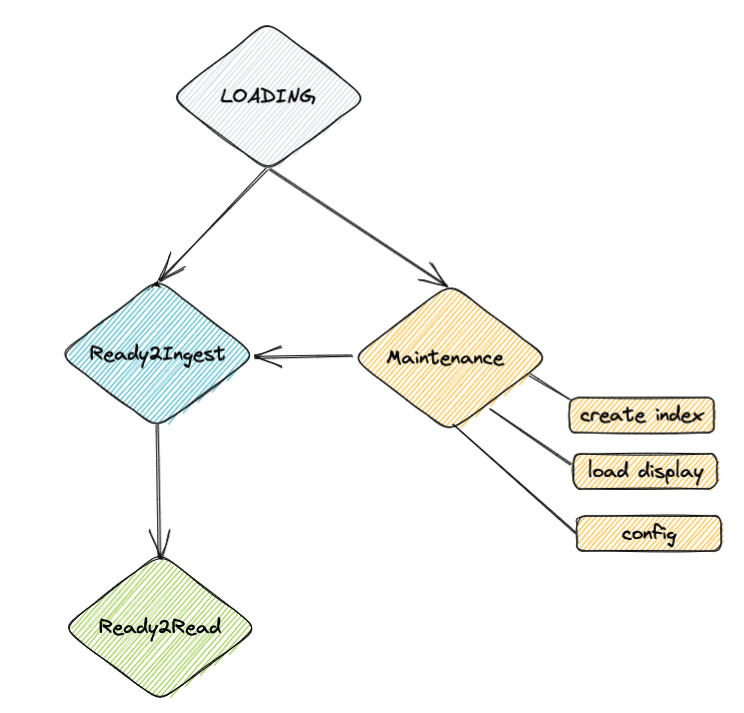 | ||
|
|
||
| The API needed from the backend should be as follows: | ||
|
|
||
| Store API: | ||
| ``` | ||
| POST _integration/store/$instance_name | ||
| ``` | ||
| The $instance_name represents the specific name the integration was instanciated with - for example an Nginx Integration can be a template for multiple Nginx instances | ||
| each representing different domain / aspect such as geographic. | ||
|
|
||
| ```jsoon | ||
| { | ||
| "name": "nginx", | ||
| "version": { | ||
| "integ": "0.1.0", | ||
| "schema": "1.0.0", | ||
| "resource": "^1.23.0" | ||
| }, | ||
| "description": "Nginx HTTP server collector", | ||
| "Information":"file:///.../schema/logs/info.html", | ||
| "identification": "instrumentationScope.attributes.identification", | ||
| "categories": [ | ||
| "web","http" | ||
| ], | ||
| "collection":[ | ||
| { | ||
| "logs": [{ | ||
| "info": "access logs", | ||
| "input_type":"logfile", | ||
| "dataset":"nginx.access", | ||
| "labels" :["nginx","access"], | ||
| "schema": "file:///.../schema/logs/access.json" | ||
| }, | ||
| { | ||
| "info": "error logs", | ||
| "input_type":"logfile", | ||
| "labels" :["nginx","error"], | ||
| "dataset":"nginx.error", | ||
| "schema": "file:///.../schema/logs/error.json" | ||
| }] | ||
| }, | ||
| { | ||
| "metrics": [{ | ||
| "info": "status metrics", | ||
| "input_type":"metrics", | ||
| "dataset":"nginx.status", | ||
| "labels" :["nginx","status"], | ||
| "schema": "file:///.../schema/logs/status.json" | ||
| }] | ||
| } | ||
| ], | ||
| "repo": { | ||
| "github": "https://github.com/opensearch-project/observability/tree/main/integrarions/nginx" | ||
| } | ||
| } | ||
| ``` | ||
| During the UX interaction with the user, user can update data-stream details shown here: | ||
|  | ||
|
|
||
| If the user keeps all the original data-stream naming convention (namespace and domain) the next phase would be the validation of the integration prior to loading all the assets. | ||
|
|
||
| ### Data-Stream naming update | ||
| In case the Cx wants to update the data-stream naming details - the next screens will be presented: | ||
|
|
||
|  | ||
|
|
||
| Selection of the naming convention may also display available existing data-streams that are selectable if the Cx wants | ||
| to choose from available ones. | ||
|
|
||
| #### Verify Integration | ||
|
|
||
| Once the Integration instance was stored in the integration `store` index, it will have a `loading` status as displayed in the | ||
| first image. | ||
|
|
||
| Next the integration instance will undergo a validation phase in which | ||
| - assets will be validated with the schema to match fields to the mapping | ||
| - datasource will be validated to verify connection is accessible | ||
| - mapping templates are verified to exist | ||
|
|
||
| If any of the validation failed - the API (the call to `_integration/store/$instance_name` ) will return a status indicating | ||
| the current state of the integration: | ||
|
|
||
| **Response**: | ||
| ```json | ||
| { | ||
| "instance": "nginx-prod", | ||
| "integration-name": "nginx", | ||
| "status": "maintenance", | ||
| "issues": [ | ||
| { | ||
| "asset": "dashboard", | ||
| "name": "nginx-prod-core", | ||
| "url": "file:///.../nginx/integration/assets/nginx-prod-core.ndjson", | ||
| "issue": [ | ||
| "field cloud.version is not present in mapping sso_log-nginx-prod" | ||
| ] | ||
| } | ||
| ] | ||
| } | ||
| ``` | ||
| The next screen shows the maintenance issues: | ||
|
|
||
|  | ||
|
|
||
| Once all the issues are manually resolved by the User, the UX can continue the loading process by the next API | ||
| `PUT _integration/store/$instance_name/activate` | ||
|
|
||
| This API attempts to move the state of the integration to `Ready` and returns the result status of this call. | ||
|
|
||
| **Response**: | ||
| ```json | ||
| { | ||
| "instance": "nginx-prod", | ||
| "integration-name": "nginx", | ||
| "status": "loading" | ||
| } | ||
|
|
||
| ``` | ||
|
|
||
| #### Load Assets | ||
|
|
||
| The loading assets phase will use the existing bulk load api for all the existing assets of the integration | ||
| - Visualizations | ||
| - Dashboards | ||
| - SaveQueries | ||
| - MappingTemplates | ||
|
|
||
| The User can chery pick specific assets to load and use the next UX window for this purpose | ||
|
|
||
|  | ||
|
|
||
| Using the next API | ||
| `PUT _integration/store/$instance_name/load` | ||
| ```json | ||
| { | ||
| "instance": "nginx-prod", | ||
| "integration-name": "nginx", | ||
| "assets" :{ | ||
| "dashboards": ["nginx-prod-core.ndjson"], | ||
| "savedQueries": ["AvgQueriesPerDayFilter.json"] | ||
| } | ||
| } | ||
| ``` | ||
|
|
||
| Once these steps are completed, the status of the integration would become `Ready` and the Ux can pull this info using status API : | ||
|
|
||
| `GET _integration/store/$instance_name/status` | ||
|
|
||
| **Response**: | ||
| ```json | ||
| { | ||
| "instance": "nginx-prod", | ||
| "integration-name": "nginx", | ||
| "status": "ready" | ||
| } | ||
| ``` | ||
|
|
||
| --- | ||
Oops, something went wrong.
Add this suggestion to a batch that can be applied as a single commit.
This suggestion is invalid because no changes were made to the code.
Suggestions cannot be applied while the pull request is closed.
Suggestions cannot be applied while viewing a subset of changes.
Only one suggestion per line can be applied in a batch.
Add this suggestion to a batch that can be applied as a single commit.
Applying suggestions on deleted lines is not supported.
You must change the existing code in this line in order to create a valid suggestion.
Outdated suggestions cannot be applied.
This suggestion has been applied or marked resolved.
Suggestions cannot be applied from pending reviews.
Suggestions cannot be applied on multi-line comments.
Suggestions cannot be applied while the pull request is queued to merge.
Suggestion cannot be applied right now. Please check back later.
There was a problem hiding this comment.
Choose a reason for hiding this comment
The reason will be displayed to describe this comment to others. Learn more.
what if integrations (observability backend) doesn't exist ?
Will we need to split this off into its own plugin that HAS to exist? Do we need to bring this into core?
There was a problem hiding this comment.
Choose a reason for hiding this comment
The reason will be displayed to describe this comment to others. Learn more.
all catalog schema are loaded during integration startup so once theoretically all schema's exist once Integration is loaded -
If an integration will attempt to use schema which wasnt loaded for any reason it will result the appropriate error reflecting this status
see https://github.com/opensearch-project/observability/blob/64eb7fe6889689dbbf6e06e687f6378efe7a3085/integrations/docs/Integration-plugin-tasks.md#catalog-registration
There was a problem hiding this comment.
Choose a reason for hiding this comment
The reason will be displayed to describe this comment to others. Learn more.
Integration would be marked as a mandatory plugin