Skip to content

Add instructions on how to find UUID#14939

Merged
frenck merged 4 commits into
home-assistant:currentfrom
OzGav:patch-2
Oct 22, 2020
Merged

Add instructions on how to find UUID#14939
frenck merged 4 commits into
home-assistant:currentfrom
OzGav:patch-2

Conversation

@OzGav
Copy link
Copy Markdown
Contributor

@OzGav OzGav commented Oct 5, 2020

Proposed change

Type of change

  • Spelling, grammar or other readability improvements (current branch).
  • [X ] Adjusted missing or incorrect information in the current documentation (current branch).
  • Added documentation for a new integration I'm adding to Home Assistant (next branch).
  • Added documentation for a new feature I'm adding to Home Assistant (next branch).
  • Removed stale or deprecated documentation.

Additional information

Checklist

  • [X ] This PR uses the correct branch, based on one of the following:
    • I made a change to the existing documentation and used the current branch.
    • I made a change that is related to an upcoming version of Home Assistant and used the next branch.
  • [X ] The documentation follows the Home Assistant documentation standards.

@probot-home-assistant probot-home-assistant Bot added current This PR goes into the current branch Hacktoberfest An PR on this issue (or the PR itself) is eligible towards Hacktoberfest! labels Oct 5, 2020
Comment thread source/_integrations/cast.markdown Outdated
keys:
uuid:
description: UUID of a Cast device to add to Home Assistant. Use only if you don't want to add all available devices. The device won't be added until discovered through mDNS.
description: UUID of a Cast device to add to Home Assistant. Use only if you don't want to add all available devices. The device won't be added until discovered through mDNS. In order to find the UUID for your device install pyChromecast on a computer or enter the Home Assistant Docker container and type the following changing the friendly names as required for your situation. python3 -c "import pychromecast; print(pychromecast.get_listed_chromecasts(friendly_names=["Living Room TV", "Bedroom TV", "Office Chromecast"]))"
Copy link
Copy Markdown
Member

Choose a reason for hiding this comment

The reason will be displayed to describe this comment to others. Learn more.

So how do users of the OS installation method do this? Or Supervised? And users running the container in Docker?

Why not simply use an mDNS browser?
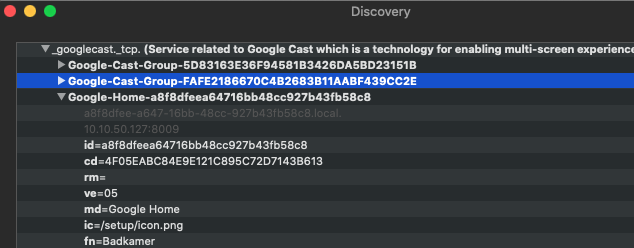
image

Copy link
Copy Markdown
Contributor Author

Choose a reason for hiding this comment

The reason will be displayed to describe this comment to others. Learn more.

What I did, and what I tried to say in brief in my suggested change, is I entered the HA docker container and ran the pychromecast command there. In all the different installation options the user just has to get to where pychromecast is installed, I appreciate that is not always easy.

So that is one option. Your option is also good so perhaps we mention both of these options? Gives people choice as to what resources they have available to get the UUID?

Copy link
Copy Markdown
Contributor Author

@OzGav OzGav Oct 6, 2020

Choose a reason for hiding this comment

The reason will be displayed to describe this comment to others. Learn more.

The only thing I notice is with your browser is that the UUID is not broken up into the segments (separates by hyphens) that mine were. I don’t know if that makes a difference when you put it into the config? If it does then might be worth mentioning it has to be formatted as such. (Five, number groups)

Copy link
Copy Markdown
Contributor Author

Choose a reason for hiding this comment

The reason will be displayed to describe this comment to others. Learn more.

Just following up. Did you want me to add the mDNS browser option?

Copy link
Copy Markdown
Member

Choose a reason for hiding this comment

The reason will be displayed to describe this comment to others. Learn more.

I think we should find options that make it accessible for users of any level. Executing Python like that isn't that friendly.

So any other option should be preferred IMHO.

Copy link
Copy Markdown
Contributor Author

Choose a reason for hiding this comment

The reason will be displayed to describe this comment to others. Learn more.

OK I have changed my suggestion to first direct users to the mDNS browser option but kept a quick reference to using pychromecast. Thoughts?

@frenck frenck added the in-progress This PR/Issue is currently being worked on label Oct 6, 2020
Copy link
Copy Markdown
Member

@frenck frenck left a comment

Choose a reason for hiding this comment

The reason will be displayed to describe this comment to others. Learn more.

Thanks, @OzGav 👍

@frenck frenck merged commit 811655d into home-assistant:current Oct 22, 2020
@probot-home-assistant probot-home-assistant Bot removed the in-progress This PR/Issue is currently being worked on label Oct 22, 2020
Olen pushed a commit to Olen/home-assistant.io that referenced this pull request Oct 25, 2020
Sign up for free to join this conversation on GitHub. Already have an account? Sign in to comment

Labels

current This PR goes into the current branch Hacktoberfest An PR on this issue (or the PR itself) is eligible towards Hacktoberfest!

Projects

None yet

Development

Successfully merging this pull request may close these issues.

2 participants