Skip to content

Change config navigation to tabs#4630

Merged
bramkragten merged 6 commits into
devfrom
config-tabs-navigation
Jan 28, 2020
Merged

Change config navigation to tabs#4630
bramkragten merged 6 commits into
devfrom
config-tabs-navigation

Conversation

@bramkragten
Copy link
Copy Markdown
Member

@bramkragten bramkragten commented Jan 28, 2020

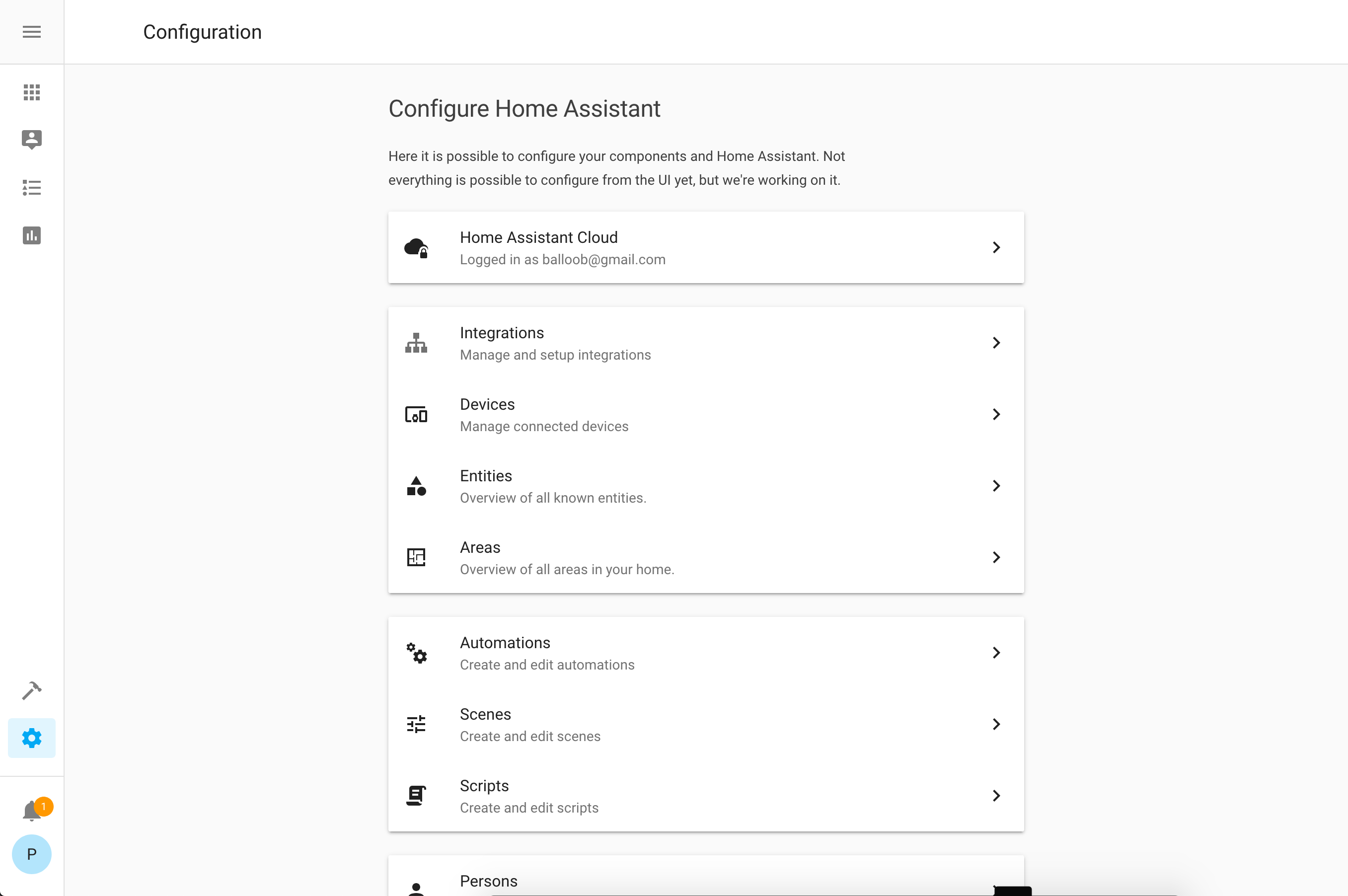
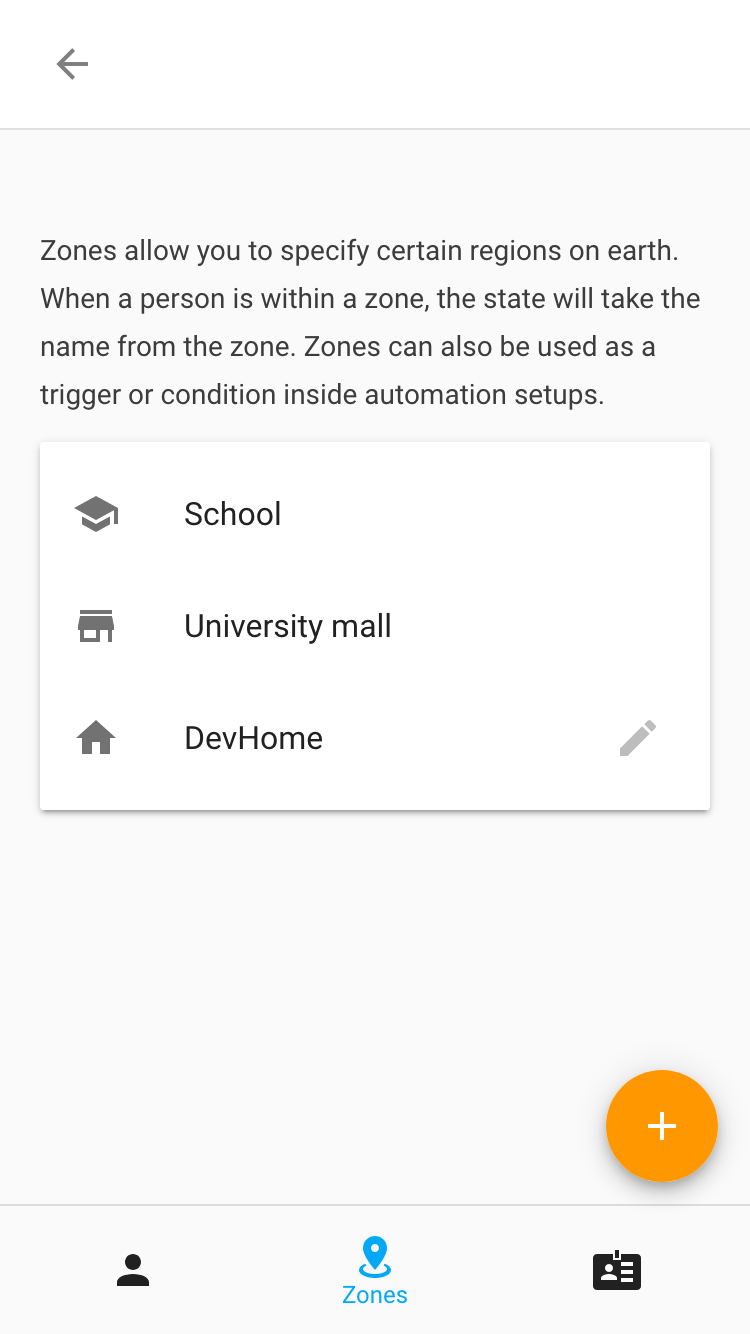
image

image

image
image

@bramkragten
Copy link
Copy Markdown
Member Author

Icon suggestions are welcome

Comment thread src/layouts/hass-tabs-subpage.ts Outdated
@property({ type: String, attribute: "back-path" }) public backPath?: string;
@property() public backCallback?: () => void;
@property({ type: Boolean }) public hassio = false;
@property({ type: Boolean }) public showAdvanced = false;
Copy link
Copy Markdown
Member

Choose a reason for hiding this comment

The reason will be displayed to describe this comment to others. Learn more.

Please add docstrings to each property. It's not clear to me what this property does.

Comment thread src/layouts/hass-tabs-subpage.ts Outdated
if (isComponentLoaded(this.hass, "cloud")) {
this._updateCloudStatus();
}
this.style.setProperty(
Copy link
Copy Markdown
Member

Choose a reason for hiding this comment

The reason will be displayed to describe this comment to others. Learn more.

Why can't we put this in the CSS?

Copy link
Copy Markdown
Member Author

Choose a reason for hiding this comment

The reason will be displayed to describe this comment to others. Learn more.

Now it applies to all config pages, and this is a router element

Comment thread src/panels/config/person/ha-config-person.ts Outdated
@balloob
Copy link
Copy Markdown
Member

balloob commented Jan 28, 2020

  • hass-tabs-subpage is having a scrollbar, even if the internal content has their own scrollbar. Debug by going to system prefs -> general -> always show scrollbars
  • Tabs need cursor: pointer
  • Config sections are not being shown in "wide" mode with descriptions to the left of the controls
  • Icons in config dashboard need to be color: var(--secondary-text-color) and centered in icon slot. Chevron secondary text color too.

@SeanPM5
Copy link
Copy Markdown
Contributor

SeanPM5 commented Jan 28, 2020

I think that maybe the icons should maybe be colored with secondary text color (so gray in this case). I feel the icons stand out a tad too much currently, it's taking attention away from the text rather than complementing it.

For the bottom tabs on mobile, I think it'd be a little nicer if they all had text and not just the active tab. Makes it look more consistent and removes any guesswork on what an icon represents.

Some icon suggestions and reasonings

Cloud mdi:cloud-check-outline I think checkmark feels more natural than lock, since you are making things available to the cloud.

Integrations mdi:puzzle most things seem to use that for add-ons/extensions/integrations. Search "browser extensions" or "add-ons" in google images for example.

Areas I would do mdi:sofa . I don't think the floorplan icon is easy enough to distinguish in such a small size, when people see a couch they'll think of their living room and it'll be clear what the purpose of areas is.

Automations mdi:robot maybe? When most people think of stuff being automated robots come to mind, and there is precedent with macOS Automator icon. Might be a little too "playful" tho compared to the other icons?

Scenes mdi:palette since mostly this will be used for changing colors of lights. Art / paintbrush palette seems fitting? Current choice feels more like an equalizer.

Persons mdi:account-multiple since you are usually adding more than one person.

@balloob
Copy link
Copy Markdown
Member

balloob commented Jan 28, 2020

fyi, automation/scene/person icons are based on their domain icons. They need to stay in sync. So it can be changed, but we need to change both.

@SeanPM5 please copy paste the picture of icons besides just mentioning the name, so much easier ! 👍

@SeanPM5
Copy link
Copy Markdown
Contributor

SeanPM5 commented Jan 28, 2020

Icon Name MDI icon
cloud Cloud mdi:cloud-check-outline
integrations Integrations mdi:puzzle
areas Areas mdi:sofa
automation Automations mdi:robot
scenes Scenes mdi:palette
persons Persons mdi:account-multiple

Some of these like scenes and integrations have "outline" versions available too.

@balloob
Copy link
Copy Markdown
Member

balloob commented Jan 28, 2020

I like all your suggestions except for the cloud and the person one.

For Cloud, the main use case is remote UI and I like to emphasize that it's encrypted and secure.

For persons. Since it's also the domain icon, picking an icon with 2 persons on it might be weird if it's shown for a single person in an entity row

@balloob
Copy link
Copy Markdown
Member

balloob commented Jan 28, 2020

Can we ditch the top bar coloring on the main screen and on subpages in narrow mode and just render the icon with the same background color? Ditch the title "Configuration" on main screen too.

image

Screen Shot 2020-01-28 at 09 55 11

Also, the fab on the mobile screenshot is not equally away from bottom and right edge.

@iantrich
Copy link
Copy Markdown
Member

looking great 🎉 nothing constructive to add 😜

@SeanPM5
Copy link
Copy Markdown
Contributor

SeanPM5 commented Jan 28, 2020

For Cloud, the main use case is remote UI and I like to emphasize that it's encrypted and secure.

This reasoning makes perfect sense, although I do think the meaning of the lock can potentially be misinterpreted, for example being "locked out" of your cloud account (did I pay my bill this month?), or being "locked out" of some features during your free trial period. I suspect those cases will be rare, just something to consider. I like it though and think it's fine to keep the current choice.

For persons. Since it's also the domain icon, picking an icon with 2 persons on it might be weird if it's shown for a single person in an entity row

Yeah, if it's also the domain icon, it's gonna feel a little bit weird in one place or the other I guess. 🤷‍♂

Current icon choice is more commonly associated with a profile settings page (image results). On mobile which doesn't have the text underneath the tab icons, I would think that most people are going to assume that goes to their personal profile page.

Plus the title of the panel is Persons plural, and when you click on it you get a listing of multiple people.. so it feels weird to not have the icon represent that? But as you mentioned, if it gets changed here, it's gonna look weird in an entity row. So I dunno maybe it's best to leave it alone.

@bramkragten bramkragten merged commit 1c9eab7 into dev Jan 28, 2020
@delete-merged-branch delete-merged-branch Bot deleted the config-tabs-navigation branch January 28, 2020 20:48
@bramkragten bramkragten mentioned this pull request Jan 29, 2020
@lock lock Bot locked and limited conversation to collaborators Jan 30, 2020
Sign up for free to subscribe to this conversation on GitHub. Already have an account? Sign in.

Projects

None yet

Development

Successfully merging this pull request may close these issues.

5 participants