EMU: Changes to Danfysik OPI & IOC #5042


Description

As a muon scientist, I need some changes to the existing Danfysik OPI & IOC for operation on EMU.
Acceptance Criteria
- The OPI should display the magnet name in its title field.
- The OPI could display a DAC1 Slew field:
- If the DAC1 Slew feature is present in hardware, the DAC1 Slew field should be displayed and active
- If the DAC1 Slew feature is not present in hardware, the DAC1 Slew field should not be displayed and should be inactive
- The OPI Off button should invoke the Danfysik's "sweep to zero and turn off" feature
- The OPI should provide an Auto On/Off feature:
- If the user sets the field to zero:
- If the PSU is powered on and Auto Off is selected, the Danfysik should be powered off (via the "sweep to zero and turn off" feature).
- Otherwise, do nothing.
- If the user sets the field to a non-zero value:
- If the PSU is powered off and Auto On is selected, the Danfysik should be powered on and the voltage & current increased to generate the desired field.
- Otherwise, do nothing.
- If the user sets the field to zero:
- The Danfysik OPI for EMU contains the following fields
- magnetic field set-point
- magnetic field set-point readback
- magnetic field read-back (i.e. "field now")
- The units of the magnetic field are in Gauss
- The OPI should display a "Field Ready" LED to show the status of the magnetic field:
- the LED should be OFF when the magnetic field is ramping.
- the LED should be ON when the magnetic field has reached its set-point.
- The OPI should display a "progress bar" to show the field as a % of full-scale (see notes below).
- The OPI should provide a remote/local toggle to switch between remote & local modes of operation.
- The OPI should provide a STOP button:
- On pressing the STOP button, the IOC should immediately "sweep to zero and turn off" the PSU (see notes below).
Notes
- The OPI needs to display the same information as the existing Longitudinal field (Danfysik) VI.
- The existing Danfysik VI is located here:
C:\LabVIEW Modules\Muon Magnets\Danfysik\danfysik controller.vi - the screenshot below shows the current VI (
danfysik controller.vi)
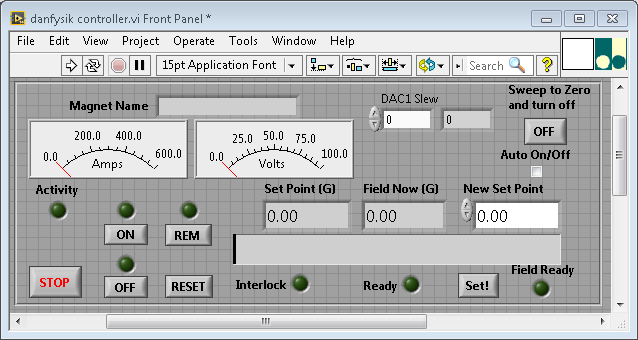
- The current/voltage gauges on the VI do not need to be reproduced on the OPI.
- In SECI, the calibration defining the relation between current and magnetic field is defined in the
magnet.inifile. - In SECI, the value of full-scale is set in the
magnet.inifile. In IBEX, it could be set as a macro. - The Auto On/Off control need not be a check-box (as used in the VI) - a check-box is ambiguous in this context. An alternative choice of control could be clearer.
- Need to determine what the STOP button in the VI does. The IOC should do the same thing.